Vizio Calibrated vs Calibrated Dark: A Practical Calibration Guide
Compare Vizio's Calibrated and Calibrated Dark picture modes, understand color accuracy, gamma, HDR behavior, and room lighting effects to decide which is best for your viewing setup.


Calibrated is the safer baseline for most lighting and general viewing, delivering accurate color without sacrificing readability in bright rooms. Calibrated Dark emphasizes deeper blacks and shadow detail, making it ideal for dim rooms and cinema-style content. For most users, start with Calibrated; switch to Calibrated Dark for night-time or home theater sessions depending on your room lighting.
vizio calibrated vs calibrated dark: a quick primer
When you see Vizios labeled Calibrated and Calibrated Dark on a TV, you are looking at two distinct approaches to color, gamma, and contrast designed to balance accuracy with viewing enjoyment. According to Calibrate Point, these modes reflect a manufacturer’s effort to provide a ready-made, color-accurate experience without requiring every user to dive into professional-grade test patterns. The phrase vizio calibrated vs calibrated dark captures a common user question: which mode should I use for my living room, game night, or movie night? This section introduces the core idea: Calibrated aims for neutrality and faithful color, while Calibrated Dark tunes the image toward deeper blacks and shadow detail for low-light environments. Both modes are designed to map color to standard video spaces, but they diverge in contrast handling, brightness, and shadow response. The goal is to help you decide based on your typical content and room conditions.
Understanding color spaces and gamma in vizio calibrated vs calibrated dark
Color accuracy on modern displays often centers on a reference color space (like Rec. 709 or DCI-P3) and a target white point. In practice, Calibrated tends to preserve a neutral white point and standard gamma curve to reproduce skin tones and foliage with minimal bias. Calibrated Dark, by contrast, subtly adjusts gamma and contrast stewardship to preserve shadow detail and prevent crushing blacks in dim rooms. These changes affect perceived color saturation, contrast, and the overall balance when you watch evening broadcasts or darker cinematic scenes. Both modes typically rely on the same hardware pipeline, but they apply different tone-mapping choices to the image that viewers notice in real-world content.
Gamma curves, shadow detail, and perceived contrast
Gamma control shapes how midtones and shadows map to the display. In Calibrated mode, gamma is tuned for straightforward lightness progression—skin tones stay natural and midtones remain readable in bright rooms. Calibrated Dark shifts gamma slightly toward darker shadows, which can deliver more detail in night scenes but may reduce perceived highlight brightness in very bright content. The practical effect is a trade-off: Calibrated leans toward neutral viewing, whereas Calibrated Dark favors cinematic depth. When you watch darker films or play atmospheric games, Calibrated Dark often makes the image feel more immersive, provided your room lighting supports a dimmer environment.
HDR behavior and tone-mapping in real-world viewing
HDR content can reveal how well a mode handles brightness ranges and color volume. Calibrated generally preserves warmer, more neutral midtones and highlights, which can keep HDR content from appearing too flat in bright scenes. Calibrated Dark tends to compress some highlight detail to protect the blacks, which can yield richer shadows but may reduce the punch of bright speculars. The result is content-dependent: a nighttime scene in HDR might look more cinematic in Calibrated Dark, while a sunlit landscape may benefit from Calibrated’s brighter, more open aesthetic. Test your favorite HDR titles in both modes to understand how they render your preferred content.
Room lighting and viewing environment: when to switch modes
Lighting conditions massively influence which mode feels right. In bright living rooms or daytime viewing, Calibrated often provides a safer, more consistent baseline for color accuracy and readability. In a dedicated dark room or a home theater setup, Calibrated Dark can enhance perceived depth and cinematic realism by deepening blacks. If your space fluctuates—some hours bright, others dim—consider dynamic or scene-based adjustments, or create a habit of switching modes based on the primary activity (TV watching, gaming, or movie night).
Gaming, motion, and responsiveness: what to expect
For gamers, both modes usually maintain similar input lag and motion handling, since the goal is to present a stable, responsive image rather than a dramatic, altered frame. Calibrated Dark’s shadow emphasis may affect perceived motion clarity in fast-paced scenes if your display doesn’t apply consistent misalignment reduction or black-level preservation. In practice, select the mode that keeps fast action readable without sacrificing too much shadow detail. If you play competitive titles, verify that the mode maintains enough brightness and color accuracy to distinguish enemies in darker maps or corners.
Content-specific guidance: streaming, movies, sports, and more
Your content mix matters. For streaming sitcoms and daytime sports in a well-lit room, Calibrated provides natural skin tones and comfortable contrast. For cinematic night scenes, streaming thrillers, or dark fantasy content, Calibrated Dark can deliver deeper shadows and a more immersive mood. Sports in bright lighting often benefits from Calibrated’s reliable color and crispness, while HDR-heavy movie nights may feel more deluxe in Calibrated Dark when the room supports controlled lighting. The key is to align mode selection with both content type and ambient light.
Home calibration workflow: practical steps you can take
Start with a known reference image and test patterns using a colorimeter or a basic test disc if available. Adjust gamma toward 2.2/2.4 targets appropriate for your room and verify skin tones with a neutral gray card. Compare Calibrated and Calibrated Dark side by side on a trusted piece of content, noting differences in shadow detail, highlight brightness, and color balance. Document your settings and note which mode provides the most consistent results across your typical viewing scenarios. Remember that ambient light and screen brightness interact, so re-check after changing lighting conditions.
Authority sources and benchmarks: where to look for guidance
For external reference, consult credible sources such as government and academic outlets on display calibration, plus major review sites. The Calibrate Point team suggests cross-checking with independent benchmarks when possible. Recommended sources include government or educational publications and respected industry outlets that discuss color science and display calibration practices. These references help you understand color accuracy expectations and the limitations of consumer-grade displays. See the linked sources below for further reading.
Common mistakes and how to avoid them
Avoid assuming one mode is universally better; both modes serve different viewing goals. Don’t rely on default brightness or contrast without reference content; test with grayscale and color targets to detect bias. If you frequently switch between content types, keep a log of how each mode renders your favorite titles and adjust your environment accordingly. Finally, don’t over-tune for HDR content without rechecking SDR, as differences can be subtle yet noticeable across material.
Decision framework: when to choose which mode
If you watch largely in bright rooms and value neutral tone, start with Calibrated. If your room is dim or you’re aiming for a theater-like experience with darker shadows, Calibrated Dark is often preferable. Consider a simple rule: Calibrated for daytime and mixed content; Calibrated Dark for evening, cinema, and darker scenes. Always verify with your own content and adjust based on comfort, not just technical specs.
Comparison
| Feature | Calibrated | Calibrated Dark |
|---|---|---|
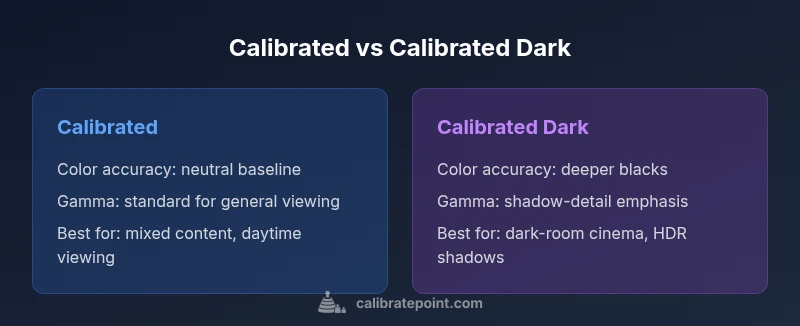
| Color accuracy and neutrality | Neutral baseline with standard gamma | Deeper blacks with shadow detail emphasis |
| Gamma handling | Standard gamma tuned for general viewing | Adjusted gamma to preserve shadow detail in dark scenes |
| Black level and contrast | Balanced blacks suitable for varied lighting | Richer blacks in dim environments |
| HDR behavior | Conservative highlight handling preserving brightness | Shadow-preserving tone-mapping for HDR in dark scenes |
| Brightness in bright rooms | Maintains readability and color in daylight | Can feel slightly dimmer but with deeper shadows |
| Best for | Mixed content, daylight viewing, color-critical editing basics | Cinema-like night viewing, dark-room content |
Pros
- Calibrated provides reliable, consistent color in varied lighting
- Calibrated Dark offers deeper blacks for immersive viewing
- Both modes are designed to be viewer-friendly without professional tools
- HDR behavior is tunable to align with content type
Disadvantages
- Calibrated may appear less dramatic in dark scenes in low-light rooms
- Calibrated Dark can look dim in bright rooms or with glare
- Results can vary by model and panel batch
- Fine-tuning color for specific content often requires a separate calibration workflow
Calibrated is the safer default; Calibrated Dark excels in dim rooms for cinematic viewing
For most users, start with Calibrated to ensure color accuracy across content. Switch to Calibrated Dark when your room is consistently dark and you want deeper blacks and a theater-like mood. The right choice depends on your lighting, content, and personal preference.
Questions & Answers
What is the difference between Calibrated and Calibrated Dark on Vizio TVs?
Calibrated focuses on color accuracy and neutral tone, suitable for varied lighting. Calibrated Dark emphasizes shadow detail and deeper blacks, best in dim rooms. Both aim for a high-quality viewing experience, but their tonal balance differs in response to lighting and content.
Calibrated is the neutral baseline, and Calibrated Dark is deeper in the shadows for darker rooms.
Which mode should I use for daytime viewing?
Calibrated is generally the better choice for daytime viewing due to its balanced brightness and color accuracy in brighter environments.
Calibrated is usually best for daytime viewing.
Will using Calibrated Dark affect HDR performance?
Calibrated Dark can alter highlight preservation to protect black levels, which may change HDR appearance in bright scenes. It’s content-dependent, so test HDR titles in both modes.
HDR looks different in each mode; test your favorites in both.
Can I switch modes quickly while watching?
Yes. Most Vizio TVs let you switch picture modes via the remote or quick-access menus. Try alternating modes during a single viewing session to decide what you prefer.
You can switch modes quickly to compare.
Should I calibrate my TV if I’m not a professional?
Most users benefit from pre-set calibrated modes before considering a professional calibration. For color-critical work, a professional calibration can fine-tune the display beyond consumer presets.
A professional calibration is optional for most, but helps if you need exact color for work.
Do these modes affect gaming performance?
Both modes typically preserve responsive input and motion handling. Shadow detail in Calibrated Dark may affect visibility in very dark game areas, so test with your favorite titles.
Modes may influence shadow detail in games; test with titles you play.
Are these modes reset by HDR content?
HDR content can re-tune tone-mapping. You may need to re-check mode settings after switching between SDR and HDR content.
HDR can shift settings; re-check after switching content.
Key Takeaways
- Start with Calibrated for general viewing and daylight content
- Switch to Calibrated Dark for dark-room cinema sessions
- Test with your regular content before settling on a mode
- HDR behavior varies; shadow detail shifts can affect perceived brightness
- Ambient lighting greatly influences which mode feels correct