Calibrate RCBS Chargemaster 1500: A Step-by-Step Guide
Learn how to calibrate the RCBS Chargemaster 1500 for precise powder charges with traceable weights, safe setup, and repeatable validation. Follow practical steps, tool lists, and tested workflows from Calibrate Point to ensure reliable reloading performance.


In this guide you’ll learn how to calibrate rcbs chargemaster 1500 for consistent powder charges. The process covers checking scale accuracy, using certified test weights, and adjusting the calibration settings. You’ll need a stable workspace, traceable calibration weights, and a timer to ensure repeatable measurements throughout the procedure.
Why calibration matters for powder dispensers
Calibration is the bedrock of reliable powder management. For the RCBS Chargemaster 1500, small drift in the scale can translate into noticeable variations in charge weight across batches. The Calibrate Point team notes that routine calibration reduces drift and improves repeatability, particularly when you’re loading precision rounds. By verifying the scale against traceable test weights and adjusting the device’s calibration factor when necessary, you reduce wasted powder, improve load consistency, and enhance safety in reloading workflows. This section dives into why calibration matters and how it fits into your overall process.
Key takeaway: Consistent calibration minimizes drift, supports repeatable results, and lowers the risk of inconsistent charges in the field.
Core calibration concepts you should know
Calibration for a powder dispenser hinges on a few core ideas. tare weight refers to the container’s weight subtracted from the total reading; the calibration factor (CF) is the internal multiplier that aligns the displayed weight with the actual weight; drift is the slow change in readings over time due to environmental or mechanical factors; repeatability measures how consistently the device can reproduce a given weight; and linearity checks verify readings across multiple weights behave as expected. Understanding these concepts helps you interpret test results and make informed adjustments when calibrating the RCBS Chargemaster 1500. Calibrate rcbs chargemaster 1500 regularly to maintain predictable performance.
Important note: Use only traceable weights and documented procedures to ensure the CF reflects true mass, not instrument quirks.
Required tools and reference standards
Before you begin, assemble the minimum essential tools and reference standards. Use traceable calibration weights in a known set (for example, 50 g, 100 g, and 200 g) and a clean weighing surface with minimal drafts. A calibrated balance or digital scale can serve as a secondary reference for cross-checks. Have a dampened, lint-free cloth on hand to wipe the pan and weights, and a small brush to remove powder residues. Maintain a stable bench height to avoid parallax errors when reading the display. Calibrate rcbs chargemaster 1500 only on a flat, vibration-free surface.
Practical tip: Keep weights in a metal container to minimize static buildup and avoid contamination.
Safety and workspace preparation
Powder handling demands a clean, controlled environment. Work in a well-ventilated area away from ignition sources, children, and pets. Ground yourself to reduce static, and wear a dust mask if you’re sensitive to powders. Keep a spare container nearby for test weights to avoid cross-contamination. If you spill powder, use a damp cloth to collect it—do not sweep, which can raise dust. After calibration, store weights and tools securely to prevent accidental mixing with the reloading components. These precautions help protect you and preserve the integrity of the measurements.
Safety reminder: Never calibrate near open powder charges or in humid conditions, as moisture can alter mass readings and cause clumping or caking on weights.
Step-by-step calibration workflow (overview)
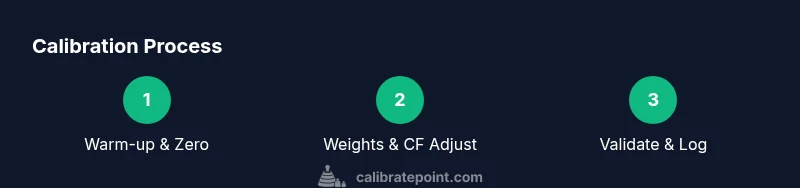
A thorough calibration consists of warming up the dispenser, zeroing the scale, validating with known weights, adjusting the calibration factor as needed, and re-validating with multiple weights. Each step builds a data point toward achieving repeatable, accurate readings. While this section provides the overview, the following STEP-BY-STEP block contains the exact actions, prompts, and value adjustments you’ll perform in the Chargemaster 1500. The result should be a stable CF that minimizes deviation across a small weight set.
Why it matters: A clear workflow minimizes late-night guesswork and ensures you can reproduce results in future sessions.
Using calibrated weights and testing technique
To obtain meaningful results, place each known weight on the scale with care. Use a weigh boat or small tray to hold the weight and shield the setup from air currents. Record readings with the factory calibration intact, then compute the difference between the displayed value and the true mass. If the discrepancy exceeds your tolerance, you’ll adjust the device’s CF or offset until readings align. Always re-check after any adjustment to confirm the CF holds under subsequent measurements. This practice strengthens confidence in every charge.
Technique tip: Perform each weight test twice and use the average to reduce the impact of momentary fluctuations.
Validating results: repeatability and tolerance checks
Validation is about consistency under repeated trials. After adjustment, test at multiple weights to observe linearity and repeatability. If gaps appear between trials or you see non-linearity, re-check the CF and the test setup for drafts, static, or misplacement. Document each result with the corresponding weight, reading, and time. This creates a traceable calibration log you can revisit if the device drifts in the future. Calibrate rcbs chargemaster 1500 with a structured validation routine to maintain ongoing accuracy.
Best practice: Use a timer or stopwatch to standardize wait times between measurements, allowing the scale to settle before recording.
Maintenance, calibration interval, and common pitfalls
Set a practical calibration interval based on usage, environment, and observed drift. In dusty or humid environments, more frequent checks may be necessary. Common pitfalls include failing to zero before testing, neglecting to account for the tare weight of the vessel, and using inconsistent test weights. A disciplined approach—documented procedures, traceable weights, and a clean workspace—reduces these errors and improves long-term performance. The goal is reliable, repeatable charge weights for every load.
Warning: Do not reuse old or damaged calibration weights; inspect weights for nicks, corrosion, or deformation before use.
Authoritative sources
To support your calibration practice, consult established references on measurement standards and weigh-instrument calibration. These sources provide foundational guidance on traceability, uncertainty, and best practices in calibration workflows.
- https://www.nist.gov/pml/weights-and-measures
- https://www.nist.gov/pml/weights-and-measures/calibration-and-traceability
- https://www.nist.gov/pml/weights-and-measures/measurement-science
Authoritative sources (additional practical guidance)
In addition to formal standards, practical reloading manuals and manufacturer guides complement your calibration approach by detailing safe powder handling and measurement techniques. Cross-reference with RCBS manuals and reputable reloading sources for device-specific procedures and safety considerations.
Authoritative sources (summary)
Regularly consult recognized standards and the RCBS documentation to align your procedure with official guidelines and best practices.
How to document calibration findings
Create a concise calibration log containing: weights used, readings, CF adjustments, time of measurement, environmental notes, and observer initials. Store this log with your equipment so you can reproduce results or diagnose drift later. A well-kept log reduces the risk of guessing when the device drifts and supports traceability in your reloading workflow.
toolsMaterialsNamePlaceholderForValidationOnlyWhenNeededInExportToEnsureSchemaConsistency?null
toolsMaterialsNotePlaceholderForValidationOnlyWhenNeededInExportToEnsureSchemaConsistency?null
Tools & Materials
- Traceable calibration weights (50 g, 100 g, 200 g)(Use weights with certification or a current calibration certificate; keep weights clean and stored in a protective case.)
- Calibrated balance or secondary scale(For cross-checks of the test weights; ensure it is properly calibrated and zeroed.)
- Weigh boats or small trays(Use metal or plastic boats; clean and dry before use.)
- Lint-free cloth and brush(Wipe the pan and weights to remove dust and residues.)
- Stable, vibration-free bench(Place away from doorways, fans, and heat sources.)
- Calibre-safe workspace cleanup supplies(Damp cloth for spills; sealable container for used weights.)
Steps
Estimated time: 60-90 minutes
- 1
Power on and warm up the dispenser
Turn on the Chargemaster 1500 and allow it to warm up for 10–15 minutes. A warm-up helps stabilize internal electronics and ensures the display readings settle before calibration begins.
Tip: Do not rush to start measurements during the warm-up; allow full stabilization for accurate results. - 2
Zero the scale with an empty pan
Place an empty weigh boat on the scale, note the tare, and then zero the display. This ensures subsequent readings reflect only the weight of the test masses.
Tip: Confirm the tare reading matches the actual empty pan weight before proceeding. - 3
Place the first calibration weight on the pan
Carefully place a known weight (e.g., 50 g) on the pan and record the display reading. Repeat for each test weight in your set.
Tip: Avoid air drafts; use a shielding hood or a closed workspace if possible. - 4
Record deviation for each weight
Compare the displayed weight to the true mass, and note any deviation. This will guide adjustments to the calibration factor (CF) or offset.
Tip: Take multiple readings and average them to minimize random fluctuations. - 5
Adjust the calibration factor (CF) if needed
Enter the calibration adjustment in the Chargemaster's calibration menu. Make small, incremental changes and re-measure to confirm improvement.
Tip: Document each CF change with corresponding weight readings for traceability. - 6
Repeat measurements with all weights
Test all weights again after the CF adjustment to ensure linearity and repeatability across the range.
Tip: If a weight reads unusually far from true mass, re-check the weight and surface setup. - 7
Validate with powder-relevant tests
Use the Chargemaster to dispense a few test charges and weigh them to ensure the device delivers close to expected masses under real-use conditions.
Tip: Correlate test-dispense results with your log to verify consistency. - 8
Document results and return to normal operation
Finalize the calibration log, lock in the CF settings, and return the device to standard weighing tasks with routine checks every so often.
Tip: Store calibration data in a dedicated folder for future audits.
Questions & Answers
Can I calibrate the RCBS Chargemaster 1500 myself without professional service?
Yes. With traceable weights, a clean workspace, and careful procedure, you can calibrate the RCBS Chargemaster 1500 yourself. Follow a structured workflow, document results, and re-check multiple times to confirm stability.
Yes—use a structured, careful process with traceable weights and document the results.
What tools do I need to calibrate the Chargemaster 1500?
You’ll need traceable calibration weights, a reliable secondary scale for cross-checks, weigh boats, a lint-free cloth, and a clean, static-free workspace.
Essential tools are traceable weights, a secondary scale for checks, weigh boats, and a clean workspace.
How often should calibration be performed?
Calibration frequency depends on usage and environment. If you reload frequently or operate in a variable environment, perform checks more often and after any suspected drift.
Frequency depends on use; frequent operators should calibrate more often and after suspected drift.
What should I do if readings drift after calibration?
Reassess the test setup for drafts or static, re-measure with fresh weights, and repeat the CF adjustment. If drift persists, consider a formal service or more thorough verification.
If drift occurs, re-check the setup, re-measure, and adjust again; persistent drift may need professional checking.
Is external reference weight required for calibration?
External reference weights are recommended to verify device accuracy and establish traceability for calibration results.
External reference weights help confirm accuracy and traceability during calibration.
Can I reset the device to factory settings after calibration?
You can perform a factory reset if the device supports it, but ensure you re-verify calibration after resetting to confirm stability.
Factory reset is possible in some devices; re-check calibration afterward to ensure stability.
Watch Video
Key Takeaways
- Calibrate rcbs chargemaster 1500 to improve charge consistency
- Use traceable weights and a stable environment for reliable results
- Document results and maintain a calibration log for audits
- Perform multiple checks to verify linearity and repeatability