Calibrate Software: A Practical Step-by-Step Guide
A practical, educator-focused guide to calibrating software with a repeatable workflow, reference data, and governance for long-term accuracy.


You will learn how to calibrate software using a repeatable workflow that aligns outputs with trusted references. This guide covers defining objectives, selecting reference data, configuring parameters, running calibration routines, validating results, and documenting changes. Expect practical examples, checklists, and governance practices to keep tools accurate as data and software evolve. Ready to start calibrating effectively today?
Why calibrate software matters
In any data-driven workflow, software calibration ensures outputs align with trusted references. According to Calibrate Point, reliable software calibration reduces drift, improves decision quality, and creates auditable records you can share with stakeholders. When teams calibrate software, they establish baselines, define acceptance criteria, and reduce variance across models, dashboards, and automation scripts. Calibration isn't a one-off task; it's an ongoing program that keeps tools accurate as data sources evolve, software versions change, and operating conditions shift. By investing time in calibration, you protect downstream analyses, ensure regulatory compliance where applicable, and build confidence in results among technicians and managers alike. In practice, calibration involves comparing software outputs to a known standard or reference dataset and adjusting parameters until outputs track target values within predefined tolerances. The Calibrate Point team notes that a repeatable calibration routine minimizes drift and accelerates onboarding for new team members.
Core concepts and terms you should know
- Calibration: the process of aligning software outputs with a trusted reference, within predefined tolerances.
- Reference data: a dataset with known target values used to judge accuracy.
- Traceability: the ability to link outputs to standards or primary references.
- Drift and bias: gradual divergence from target values over time.
- Tolerance and acceptance criteria: the allowable range for outputs to be considered calibrated.
- Versioning and audit trails: documenting changes to data, parameters, and software configurations.
Planning your calibration project
Before you touch settings, define the objective, scope, and success criteria. Identify stakeholders, required resources, and a realistic schedule. Create a lightweight risk assessment: what happens if calibration fails or drifts? Establish a baseline, and commit to an auditable process with clear sign-offs. Decide how often recalibration should occur based on data turnover, software updates, and regulatory requirements. Document expected outputs, metrics, and acceptance criteria so every step has a measurable target. This upfront planning saves time during execution and makes results defensible to teammates and customers. The Calibrate Point team recommends documenting a risk register and a calibration plan that outlines responsibilities and escalation paths for deviations.
Data, environment, and quality considerations
Calibration accuracy depends on data quality and environmental stability. Use isolated environments to minimize interference from other processes. Ensure input data is clean, normalized, and labeled with metadata. Record data provenance, including source, collection method, and timestamps. Check for missing values, outliers, and inconsistencies before starting. Version-control both data and configuration files so you can reproduce results later. Maintain reproducible environments (containers or virtual machines) to prevent drift caused by system updates. High-quality data and stable environments are the foundation of reliable software calibration.
Selecting reference data and establishing traceability
Choose reference data that represents the real-world operating conditions for your software. If possible, use primary standards with traceable measurement chains. Document how reference data were collected, processed, and validated. Map each reference value to the corresponding software input and output, creating a clear audit trail. When source data or references change, re-evaluate the calibration and adjust baselines accordingly. This keeps calibration credible and defensible in audits or peer reviews.
Step-by-step calibration workflow
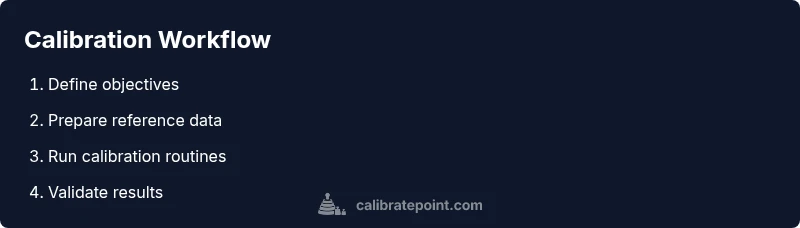
Below is a practical workflow you can apply to most software calibration tasks. The steps are designed to be repeated, with modifications for your specific toolset and domain.
- Define objectives and scope
- Gather reference data and metadata
- Configure calibration parameters and ranges
- Run calibration routines and collect outputs
- Compare results against acceptance criteria
- Document changes and publish the calibration record
Each step should be traceable to a data artifact and include justification for parameter choices. The workflow emphasizes version control, repeatability, and auditability.
Validation and verification of calibration results
Validation confirms that the calibration achieved its goals under expected conditions. Verification checks that results hold under new data or scenarios, ensuring robustness. Use holdout datasets, cross-validation, or back-testing where appropriate. Compare calibrated outputs to target values, compute deviations, and assess whether they fall within defined tolerances. If targets are not met, revisit parameter configurations or data quality, and re-run the calibration cycle. Document all validation outcomes, including successes and limitations, so stakeholders can assess trustworthiness.
Documentation, governance, and ongoing maintenance
Maintain a living calibration record that includes objectives, data sources, parameter mappings, and acceptance criteria. Store artifacts in a version-controlled repository with a clear naming convention. Schedule periodic reviews and re-calibration based on data turnover, software updates, or regulatory changes. Build governance around who can start a calibration, approve changes, and sign off on results. By treating calibration as an ongoing program rather than a one-time task, you ensure long-term reliability and trust in your software systems.
Tools & Materials
- Calibration software(Licensed or open-source tool used for running calibration routines)
- Reference dataset(Clean, labeled and versioned data representing target values)
- Test harness or data generator(To produce controlled inputs for calibration)
- Environment isolation (VM/Container)(Prevents external drift during calibration)
- Documentation templates(For recording results, criteria, and decisions)
- Admin credentials(To install/configure software and manage settings)
- Log files and config snapshots(Optional but helpful for auditing)
Steps
Estimated time: 2-3 hours
- 1
Define objectives and scope
Articulate what the calibration should achieve, which software components are involved, and the acceptable error margins. Align with stakeholders and document the success criteria before touching data or settings.
Tip: Lock in the objectives and acceptance criteria in a living document. - 2
Identify reference data sources
Select datasets that represent real operating conditions and are traceable to standards. Ensure data is clean, labeled, and versioned so you can reproduce results later.
Tip: Prefer multiple reference datasets to test robustness. - 3
Configure calibration parameters
Map input features to target outputs, set parameter ranges, and define stopping conditions. Keep changes justified and linked to the reference data.
Tip: Use default baselines first, then adjust incrementally. - 4
Run calibration routines
Execute the calibration process and collect outputs for comparison. Record any anomalies and note system state during execution.
Tip: Run in an isolated environment to avoid interference. - 5
Evaluate results against criteria
Compare outputs to target values within tolerances. If deviations exceed thresholds, refine parameters or data quality and re-run.
Tip: Document every deviation and justification for changes. - 6
Document and publish
Create a calibration report detailing objectives, data provenance, configurations, and results. Store artifacts with version control for auditability.
Tip: Include a reproducibility appendix with steps and data references.
Questions & Answers
What is software calibration and why is it needed?
Software calibration is the process of aligning software outputs with a trusted reference to minimize drift and maintain accuracy. It is essential for reliable analytics and regulatory compliance where applicable.
Software calibration aligns outputs with trusted references to keep data accurate, reliable, and auditable.
What data do I need for calibration?
You need clean, labeled reference data with metadata, including source, timestamps, and processing steps. Provenance and versioning are critical for reproducibility.
Use clean reference data with clear provenance and version history.
How often should I calibrate software?
Calibration frequency depends on data turnover, software updates, and regulatory requirements. Establish a plan and revisit it after major changes.
Set a calibration cadence based on data changes and software upgrades.
Do I need special hardware to calibrate software?
Hardware is not always required. Calibration often relies on reference data and software configurations, though specialized devices may be used for certain domains.
Often software-only calibration is possible, but some domains use hardware references.
What are common mistakes in software calibration?
Skipping documentation, using non-representative reference data, and neglecting version control can invalidate calibration results.
Avoid missing docs, non-representative data, and lack of versioning.
How do I verify calibration success?
Use holdout data or cross-validation to verify that calibrated outputs meet target tolerances under varied scenarios.
Test with unseen data and multiple scenarios to confirm robustness.
Watch Video
Key Takeaways
- Define objective and acceptance criteria before starting
- Use versioned reference data and maintain audit trails
- Run validation checks after calibration
- Document the entire process for governance
- Schedule regular re-calibration