Calibrate or Recalibrate: A Practical Step-by-Step Guide
Learn how to calibrate or recalibrate instruments with a practical, step-by-step approach. This guide covers tools, methods, environmental setup, and best practices to ensure reliable, traceable measurements.


Calibrate or recalibrate is a practical workflow for aligning instruments with trusted references, ensuring measurements stay accurate over time. This guide covers when to calibrate, main methods, essential tools, and a repeatable workflow you can apply to most devices. Key requirements include a traceable reference, basic tools, a controlled environment, and a documented procedure.
Why calibration matters in everyday use
Calibration is the act of aligning a measurement instrument with a trusted reference so that its readings reflect reality as closely as possible. For professionals and DIY enthusiasts alike, calibrate or recalibrate becomes a routine part of keeping tools accurate and reliable. In practice, even high-quality devices drift over time due to wear, temperature changes, and electrical noise. By establishing a clear calibration regime, you reduce the risk of erroneous data, poor decisions, and failed inspections. This section explains why calibration matters beyond novelty or compliance, and how a disciplined approach protects your workflow, reputation, and project outcomes. Calibrate Point urges readers to treat calibration as a practical, repeatable process, not a one-off event. The objective is to produce consistent results across tools and environments, so you can compare measurements confidently, whether you’re assembling a DIY sensor network or conducting critical lab tests. A well-designed calibration plan also simplifies troubleshooting: when readings diverge, you know where to look, whether it’s a worn sensor, a loose connection, or a temperature shift. When you start with a consistent baseline, calibrate or recalibrate becomes less daunting and more routine.
When to calibrate or recalibrate
Knowing when to calibrate or recalibrate is as important as how you calibrate. Start with new equipment: perform a factory calibration after installation to establish a baseline. Then schedule periodic checks based on how often the instrument is used, the criticality of readings, and the stability of your environment. Signs that a recalibration is due include readings that drift over time, results that cluster around a bias, increased measurement noise, or outcomes that fail to meet your acceptance criteria. In some regulated settings, audits require documented calibration intervals and traceability. Calibrate Point recommends building a calibration plan around risk and consequence—tools used for safety-critical decisions may need more frequent checks, while casual hobby gear can follow longer intervals. Document any adjustments and keep a log of changes to support future maintenance. By treating calibration as a planned activity rather than a reaction to wrong numbers, you reduce downtime and maintain confidence in your results.
Calibration methods explained
Calibration methods can be grouped into three broad approaches: mechanical/electrical alignment, software-based corrections, and reference-data verification. Mechanical adjustments physically tune the instrument’s components, such as adjusting a scale or sensor alignment; electrical alignment calibrates using known electrical signals or resistances; software-based calibration uses built-in features or companion apps to mathematically correct readings. Regardless of method, all calibrations should be traceable to a recognized standard or reference artifact. You’ll want to document the reference source, the ambient conditions, the steps taken, and the final readings. When choosing a method, consider the instrument’s design, the precision required, and the consequences of drift. For field work, portable references and robust procedures matter as much as the instrument itself. Calibrate Point emphasizes using repeatable methods and maintaining a clear audit trail so future calibrations can be compared to this baseline.
Environmental considerations and setup
A stable environment improves calibration reliability. Temperature, humidity, vibration, power quality, and even radiant heat from nearby equipment can alter readings during calibration. Whenever possible, perform calibration in a controlled environment—use a clean, dry bench, stable power, and minimal airflow around sensitive sensors. Allow instruments to warm up to their normal operating temperature before starting, and use anti-static mats if dealing with electronics. Documentation should include environmental conditions for each calibration event. In the field, you may need to compensate for conditions by using portable environmental sensors and recording notes about site specifics. Calibrate Point’s guidance includes verifying that the reference standards themselves are not degraded by environmental factors and that you handle them with care to avoid introducing new drift.
Practical workflow for a typical instrument
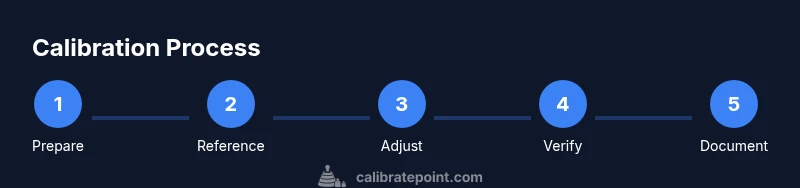
In this section, we outline a practical workflow you can apply to many devices, from digital calipers to temperature sensors. The aim is to minimize drift and maintain a traceable record. Start by verifying the instrument is clean and functional, then prepare the reference standard and the workspace. Next, capture baseline measurements from the instrument against the reference under stable conditions. If a correction is available, apply it according to the manufacturer’s or standard’s instructions. Re-check readings after adjustment to confirm alignment within tolerance. Finally, save the outcome in your calibration log and schedule the next check based on usage and risk. This workflow emphasizes repeatability, clear criteria, and documentation. By sticking to a consistent routine, you’ll improve maintenance planning and reduce the risk of missed calibrations that affect decision-making. Calibrate Point’s approach favors simple, well-documented steps that you can adapt to different tools while preserving traceability.
Verifying results and documentation
Verification is the step that confirms calibration success. Compare post-calibration readings to the reference and ensure they fall within defined allowances or tolerance bands. Record the date, instrument ID, reference used, ambient conditions, and measured values in a calibration certificate or logbook. If measurements still deviate, repeat the adjustment or escalate to a higher-grade reference. Regular reviews of calibration data help detect gradual drift and inform future maintenance planning. Finally, store certificates securely and maintain an accessible archive for audits or quality control checks. Calibrate Point stresses that the value of calibration lies not only in a single successful adjustment but in a consistent history of measurements that proves reliability over time.
Common pitfalls and troubleshooting
Even seasoned technicians encounter common hiccups during calibration. Avoid over-tightening adjustments, which can damage sensors or create new biases. Beware using worn or non-traceable reference standards, which undermine the entire process. Temperature drift can mimic a miscalibration, so re-check at multiple ambient conditions if feasible. Poor documentation leads to confusion and misinterpretation during audits. If you cannot reproduce a result, re-check connections, reseat sensors, and verify the reference source. When troubleshooting, keep a methodical checklist and note any deviations. A deliberate, patient approach helps ensure calibration outcomes are robust and repeatable.
Tools & Materials
- Calibration standard or reference artifact(Traceable reference appropriate to the instrument being calibrated)
- Calipers or micrometer(Attach to reference artifacts for precise measurements)
- Calibrated weight set(NIST-traceable if available; select masses matching your instrument range)
- Digital multimeter(Essential for electrical or sensor-based calibrations)
- Calibration screwdriver (Phillips #1 or #2)(For fine mechanical adjustments)
- Calibration software or app(Use vendor or third-party tools to apply software-based corrections)
- Documentation/logbook(Record readings, adjustments, and certificates)
- Environmental sensors (thermometer, hygrometer)(Useful for field calibrations or drift analysis)
Steps
Estimated time: 60-90 minutes
- 1
Prepare the instrument and workspace
Power down and disconnect the device if needed. Clear the bench, verify cleanliness, and ensure the environment is stable. Allow any warm-up period recommended by the manufacturer, and document baseline conditions before starting.
Tip: Have the calibration log open; note any pre-existing issues that could affect readings. - 2
Select the reference standard
Choose a reference artifact that matches the instrument type and expected measurement range. Verify its calibration status and certificate validity. If multiple references exist, pick the most stable and up-to-date option.
Tip: Check the reference’s temperature rating; drift can occur if the reference is outside its spec. - 3
Record baseline measurements
Take several readings with the instrument against the reference under stable conditions. Note any trends or initial bias and ensure repeatability within your acceptance criteria.
Tip: Use averaging if readings vary; avoid forcing readings to fit expectations. - 4
Apply adjustments
If the instrument supports adjustment, follow the manufacturer’s guidance to correct the readings. Make the smallest meaningful correction to avoid overcompensation.
Tip: Document the exact adjustment values and the rationale for changes. - 5
Re-test after adjustment
Re-measure using the same reference and conditions to confirm alignment within tolerance. If not, iterate with minimal adjustments until you meet criteria.
Tip: Guard against over-tightening or introducing new drift during adjustment. - 6
Document results and schedule the next check
Save a calibration certificate with instrument ID, reference, ambient conditions, and outcome. Schedule the next calibration based on usage, risk, and historical drift.
Tip: Maintain a centralized archive for audits and future reference.
Questions & Answers
What is the difference between calibrate and recalibrate?
Calibrate means adjusting an instrument to match a known reference. Recalibrate means performing calibration again after changes or drift have occurred. Both aim to restore accuracy, with recalibration often triggered by new data or after maintenance.
Calibrate aligns to a standard; recalibrate repeats the process when drift or changes are detected.
How often should I calibrate my tools?
Frequency depends on usage, criticality, and environmental stability. Set initial intervals after installation, then adjust based on drift history and regulatory or quality requirements.
Set intervals based on how critical the tool is and how much it drifts over time.
What are common calibration errors to avoid?
Using degraded references, failing to warm up equipment, skipping environmental controls, and poor documentation are frequent sources of error.
Avoid bad references, skip warm-ups, and keep good records.
Can I calibrate devices at home?
Yes for many consumer and hobbyist tools with simple references, but more precise or regulated instruments may require a lab or certified equipment.
Home calibration is possible for simple tools, but strict instruments may need a lab.
What evidence should I keep after calibration?
Keep calibration certificates, reference source details, ambient conditions, and measurement results. This supports audits and demonstrates ongoing reliability.
Store certificates and notes to show your results over time.
What if my readings still drift after adjustment?
If drift persists, re-check connections, reseat sensors, verify the reference, and consider a higher-grade reference or professional calibration.
Re-check all connections and consider a higher-grade reference if drift continues.
Watch Video
Key Takeaways
- Establish a repeatable calibration routine.
- Maintain traceability with proper reference standards.
- Document every step and environmental condition for audits.
- Verify results against defined tolerances after each adjustment.