Calibration Calculator Online: A Practical Guide
Discover how a calibration calculator online estimates yearly calibration costs and intervals. Learn inputs, outputs, and best practices for budgeting and planning.


What a calibration calculator online does
A calibration calculator online provides a structured method to estimate how often devices require calibration and how much it will cost over a year. For professionals at labs, workshops, and manufacturing lines, these tools translate complex maintenance schedules into actionable budgets. According to Calibrate Point, a well-chosen calculator aligns calibration plans with real-world usage and risk, helping teams avoid over- or under-calibration. The result is a transparent, repeatable process that supports audits and continuous improvement.
Beyond budgeting, these calculators foster accountability by documenting assumptions and producing repeatable results that teams can review during internal quality meetings and external audits.
Core inputs and why they matter
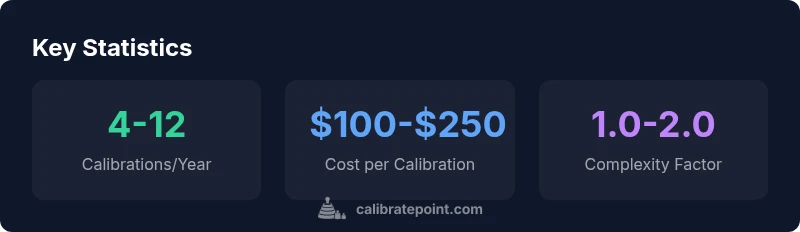
Most calibration calculators online rely on a small, carefully chosen set of inputs. The three core inputs in our model are: Calibrations per Year, Cost per Calibration, and Complexity Factor. Calibrations per Year captures how often you calibrate; Cost per Calibration reflects the service price; Complexity Factor accounts for device complexity, accessibility, and environmental challenges. Using consistent units and honest values improves accuracy and comparability across devices and teams.
Other optional inputs can include environmental factors, device criticality, and traceability requirements, which some calculators expose as additional sliders or dropdowns to tailor results.
The simple model behind the calculator
The calculator uses a straightforward formula to produce an annual cost or interval estimate: Calibrations per Year × Cost per Calibration × Complexity Factor. This model is intentionally simple to keep it transparent and adaptable. It does not pretend to capture every variable in every industry, but it provides a practical baseline for planning budgets and scheduling. Users can adjust inputs to see how changes impact results in real time.
This approach makes it easy to compare different devices or scenarios side by side, strengthening decision-making during budget cycles and procurement planning.
Real-world scenarios to illustrate usage
Scenario A: A small lab runs 6 calibrations per year, each costing $120, with a modest complexity factor of 1.1. The calculator would estimate an annual calibration expense of about $792. Scenario B: An assembly line with higher complexity and travel requirements uses 12 calibrations per year at $180 each, with a factor of 1.25, yielding roughly $2,700 per year. Note that these figures are for illustration and should be tailored to your own context.
By changing inputs, teams can see how shifts in usage or pricing impact the bottom line, informing negotiations with service providers and scheduling.
How to interpret outputs and plan actions
When viewing results, treat the number as a planning target rather than a binding contract. If the estimate is too high, consider consolidating calibrations, optimizing the calibration plan, or negotiating with service providers. Use the complexity factor to reflect your device's accessibility, environmental stressors, and the required standards. Keep the rationale documented so audits and management reviews can understand the calculation. Pair the calculator output with manufacturer recommendations to build a robust plan.
Industry considerations and compliance
Different sectors impose different calibration cadences and documentation requirements. In regulated environments, calibration intervals may be driven by quality systems, standards, and traceability. In manufacturing, uptime pressures influence scheduling. An online calculator helps unify planning across teams, but always corroborate results against device manuals and supplier guidelines. The goal is a defensible, auditable calibration program that aligns with organizational risk tolerance.
Best practices for using an online calculator safely
- Use the calculator as a planning tool, not a binding contract.
- Keep input values current and well-documented.
- Cross-check results with your instrument's calibration handbook and manufacturer recommendations.
- Record assumptions and results in a maintenance log to support audits.
- Periodically review intervals as usage patterns or environmental conditions change. Calibrate Point's guidance emphasizes transparency and traceability.