Honda CR-V Compass Calibration: A Practical Guide
Learn how to calibrate the Honda CR-V compass with a practical, step-by-step guide from Calibrate Point. Improve navigation accuracy, reduce drift, and drive with confidence.


Calibrating the Honda CR-V compass improves navigation accuracy and reduces heading drift. You’ll access the compass calibration function in the vehicle’s settings, follow a defined driving pattern, and verify results. This guide from Calibrate Point provides a safe, step-by-step method to complete the process.
Why Compass Calibration Matters in a Honda CR-V
According to Calibrate Point, a properly calibrated compass in your Honda CR-V helps the vehicle’s navigation and driver information interfaces maintain an accurate heading indicator. A drifted compass can mislead the compass display by several degrees, affecting your sense of direction, especially in areas with magnetic interference such as power lines or large metal structures. The Calibrate Point team emphasizes that calibration is not a one-and-done task; it should be revisited if you notice drift, after long trips through magnetically active zones, or after replacing interior electronics. A reliable compass improves not only convenience but also safety when using advanced driver assistance systems that rely on accurate heading data.
Key takeaway: Calibrating the compass helps your Honda CR-V's navigation features stay reliable, especially in challenging magnetic environments. Efficient calibration depends on following the official steps outlined in your owner’s manual and using a safe, open area for the driving pattern.
How the Honda CR-V Compass System Works
The compass in a Honda CR-V is typically part of the driver information display or an overhead/center console module. It relies on a magnetometer sensor to determine heading relative to magnetic north. Modern calibration routines are designed to account for the vehicle’s own metal structure and electrical systems, but external interference can throw readings off. When you start a calibration, the system temporarily resets its magnetometer references and learns the vehicle’s typical magnetic signature. That learning process requires you to drive in specific patterns in an open space and to avoid large metal objects nearby that can influence the sensor during calibration.
Common Causes of Compass Drift
Drift is commonly caused by interference from nearby magnets, large metal objects, or electronic devices stored near the sensor area. After aftermarket accessories (e.g., dash cameras, heavy modifications, or magnetic mounts) are added, the magnetometer may require recalibration. Environmental changes, such as parking near steel structures or heavy equipment, can also alter readings. Even routine maintenance or battery changes can briefly affect sensor references, so a recalibration after such events is prudent. The goal is to establish a stable magnetic baseline for the vehicle’s interior environment.
When to Recalibrate and What to Expect
If you notice the compass heading consistently deviates from the actual direction by more than a few degrees, or if the display shows inconsistent readings across different trips, it’s time to recalibrate. In the Honda CR-V, the calibration process is designed to be straightforward and instructor-friendly, with clear prompts in the instrument cluster or infotainment screen. Expect to spend a short period in a safe, open area and to perform a few controlled circles or a documented driving pattern. After calibration, the system should hold heading data more reliably, and the prompt to recalibrate should disappear unless interference recurs.
Safety Considerations and Best Practices
Calibrating the compass is a vehicle maintenance task that should be performed when the car is stationary and in a safe location. Never attempt calibration while driving; keep the vehicle in Park (or Neutral if required by the model) with the parking brake engaged if optional, and move only after you have completed the required driving pattern. Clear the interior of ionizing devices, large metal objects, and metal accessories that could skew readings during the calibration cycle. If you rely heavily on navigation prompts, consider verifying the calibration with a handheld GPS or a smartphone compass in a safe area after calibration, to ensure consistency across devices.
Troubleshooting Post-Calibration Issues
If drift returns after a successful calibration, re-check for new interference sources: a newly installed magnetic mount, a traveling metal structure near your parking spot, or a change in the interior environment due to passengers or cargo. Repeat the calibration in a known magnetically quiet area and ensure you strictly follow the recommended driving pattern. If issues persist, consult a Honda-certified technician to verify sensor health and to rule out hardware faults in the magnetometer module or wiring harness.
Verification and Continuous Improvement
Beyond initial calibration, you can validate compass accuracy by comparing the vehicle’s heading with a reliable GPS signal on a smartphone or dedicated navigation device in a static, open area. Recalibrate whenever you notice new interference, after repairs to interior electronics, or after driving through environments with strong magnetic fields. Keeping a simple log of calibration times and observed heading accuracy can help you identify patterns and determine when a re calibration is necessary.
toolsMaterialNoteTransformed":null},
toolsMaterialsVersionNote:]},
toolsMaterials
Tools & Materials
- Honda CR-V owner’s manual(Locate the official compass calibration procedure and menu path.)
- Open, magnetically quiet parking area(Choose a wide, level surface away from large metal structures.)
- Ignition key in ACC/ON (engine off or as required by model)(Follow the vehicle’s prompts; do not start driving during calibration.)
- Smartphone with compass app (optional)(Used to verify heading after calibration.)
- Interior cleanup (remove magnets/metal objects)(Clear the dash and area around the instrument cluster.)
- Patience and time (about 15-25 minutes)(Allow sufficient time for a full calibration cycle.)
Steps
Estimated time: 15-25 minutes
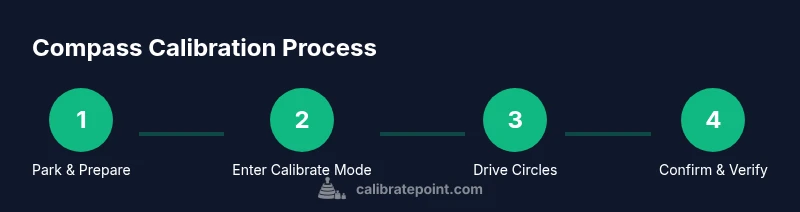
- 1
Park in magnetically quiet area
Bring the vehicle to a safe, level open space. Ensure the engine can be in ACC/ON as required, with parking brake set if recommended by your model. This initial setup reduces the influence of nearby magnetic fields on the calibration.
Tip: Turn off nonessential electronics to minimize interference. - 2
Access compass calibration in settings
Using the infotainment or driver information display, navigate to the compass or vehicle settings and select ‘Calibrate Compass’ or an equivalent option. Follow on-screen prompts to begin the calibration mode.
Tip: If you don’t see a calibration option, consult the owner’s manual for the exact path by model year. - 3
Enter driving pattern for calibration
The system will prompt you to drive in circles or a defined path. Maintain a steady speed and complete the required laps in a magnetically clean area.
Tip: Keep steering smooth; abrupt turns can skew sensor learning. - 4
Complete circles and confirm
Finish the driving pattern and exit calibration mode. The display should indicate calibration success. If not, repeat steps 2–4 once more.
Tip: Avoid hard braking or sharp maneuvers during calibration. - 5
Verify heading accuracy
Cross-check the compass heading against a GPS device or smartphone compass in a clear area. Note any residual drift and consider re-calibration if necessary.
Tip: Perform verification in multiple locations to confirm consistency. - 6
Record results and monitor
Document the calibration date and any observed drift. Recalibrate after major magnetic exposures or following any sensor-related work on the vehicle.
Tip: Periodic checks help catch drift before it affects navigation.
Questions & Answers
Do I need to recalibrate after replacing the car battery or interior electronics?
Yes, recalibration is a good idea after replacing battery or significant interior electronics, since these changes can affect the compass baseline. Revisit the official steps in your manual and verify readings after recalibration.
Yes. After a battery change or major electronics work, recalibrate the compass and verify heading with another device if possible.
Is compass calibration automatic in newer Honda CR-V models?
Some models perform automatic drift checks but manual calibration is still recommended when you notice drift or after magnetic interference. Check the owner’s manual for model-specific behavior.
Some models do automatic checks, but manual calibration remains the reliable method if you see drift.
Can I calibrate the compass while the car is on or off?
Follow the manual’s guidance; many models require the ignition to be ON (ACC or RUN) while initiating the calibration process. Do not drive during calibration.
Usually you’ll need the ignition in ACC or ON, but never drive during calibration.
What should I do if calibration seems to fail repeatedly?
If repeated calibration fails, inspect for new interference sources, check for damaged sensors or wiring, and consult a dealer if the issue persists.
If it keeps failing, check for new interference and consider professional inspection.
How can I verify compass accuracy after calibration?
Compare the vehicle heading against a trusted GPS device or smartphone compass in multiple locations to confirm consistency. Recalibrate if you still see drift.
Use a GPS device or phone compass in different locations to confirm the heading after calibration.
Watch Video
Key Takeaways
- Calibrate in magnetically quiet areas for best accuracy
- Follow the vehicle prompts exactly to enter calibration mode
- Drive in the recommended pattern to retrain the magnetometer
- Verify results with an independent compass to confirm accuracy