How to Calibrate a Samsung Washer Without Delay End Button
Learn how to calibrate a Samsung washer without using the delay end button. This step-by-step guide covers tools, safety, service-mode procedures, verification checks, and best practices for reliable, accurate wash performance.


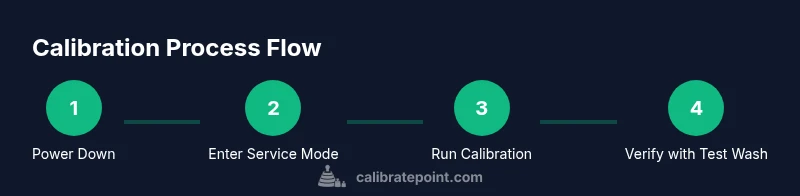
You can calibrate a Samsung washer without the delay end button by entering service mode through model-specific sequences, initiating a calibration cycle, and then exiting to run a test wash. Gather essential tools, follow safety steps, and verify results with a controlled load. This guide walks you through the process in clear, actionable steps.
Why calibration matters for Samsung washers
Calibration ensures accurate water level sensing, spin balance, detergent dosing, and cycle timing. When a washer is miscalibrated, you may see underfilled or overfilled loads, unbalanced spins, or inconsistent wash results. According to Calibrate Point, a precise calibration routine helps minimize water waste, improve rinse quality, and extend the life of your appliance. In models that rely on a Delay End button to initiate certain calibration sequences, it’s especially important to learn an alternative path that works when that button is unavailable or non-functional. A thorough calibration not only improves performance but also provides a baseline for future maintenance checks. This article presents a practical, step-by-step method tailored to Samsung front-load and top-load washers, with emphasis on safety, model variability, and verification.
What you’ll gain from a proper calibration
- Accurate fill levels and drum rotation
- Consistent wash performance across cycles
- Reduced risk of over-drainage or overflow incidents
- Clear diagnostic indicators if something drifts out of spec
Using calibration as a routine check helps you catch sensor drift early. The Calibrate Point Team emphasizes that the goal is not to “fix everything at once” but to establish reliable reference points the system can reuse during daily operation. If you notice persistent issues after calibration, revisit the steps or consult the manufacturer’s service manual for model-specific instructions.
Defining the delay end button and why it matters here
The delay end feature is designed to delay the end of a cycle to fit your schedule. Some calibration procedures use a sequence that depends on this button to access internal menus. When the Delay End button is not available or is non-functional, you’ll need an alternate entry point into service or diagnostic mode. This guide focuses on a robust approach that works across common Samsung models by leveraging the device’s service or diagnostic features rather than the consumer shortcuts. Always refer to your model’s user manual for exact menu labels and button combinations.
Safety first: prerequisites and environment
- Disconnect power before accessing panel internals or connectors. - Use a dry, clean area with stable footing and adequate lighting. - Have a clean, dry microfiber cloth to wipe any moisture from the panel. - If you’re taking out panels or accessing internal sensors, label cables to ease reassembly. Always power down and unplug prior to any hardware work.
Tools and safety precautions (overview)
A calibrated approach requires basic tools and a safe work environment. Always follow local safety guidelines, check for damaged wires, and avoid forcing connectors. If you encounter resistance or damaged components, stop calibration and seek professional support.
Step-by-step overview before the detailed steps
Familiarize yourself with the model’s service/diagnostic interface. Prepare a test load that won’t risk dye transfer or residue buildup. The calibration sequence typically involves cycling through sensor checks, actuator tests, and timing alignments. While the exact button sequence varies by model, the aim remains the same: reestablish accurate sensing and cycle timing without relying on the Delay End button.
Verifying calibration after completion
Run a controlled test load: use a small load with towels or towels and a light garment mix. Observe water level, drum movement, balance, and rinse performance. Compare outcomes with the expected behavior described in your model’s service manual. If anomalies persist, repeat the process or escalate to professional diagnostics.
Tools & Materials
- Phillips head screwdriver(Small size for panel screws)
- Flathead screwdriver or plastic pry tool(For panel latch access)
- Microfiber cloth(Dry wipe to remove moisture or fingerprints)
- Multimeter (optional, for sensor checks)(Use for voltage or resistance checks if you’re comfortable)
- Towel or shallow tray(Catch any incidental drips or leaks)
- Owner manual or model-specific service manual(Model-dependent instructions and sequences)
Steps
Estimated time: 45-60 minutes
- 1
Power down and prepare
Unplug the washer and ensure all indicators are off. Clear the area of clutter and place a towel under the service panel if you’ll be handling wiring or sensors. This step protects both you and the unit from accidental shocks and damage.
Tip: Have your manual handy for model-specific terminology and menu names. - 2
Access service/diagnostic mode
Model-specific sequences exist to enter diagnostic or service mode without the Delay End button. Use the manufacturer’s instructions to reach the internal menus. Do not force panels or connectors; use appropriate tools to avoid panel damage.
Tip: If you cannot locate the service sequence in the manual, search the exact model number online for community-tested sequences. - 3
Navigate to calibration or sensor checks
Within service mode, locate the calibration, sensor, or offset options. This area contains the settings for water level, drum rotation, and sensor baselines. Confirm you’re in the calibration subtree rather than a generic test.
Tip: Label any selected options with a marker so you can revert if needed. - 4
Run the calibration cycle
Initiate the calibration procedure as directed by the manual. Expect a sequence that tests sensors and actuator responses without needing the Delay End button. Allow the cycle to complete without interrupting it.
Tip: Do not open the door or interrupt the cycle during calibration. - 5
Record baseline readings
Note any sensor readouts, positions, or LED indicators shown during the calibration. A few models display values; others indicate pass/fail. This data helps you verify alignment and detect drift later.
Tip: Take photos of the display or panel indicators for reference. - 6
Exit service mode and perform a test wash
Follow the manual to exit calibration mode, then run a small test wash with a neutral load. Observe water fill, agitation, and drain cycles. Check for even tumbling and consistent rinse quality.
Tip: Use a light, non-dye load to avoid staining in case of residual miscalibration. - 7
Evaluate performance against expectations
Compare observed results to the model’s documented targets for fill level, spin speed, and cycle duration. If anomalies appear, repeat calibration or consult service support.
Tip: When results deviate, re-enter service mode and re-check sensor connections and calibration values. - 8
Finalize and document results
Document the calibration outcome, noting any adjustments made, dates, and model specifics. This record supports future maintenance and helps technicians diagnose drift.
Tip: Keep the documentation with the appliance for quick reference during future service.
Questions & Answers
Can I calibrate my Samsung washer without the delay end button?
Yes. Many Samsung models provide a service or diagnostic path that bypasses the Delay End button. Consult the model-specific manual for the exact sequence to access calibration options. This guide covers a robust alternative that does not rely on that button.
Yes. You can access calibration through the model’s service mode rather than the delay end button.
What are common signs of miscalibration in Samsung washers?
Common signs include improper water fill, unbalanced spins, longer cycle times, and inconsistent rinse performance. These symptoms indicate sensor drift or actuator misalignment that calibration can address.
Common signs are wrong fill levels, unbalanced spins, and uneven rinsing.
Is it safe to calibrate a washer at home?
Calibrating at home is generally safe when you follow the manufacturer’s service instructions, unplug the unit during work, and avoid opening live electrical components. If you’re unsure, seek professional support.
It's usually safe if you follow the manual and safety steps; if unsure, get a pro.
Will recalibration affect saved settings or data?
Calibration affects only sensor baselines and cycle timing. It does not erase user data like saved settings or cycles unless you perform a factory reset. Always back up any custom configurations if available.
Calibration adjusts sensors and timing, not your saved settings.
What should I do if the washer still misbehaves after calibration?
If issues persist, reenter service mode to review connections and calibration readings. If readings are out of spec or a component is damaged, contact a qualified technician.
If issues persist, check connections and seek a technician if needed.
Are there model-specific cautions for Samsung washers?
Yes. Samsung models vary in service menu layouts and calibration options. Always consult the official manual for your exact model to avoid incorrect sequences.
Yes—model specifics matter; check your manual.
How long does a typical calibration take?
A typical home calibration session runs roughly 45-60 minutes, depending on model complexity and the need for verification washes.
Most calibrations take about 45 to 60 minutes.
Do I need special tools for calibration?
Basic tools and a manual are usually sufficient. A multimeter is optional for advanced sensor checks, but not required for standard calibration.
basic tools and the manual are enough; meter use is optional.
Watch Video
Key Takeaways
- Identify model-specific calibration steps before starting
- Use service/diagnostic mode when Delay End is unavailable
- Verify results with a controlled test load
- Document outcomes for future reference
- Seek professional help if any safety concerns arise