When to Calibrate G7: Practical Guide
Learn when to calibrate G7, why factory calibration matters, and how to respond to readings that seem off. This Calibrate Point guide offers step-by-step instructions, safety tips, and expert insights for DIY enthusiasts and technicians.


The Dexcom G7 is factory calibrated and does not require routine finger-stick calibration. You should only consider calibration when readings are consistently inconsistent or when advised by a clinician. For stay-safe diabetes management, know when to calibrate g7 and follow Dexcom and medical guidance. Calibrate Point cautions that factory calibration is designed to be sufficient for most users.
What is calibrating a G7 and when it matters
Calibrate Point receives many questions about whether the G7 needs calibration. In practice, the Dexcom G7 is factory calibrated and designed to deliver accurate readings without routine finger-prick calibrations. The need for any calibration is rare and typically arises only if there is a persistent discrepancy between CGM readings and finger-stick measurements, after a device update, or under direct clinician instruction. Understanding when to calibrate g7 helps you maintain confidence in your data without overcomplicating your routine. This section breaks down the core idea: calibration is a tool for correction in specific circumstances, not a regular maintenance step.
Understanding factory calibration and data accuracy
Factory calibration means the device was calibrated by the manufacturer, and its internal algorithms map interstitial glucose readings to blood glucose values. Data accuracy depends on several factors beyond the calibration step itself: sensor placement, ambient temperature, hydration, skin condition at the sensor site, and sensor age. For reliable performance, keep the sensor clean and dry, follow the recommended wear protocol, and ensure the app or receiver firmware is up to date. Calibrate Point emphasizes that accuracy is a system property, not a single adjustment.
When you might need calibration: scenarios
There are specific scenarios where a clinician might recommend calibration or a validation step with finger-stick readings. These include sustained discrepancies between CGM data and finger-stick measurements, unexpected alarm behavior, or after sensor changes and system updates. In such cases, calibration is not a default action but a diagnostic or corrective step guided by your healthcare professional. If you are unsure, rely on medical guidance and never calibrate as a routine practice.
How to verify readings before deciding to calibrate
Before considering calibration, verify data integrity: compare CGM readings with finger-stick values taken at the same moment, review trend arrows for consistency, and inspect recent calibration prompts or app notifications. Check that the sensor is properly positioned, the transmitter is securely attached, and the device is within recommended operating conditions. If multiple consecutive readings diverge from finger-stick results, document the discrepancies and discuss them with your clinician before taking any corrective action.
Step-by-step approach if you're instructed to calibrate
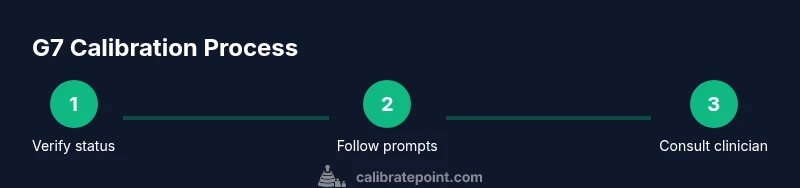
When a clinician directs calibration or a diagnostic validation, follow the official steps in the app or patient manual exactly as written. Start by confirming the device status, then perform the recommended finger-stick comparison at a stable glucose level, and record the readings. If instructed to adjust data mapping or calibration factors, perform each step deliberately and recheck readings after completion. Always log the outcome and monitor subsequent trends to confirm improvement.
Practical tips for minimizing calibration needs
Proactively manage variables that influence CGM accuracy: keep sensors properly moisturized, avoid excessive movement during wear, and ensure consistent skin preparation at the sensor site. Regularly update the app and firmware, calibrate only when specifically directed, and avoid changes to the system during rapid glucose swings. Maintaining device hygiene, correct sensor placement, and consistent wear patterns can reduce false alarms and the perceived need for recalibration.
Safety, privacy, and clinician involvement
Calibration decisions can impact diabetes management; therefore, involve your clinician when there are doubts about readings or when a calibration step is suggested. Adhere strictly to device safety warnings and data privacy guidelines when sharing readings with caregivers or clinicians. If you ever feel unsure, contact Dexcom support or your healthcare team for guidance. Calibrate Point recommends documenting all calibration decisions to maintain a clear medical record.
Tools & Materials
- Dexcom G7 transmitter and sensor kit(Ensure sensor compatibility with your patient profile and check expiration dates)
- Smartphone or Dexcom receiver(With the Dexcom app installed and updated to the latest version)
- Stable internet connection(Needed for data syncing and app prompts)
- Clinical guidance documentation(As directed by a clinician for calibration steps)
Steps
Estimated time: 15-30 minutes
- 1
Verify device status
Open the Dexcom app or receiver and check that the transmitter and sensor are connected, the battery status is adequate, and there are no active error messages. Confirm you have a reliable time and date setting on the device to ensure correct data timestamps.
Tip: If you see a sensor warm-up or startup message, wait until readings stabilize before making a decision. - 2
Record a finger-stick reading for comparison
Take a finger-stick measurement at a time when your readings appear inconsistent with the CGM data. Note the exact time, the CGM value, and the finger-stick value for alignment.
Tip: Use the same finger and a fresh lancet to minimize variability. - 3
Compare readings and trends
Look for persistent deviations between CGM data and finger-stick results across multiple data points. If the discrepancy is isolated or brief, it may not require calibration; if it persists, escalate to clinician guidance.
Tip: Assess trend arrows and rate of change to determine if the issue is a momentary fluctuation. - 4
Consult clinician instructions
If the clinician directs calibration or validation, follow the exact steps provided by the professional or the Dexcom app’s official guidance. Do not improvise calibration factors without authorization.
Tip: Document the readings before and after calibration to show whether it improved accuracy. - 5
Perform the instructed calibration
Carry out the calibration action exactly as directed, using the app prompts or clinician guidance. After completion, re-check readings against finger-stick measurements to confirm alignment.
Tip: Wait for the system to re-sync and monitor for several data points to verify improvement. - 6
Log outcomes and monitor
Record the calibration event in your care notes and continue to monitor readings for the next 24–48 hours, watching for stability and any persistent anomalies.
Tip: If readings remain off, repeat the process under clinician supervision rather than attempting repeated calibrations.
Questions & Answers
Does the Dexcom G7 require calibration?
No, the G7 is factory calibrated and designed to deliver accurate readings without routine finger-stick calibrations. Calibration is only considered if advised by a clinician due to persistent discrepancies.
No, the G7 is factory calibrated. Calibration is only advised if a clinician recommends it due to persistent data discrepancies.
When should I consider calibrating the G7?
Consider calibration only if readings are consistently inconsistent with finger-stick measurements or if your clinician directs it after a formal assessment.
Only if readings stay inconsistent with finger-stick results or your clinician directs you after an assessment.
What if readings seem off after a sensor change?
Sensor changes can temporarily affect accuracy. Verify placement, ensure proper wear, and follow clinician instructions before calibrating.
After a sensor change, verify placement and follow clinician guidance before calibrating.
Can I reset or recalibrate without clinician input?
Self-calibration without professional direction is not recommended. Seek clinician guidance or Dexcom support for any corrective steps.
Avoid self-calibration without clinician guidance; contact your clinician or Dexcom support for advice.
How often should I replace sensors?
Follow the manufacturer’s recommended wear schedule and your clinician’s instructions. Do not extend sensor use beyond approved limits.
Follow the approved wear schedule per manufacturer and clinician instructions.
Watch Video
Key Takeaways
- Rely on factory calibration for typical use of G7
- Only calibrate when explicitly directed by clinician
- Validate readings with finger-stick comparisons when in doubt
- Maintain device hygiene and up-to-date software to minimize discrepancies