Calibrate Yaw Rate Sensor: A Practical Step-by-Step Guide
Learn how to calibrate yaw rate sensor for drones and vehicles with a practical, step-by-step method. Calibrate Point guides you through setup, data collection, and verification for yaw accuracy.


According to Calibrate Point, calibrating a yaw rate sensor is essential for accurate attitude control in drones and vehicles. This guide outlines a practical, field-ready workflow to minimize drift, improve yaw accuracy, and reduce erroneous corrections in automated systems. You’ll learn required tools, setup best practices, and a repeatable verification process to ensure reliable performance.
Why calibrate yaw rate sensor and how it impacts control
A yaw rate sensor measures rotation around the vertical axis and feeds data into stabilization and navigation systems. If the yaw measurement drifts or responds slowly, control algorithms may overcorrect or underreact, leading to unstable turns or poor path tracking. Calibrate Point emphasizes that regular calibration helps maintain consistent attitude estimates, which in turn improves flight safety, ride quality, and task accuracy in both drones and robotic platforms. Factors such as temperature, supply voltage, sensor age, and mounting alignment can all impact yaw output, making a structured calibration routine essential for repeatable results.
Understanding the yaw rate sensor and typical error sources
Yaw rate sensors (often gyros or IMUs with a dedicated yaw axis) translate rotational motion into electrical signals. Common error sources include bias drift, scale factor error, misalignment, and sampling latency. Environmental changes, improper mounting, and power supply variations can compound these errors. A solid calibration identifies and compensates for these biases, producing a calibrated output that better matches a known reference input. This section sets the foundation for choosing a calibration method aligned with your device type and operating environment.
Safety and setup considerations before starting
Before any calibration, power down the system and remove power to the sensor during hardware adjustments. Work on a stable, vibration-free surface to avoid introducing artificial yaw motion. Ground yourself to prevent static discharge on sensitive electronics. If you are calibrating in the field, ensure you have a controlled reference environment with minimal external yaw movement. Document any environmental conditions that could influence readings, such as wind or nearby machinery, so you can account for them later in the verification phase.
Tools, fixtures, and environment you’ll need
A reliable calibration requires a small set of essential items: a bench power supply suited to your sensor’s voltage range, a digital multimeter for voltage references, a data logger or oscilloscope to capture yaw output, and a stable test jig to hold the sensor firmly. If you have access to a CAN or UART interface, a diagnostic tool helps extract raw sensor data for cross-checking against a reference. A clean, vibration-free surface and secure cabling prevent accidental movement during measurements. Having a defined test area reduces variability between calibration sessions.
Step-by-step calibration workflow (bench setup)
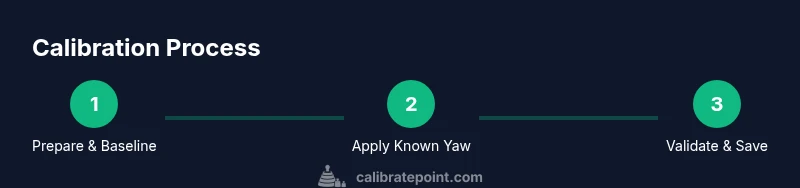
- Prepare the sensor: power down, disconnect leads, and mount the sensor on the test jig. 2) Connect measurement devices: attach the data logger or oscilloscope to capture yaw output and verify supply voltage with a multimeter. 3) Establish a baseline: power up, record several seconds of yaw output with the sensor stationary, noting any bias. 4) Apply a controlled yaw input: rotate the test rig or apply a known steering action at a fixed rate, capturing the sensor response. 5) Compute error and adjust: compare the sensor output to the reference, calculate bias and scale corrections, and update calibration constants in the firmware if supported. 6) Re-verify: repeat the test with the corrected parameters to confirm the output matches the reference. 7) Document results: save the calibration data, environment notes, and software versions for future audits. 8) Reintegrate and test: install the calibrated sensor back into the system and perform a final functional test.
How to derive calibration constants from test data
Extraction of calibration constants typically involves comparing the measured yaw rate against a known input, then solving for bias (offset) and scale (sensitivity) errors. A simple linear model often suffices: yaw_measured = scale * yaw_true + bias. Use multiple known inputs to run a quick linear regression and extract both parameters. Store these constants in a bounded range to avoid overfitting. If your platform supports adaptive calibration, you can enable online refinement during normal operation, but validate changes in a controlled session first.
Field calibration vs lab calibration: pros, cons, and when to use each
Lab calibration offers controlled temperature, lighting, and vibration-free conditions, yielding repeatable results. Field calibration adapts to real-world conditions, but it introduces more variables. Use lab calibration for baseline performance and manufacturing qualification; use field calibration to compensate for installation-specific biases, mounting shifts, or temperature effects. In both cases, document environmental conditions and sensor versions to enable meaningful comparisons over time.
Verifying calibration with live yaw tests and performance checks
Verification should confirm that the calibrated yaw rate sensor matches a trusted reference under representative maneuvers. Use test scenarios that cover straight-line stabilization, gentle yaw turns, and aggressive yaw motions to ensure the sensor performs consistently. Monitor the response time, overshoot, and steady-state error, and check for any residual bias after calibration. A robust verification plan reduces the risk of post-calibration drift when the system encounters real-world conditions.
Troubleshooting common issues and how to address them
If yaw drift persists after calibration, recheck mounting alignment and cable routing for mechanical backlash or intermittent connections. Temperature effects can shift sensor output; implement temperature compensation if supported. If firmware calibration options are available, ensure the correct device profile is loaded and that there are no conflicting calibration settings. When in doubt, repeat the calibration cycle with tighter data collection and additional yaw input samples to improve confidence.
Best practices to maintain yaw rate accuracy over time
Schedule periodic recalibration as part of routine maintenance, especially after hardware changes or firmware updates. Keep environmental conditions as consistent as possible during calibration sessions, and log all calibration data for trend analysis. Use versioned calibration files to prevent stale parameters from being loaded. Finally, correlate yaw rate data with other sensors (like a compass or accelerometer) to catch cross-sensor inconsistencies early.
How to document calibration results for auditability and future reference
Create a standardized calibration report that includes sensor model, serial number, firmware version, test date, operator, environment notes, raw data, derived constants, and validation results. Attach the data file(s) and a summary of conclusions, plus any recommended action items. Storing this in a shared repository makes it easy to track changes over time and support future troubleshooting.
The role of yaw rate calibration in safety-critical systems
For safety-critical applications—drones, autonomous vehicles, and robotics—the yaw rate calibration quality directly influences control stability and user safety. A well-documented, repeatable calibration process reduces surprises in the field and increases operator confidence. Regular reviews aligned with maintenance cycles help ensure ongoing reliability and compliance with operational standards.
Tools & Materials
- Yaw rate sensor under test (device)(Ensure power is disconnected before removal; handle with anti-static precautions)
- Digital multimeter(Verify supply voltage and reference voltage during bench testing)
- Bench power supply(Provide stable voltage within the sensor’s specified range)
- Data logger or oscilloscope(Capture yaw output versus time for analysis)
- Test jig or mounting fixture(Rigid, vibration-free mounting to prevent artificial yaw motion)
- CAN/UART diagnostic tool (optional)(Useful for extracting raw sensor data from some modules)
- Reference yaw rate source (optional)(Helps create a known yaw input for comparison)
- Cables, connectors, and labeling(Label all connections to avoid mis-wiring during reassembly)
Steps
Estimated time: 60-90 minutes
- 1
Prepare and power down
Power down all related systems and unplug the sensor. Remove the sensor from its housing if needed, and mount it securely on the test jig. This step prevents accidental movement and ensures safety during measurements.
Tip: Verify you have a clear test area and anti-static measures in place. - 2
Connect measurement tools
Attach the data logger or oscilloscope to capture yaw output and use the multimeter to confirm the supply and reference voltages. Secure all cables to prevent movement during tests.
Tip: Double-check ground references to minimize noise. - 3
Establish baseline readings
With the sensor still, record several seconds of output to identify any bias when no yaw motion is present. Document noise level and drift tendencies for later comparison.
Tip: Take multiple samples to average out transient fluctuations. - 4
Apply controlled yaw input
Induce a known yaw rate by rotating the test rig or applying a controlled steering action. Capture a representative set of responses across different yaw rates.
Tip: Use a fixed, repeatable rotation rate for consistency. - 5
Compute error and adjust
Compare measured yaw output to the reference. Calculate bias and scale corrections and update calibration constants in the firmware if supported.
Tip: Use a simple linear model to start (yaw_measured = scale * yaw_true + bias). - 6
Re-test with corrected parameters
Repeat the yaw tests using the updated constants. Look for reduced bias and closer alignment with the reference input.
Tip: Aim for minimal steady-state error across the tested range. - 7
Document results
Log constants, environmental conditions, and firmware versions. Save raw data and summary metrics for future audits.
Tip: Create a standardized calibration sheet for easy reuse. - 8
Reinstall and verify in-system
Install the calibrated sensor back into the system and perform a final functional check under typical operating conditions.
Tip: Run a short flight or drive test to confirm real-world performance.
Questions & Answers
Is yaw rate sensor calibration the same as gyro calibration?
They are related but not identical. Yaw rate calibration focuses on the yaw axis with specific bias and scale corrections, while gyro calibration may include multiple axes and bias compensation. Understanding the sensor architecture helps ensure you target the correct parameters.
Yaw calibration targets the yaw axis bias and scale, while gyro calibration may cover all axes. Check your sensor datasheet for axis-specific guidance.
Can yaw rate sensor calibration be done in the field?
Yes, you can perform field calibration with proper setup and a known yaw reference. Field calibration is useful for compensating installation-specific factors, but it may introduce more variables than a lab setup.
Field calibration is possible with careful setup, but expect more variability than in a lab.
What are common signs that a yaw rate sensor needs recalibration?
Frequent drift, inconsistent yaw responses, overshoot during turns, or mismatch with other attitude sensors indicate calibration drift. If in doubt, repeat the calibration cycle and verify against a trusted reference.
Drift, inconsistent yaw response, or mismatch with other sensors usually means recalibration is due.
What tools are essential for yaw rate sensor calibration?
A stable test jig, a reliable power supply, a data logger or oscilloscope, a digital multimeter, and proper documentation gear are essential for a repeatable calibration.
You need a jig, power supply, data logger, multimeter, and good record-keeping.
How often should yaw rate sensor calibration be performed?
Calibration frequency depends on usage, environmental conditions, and sensor quality. Establish a baseline and recalibrate after maintenance, firmware updates, or noticeable drift.
Recalibrate after maintenance, firmware updates, or when you notice drift.
What if calibration doesn’t improve yaw accuracy?
Re-check mounting alignment, cable integrity, and reference inputs. Consider temperature effects and confirm firmware settings. If issues persist, consult the sensor’s datasheet or seek expert guidance.
If scores don’t improve, re-check mounting, wiring, and references, and review temperature effects.
Watch Video
Key Takeaways
- Calibrate yaw rate sensor to improve attitude control.
- Use a structured bench workflow with clear baselines and references.
- Verify results with multiple input rates and document consistently.
- Maintain calibration logs for ongoing performance monitoring.