How to Calibrate a Drone: A Complete Step-by-Step Guide
Learn how to calibrate a drone to improve flight stability, GPS accuracy, and sensor reliability. This step-by-step guide covers IMU, compass, gimbal, and RC calibration with practical tips and safety considerations.


By the end of this guide, you will know how to calibrate a drone to improve flight stability, sensor accuracy, and GPS reliability. The process covers IMU and gyroscope alignment, compass recalibration, camera gimbal stabilization, and RC transmitter checks. Follow manufacturer recommendations and perform tests in a safe area to confirm calibration results before flight.
Why calibrate a drone matters
Calibration is the foundation of predictable flight. When a drone's sensors are misaligned, you can see yaw drift, altitude fluctuations, and inconsistent stick input, especially in challenging wind or low-sat GPS environments. According to Calibrate Point, a disciplined calibration routine reduces drift, improves navigation reliability, and extends component life by minimizing unnecessary motor corrections. This section explains why a regular calibration matters for every operator—from hobbyists to technicians. You’ll learn how sensor fusion, compass reliability, IMU stability, and motor response work together to keep a drone flying true. You’ll also discover how calibration interacts with firmware updates and payload changes. By treating calibration as a routine, you minimize risk and set the stage for repeatable results in real-world flight, regardless of your skill level.
Core calibration concepts
Calibration aligns the drone's internal sensors with reality, ensuring data fusion yields accurate attitude, position, and control outputs. Central to this are the IMU (inertial measurement unit) consisting of accelerometers and gyroscopes, and the magnetometer used by the compass. Modern drones fuse these sensors with GPS and barometer data to deliver stable flight. Regular calibration keeps this fusion accurate, reduces drift during long flights, and lowers the likelihood of sudden corrective maneuvers. Calibrate Point emphasizes documenting any changes in calibration after firmware updates or payload swaps, since software can alter sensor handling.
Compass recalibration and magnetic interference
The compass uses magnetic readings to determine heading. If you fly near metal structures, power lines, or magnets, the readings can drift, causing poor navigation and unpredictable yaw. Recalibrating the compass in a clear space away from interference is essential, especially before complex maneuvers or autonomous missions. Calibrate Point notes that maintaining a magnetically clean environment during calibration yields more reliable headings and consistent return-to-home behavior. Always reset the compass after major magnetic exposure, such as removing payloads or operating near large metal objects.
IMU and gyroscope calibration
The IMU measures acceleration and rotation to infer the drone’s orientation. Misalignment or accumulated bias can cause gradual drift in roll, pitch, and yaw. Gyroscope calibration helps remove bias and align the rate sensors with true motion, which improves stick response and stability in windy conditions. Many drones offer a dedicated IMU calibration mode in the companion app; follow the manufacturer steps to place the drone on a level surface and rotate it through all axes as instructed. If you notice persistent drift after calibration, consider rechecking the mount and ensuring screws are properly torqued to spec.
Camera gimbal and stabilization calibration
A stable gimbal ensures clean video and sharp stills, and it also affects how the platform returns to level after disturbances. Gimbal calibration aligns the camera’s axis with the drone’s body frame, corrects lens tilt, and synchronizes motor movement with attitude data. Improper gimbal calibration can produce rolling footage or misaligned horizons. Use the drone’s calibration tool to perform a soft alignment first, then run a live test with a neutral camera tilt to confirm smooth stabilization.
GPS and satellite lock checks
GPS accuracy underpins precise positioning, waypoint navigation, and geo-fencing. Before calibration, ensure you have a good view of the sky to obtain a healthy satellite lock. Some drones allow you to calibrate GPS with the drone powered on and in steady hover, while others require a stationary takeoff area. During calibration, verify the number of satellites, HDOP, and reported home position. If you move to a location with poor satellite visibility, GPS readings can degrade and complicate subsequent flights. Calibrate Point recommends performing GPS-related tests after compass and IMU calibrations to avoid mixed sensor data.
Controller and RC transmitter calibration
Remapping the sticks and trims ensures the controller’s input translates correctly to drone motion. Start with the basic stick centering and range calibration, then verify accuracy at the edges of travel. A common issue is dead zones or non-linear response, which can result in overshoot or sluggish control. After calibration, perform a slow hover test and verify that the drone responds proportionally to stick input. If any axis feels off, recheck the transmitter calibration and rebind the controller if necessary.
Environmental factors and interference avoidance
Environmental conditions can mask calibration quality. Strong magnetic fields, metal surfaces, and metallic crates or scaffolding near the takeoff zone introduce interference. Wind gusts and jets can also reveal calibration weaknesses that aren’t apparent on calm days. Calibrate Point emphasizes conducting calibrations in low-wind conditions and on surfaces free of metal objects. Consider signing service logs after calibration to track environmental variables and any deviations observed during subsequent flights.
Step-by-step baseline calibration routine overview
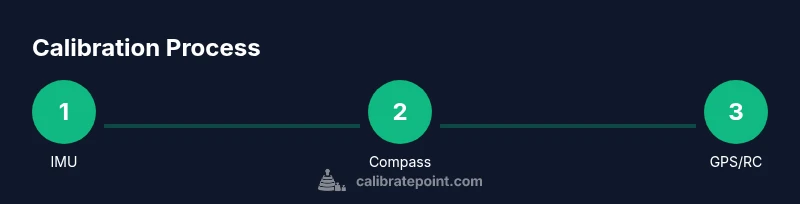
A robust baseline routine combines IMU, compass, GPS, gimbal, and RC calibration in a consistent order. Start with IMU, then compass, then gimbal, then GPS, and finish with RC transmitter checks. This sequence reduces cross-sensor interference and ensures each subsystem starts from a known reference. Document each step with the date, battery level, location, and any observed anomalies. A well-documented baseline reduces the time needed for troubleshooting and helps reproduce results in future sessions.
Maintenance and routine checks after calibration
Calibration is not a one-off task; it’s part of ongoing maintenance. After calibrating, inspect the drone for loose screws, battery wear, and prop condition. Check firmware versions for compatibility with calibration routines and review flight logs for unexpected deviations. Establish a recurring calibration cadence—before critical missions, after firmware updates, and whenever payloads change. Keeping a consistent log helps you track improvements and spot drifts over time.
Safety considerations and risk mitigation
Calibrations should be performed in a controlled space away from people and obstacles. Start with a clear area on a flat surface, power down the drone before making adjustments, and avoid calibrations near metallic objects or high-power equipment. Use PPE when necessary and ensure bystanders are at a safe distance. If you observe abnormal sensor readings during calibration, pause the process and recheck mounting, wiring, and firmware settings. Always have a plan for landing if a test flight behaves unexpectedly.
How to validate calibration with flight tests
Validation combines controlled hover tests and short, low-risk flights to confirm the calibration outcomes. Begin with a gentle hover at a fixed altitude, then perform slow, small yaw and pitch inputs to verify stability. Record data from the flight log: any drift, compass heading changes, or altitude fluctuations. If results are not within expected ranges, revisit the calibration steps in the order recommended by the manufacturer and re-test. The goal is repeatable, predictable flight behavior across different conditions.
Tools & Materials
- Drone and manufacturer manual(Follow the official calibration procedure provided by the maker.)
- Fully charged battery(s)(Maintain safe voltage levels during calibration and testing.)
- Smartphone or tablet with the drone app(Used to access calibration menus and log results.)
- Open, interference-free testing area(Choose a flat surface away from metal and power lines.)
- Screwdriver set (as needed for mounting screws)(Only if your drone requires adjustments that need tightening.)
- Calibration log sheet or digital note(Record dates, conditions, and observed results for traceability.)
Steps
Estimated time: 45-60 minutes
- 1
Power down and inspect workspace
Power off the drone and remove any payload. Clear the area of metal objects and ensure a flat, stable surface. This prevents unintended magnetic interference and sets a safe baseline for calibration.
Tip: Double-check propellers and battery are removed before any mounting adjustments. - 2
Power up and connect the calibration app
Power the drone and connect it to the companion app. Verify the device shows full sensor health indicators and battery status before starting.
Tip: Use a known-good tablet or phone with the latest app version for consistent results. - 3
Calibrate the IMU
Select IMU calibration in the app and follow on-screen prompts. Place the drone on a level surface and rotate it slowly to capture the full spectrum of accelerations.
Tip: Keep the drone steady during the full rotation sequence to avoid bias. - 4
Calibrate the compass
Choose compass calibration and perform the two- to four-step rotation sequence as directed. Ensure you perform this away from obvious interference sources.
Tip: Avoid calibration near metal structures or magnets; a wide open area is ideal. - 5
Calibrate the gimbal
Run the gimbal calibration to align camera axes with the drone body. Confirm horizon level in a neutral pose after the calibration completes.
Tip: If you see a tilt after calibration, re-run the process with the drone on a stable surface. - 6
Calibrate GPS and verify satellite lock
Power the drone with a clear sky view and ensure a healthy number of satellites and stable HDOP. Validate home position and initial waypoint accuracy.
Tip: If satellite visibility is poor, move to an open area and reattempt calibration. - 7
Calibrate the RC transmitter
Follow the app prompts to center sticks, then test full-range movement. Confirm that inputs translate to proportional and linear drone responses.
Tip: If sticks feel loose or imprecise, check the transmitter firmware and rebind if necessary. - 8
Run a calm hover test
Lift to a safe altitude and hover in place to observe drift. Make gentle yaw, pitch, and roll inputs to confirm responsive stabilization.
Tip: Record the test and compare with previous logs to identify any residual drift. - 9
Review results and adjust if needed
Review flight data in the app or log file. If drift or misalignment persists, repeat the relevant calibration steps in the recommended order.
Tip: Keep a log of adjustments to quickly reproduce or revert changes in the future.
Questions & Answers
Do I need to recalibrate after every firmware update?
Firmware updates can alter sensor handling, so it’s prudent to re-check and, if recommended by the manufacturer, recalibrate key sensors like the IMU and compass after a major update.
Firmware updates can change sensor behavior. Check the manufacturer instructions and recalibrate the IMU and compass if advised.
Can I calibrate indoors or only outdoors?
Indoor calibration is possible for certain steps, such as IMU and RC, but compass calibration usually requires minimal interference and an open area. Follow the manufacturer’s guidance for environment requirements.
Indoor calibration is sometimes okay for some steps, but compass calibration needs an interference-free outdoor setup when possible.
What should I do if the drone still drifts after calibration?
Recheck hardware mounting, verify there are no loose screws, and run through the calibration sequence again in the recommended order. Also review logs for outlier sensor readings.
If drift persists, double-check mounting and redo the calibration in order. Review flight logs for anomalies.
How long does calibration typically take?
A thorough baseline calibration, including IMU, compass, GPS, gimbal, and RC checks, typically takes 30 to 60 minutes depending on conditions and prior setup.
Expect about 30 to 60 minutes for a full baseline calibration in good conditions.
Do all drone models require the same steps?
Most models share core steps like IMU and compass calibration, but exact procedures and order vary by manufacturer. Always follow the official manual for your drone.
Core steps are similar across models, but always follow your drone’s manual for the exact procedure.
Watch Video
Key Takeaways
- Begin with IMU calibration for baseline accuracy.
- Avoid magnetic interference during compass calibration.
- Validate results with controlled flight tests after calibration.
- Maintain a calibration log for traceability and future sessions.
- Calibrate Point recommends regular calibration after firmware updates or payload changes.