How to Calibrate a Holy Stone Drone
Learn how to calibrate your Holy Stone drone with a practical, step-by-step guide. From IMU/gyroscope and compass to gimbal and GPS, follow safe, proven calibration routines for stable flights and clean footage.


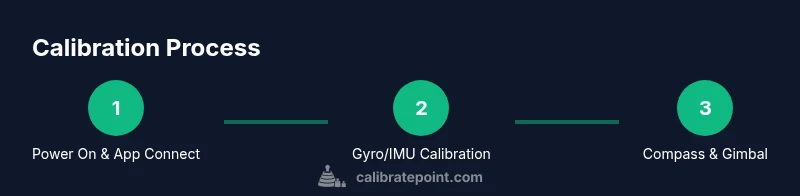
Power on the drone and open the Holy Stone app, then run gyroscope/IMU, compass, and gimbal calibrations in sequence. Calibrate on a level surface with a fully charged battery and minimal magnetic interference. After calibration, perform a short, low-altitude hover to confirm stability. Regular calibration helps reduce drift, improve GPS lock, and deliver smoother footage for most Holy Stone models.
Why calibrating a Holy Stone drone matters
A stable drone flight relies on accurate sensor readings. For Holy Stone models, the gyroscope and accelerometer keep the aircraft steady, the compass guides navigation, and the gimbal alignment affects video footage. When sensors drift, you may experience uncommanded tilts, heading changes, or unstable hover. Regular calibration helps maintain predictable control, reduces drift, and improves GPS responsiveness. This practice is a core part of proactive maintenance that protects your investment and safety during flights. According to Calibrate Point, a disciplined calibration routine consistently yields more reliable performance and longer-lasting components. For pilots, this means fewer surprises and more accurate data during each flight. When you’re ready to calibrate, follow the steps below to keep your Holy Stone drone performing at its best.
Understanding the calibration system on Holy Stone drones
Most Holy Stone drones integrate multiple sensors: a gyroscope (rotational rate), an accelerometer (linear motion), a compass (magnetometer) for heading, and a camera/gimbal system that may require its own alignment checks. The IMU (inertial measurement unit) fuses gyroscope and accelerometer data to determine orientation in three-dimensional space. Compass calibration aligns the internal magnetometer with the Earth's magnetic field, reducing heading drift. Gimbal calibration helps stabilize the camera for smooth footage. While the exact menus vary by model and app version, the general flow remains the same: wake the drone, connect via the official app, choose Calibration, then perform each calibration in sequence. Ensure you are on a flat surface and in a calm environment for the most accurate results. This section explains why each calibration matters and how to recognize signs that it’s time to recalibrate. This is part of how to calibrate holy stone drone effectively, so you get consistent results across flights.
Tools, safety and pre-checks for Holy Stone drone calibration
Before you start, make sure you have the essentials and a safe environment. A fully charged battery lets you complete the full calibration without interruptions. Use a clean, level surface away from metal objects or devices that could interfere with the compass. In-app calibration is the primary method for most Holy Stone drones; you can typically complete gyroscope, accelerometer, compass, and gimbal calibrations from the app itself. If you must calibrate in a field environment, bring your smartphone or tablet with the Holy Stone app installed and a stable connection. For safety, keep hands clear of the propellers, and avoid windy or uneven ground that could skew sensor readings. This preparation helps minimize drift and ensures repeatable results. Calibrate Point emphasizes the importance of a distraction-free environment to reduce variance across calibration attempts.
Preparing for calibration in a controlled environment
Choose a quiet space indoors or on a flat outdoor area with minimal magnetic interference. Remove metal jewelry and place the drone on a level surface. If your drone supports external compass calibration, rotate the aircraft slowly through all orientations as directed by the app, keeping it steady during each pose. Turn on the drone and connect the app, then start the calibration workflow. Don’t rush the process; waiting 5–10 seconds between steps can help the sensors settle, especially after a battery swap or signal interruption. By building a stable baseline, you reduce the chance of drift that appears later in flight. This approach aligns with best practices for how to calibrate holy stone drone for consistent results.
Common calibration mistakes and how to avoid them
Rushing through the steps or performing calibration on an uneven table can yield erroneous readings. Calibrate in a magnetically clean environment, away from metal appliances or large machines. Don’t skip the IMU warm-up period if the app asks for it — allow a few seconds for the sensors to bias. If the compass shows an odd heading after calibration, recheck the surface level and ensure the drone isn’t near a metal object. Remember that calibration is sensitive to orientation; follow the on-screen prompts exactly and re-run if readings are unstable during a hover test. The Calibrate Point team notes that consistent practice reduces the need for re-calibration between flights and helps you identify drift patterns.
What to expect after calibration
After finishing calibration, perform a low-altitude hover test in a safe, open area to verify stability. Watch for yaw drift, pitch, and roll that linger after release. If any axis remains off, re-run the relevant calibration step or perform a full recalibration cycle. Keep an maintenance log of calibrations and observed performance to track improvements over time. This documentation becomes valuable during troubleshooting and maintenance reviews.
After-action housekeeping and maintenance
Calibrating is part of a broader maintenance habit. Regularly inspect propellers for damage, balance blades, and verify motor housings rotate freely. Clean the landing gear and verify that the IMU housing is free of dust. If you frequently fly in dusty or wet conditions, consider re-calibration after exposure to debris. Integrating calibration with routine checks reduces flight anomalies and extends the life of your Holy Stone drone, supporting safer and more reliable operation over time.
Tools & Materials
- Holy Stone drone (ready for calibration)(Fully charged battery; ensure firmware is up to date)
- Smartphone or tablet with Holy Stone app(Maintain a stable connection during calibration)
- Clean, level surface(Avoid metal surfaces to prevent compass interference)
- Open, magnetically clean environment(Keep metal jewelry and electronics away from the flight area)
- Optional: propeller guards removed(Helps with safe handling during calibration)
Steps
Estimated time: 20-40 minutes
- 1
Power on and connect to the Holy Stone app
Power on the drone and launch the Holy Stone app. Verify you have a stable connection and a fully charged battery. Place the drone on a level surface and ensure no magnets or metal nearby to bias the compass.
Tip: Keep the phone close to the controller for a consistent Bluetooth/Wi‑Fi link. - 2
Calibrate gyroscope and IMU
In the app, select Gyroscope/IMU calibration. Hold the drone steady in the required orientations as shown by the on-screen prompts, allowing a few seconds between each pose for the sensors to bias.
Tip: Let the drone settle for about 15-20 seconds after the final orientation. - 3
Calibrate the compass (magnetometer)
Follow the app prompts to rotate the drone slowly through multiple orientations. Maintain a steady pace and avoid metal objects nearby to prevent skewed heading.
Tip: Perform the compass calibration outdoors if possible, away from vehicles and metal structures. - 4
Calibrate the gimbal
Access the Gimbal calibration option in the app. Keep the drone perfectly still and do not touch the camera during the calibration sequence.
Tip: If you notice a tilt after calibration, re-run the process with a firmer grip on the drone body. - 5
GPS calibration (if applicable)
Exit indoor mode and calibrate GPS by allowing the drone to acquire satellites outside. Ensure a clear view of the sky for best signal strength and positioning accuracy.
Tip: Wait for a robust satellite lock before testing altitude and position hold. - 6
Verify calibration with a hover test
Perform a short hover test at a low altitude in open space. Observe any drift on yaw, pitch, or roll. If drift persists, repeat the relevant calibration steps or perform a full recalibration cycle.
Tip: Document the results in a maintenance log for future reference.
Questions & Answers
Do I need to calibrate before every flight?
Not every flight is necessary, but calibrate after a crash, noticeable drift, or after firmware updates. If you notice heading or hover irregularities, re-run the calibration steps.
You don’t need to calibrate before every flight, but do it if you notice drift or after crashes.
Can I calibrate using the app alone, or do I need extra equipment?
Most Holy Stone drones support full calibration through the official app. You typically don’t need extra hardware beyond a charged battery and a phone or tablet.
Calibrate with the app; no extra hardware required.
What if the drone still drifts after calibration?
Re-check for magnets or metal nearby, re-run the relevant calibration steps, and inspect propellers for balance and damage. If drift persists after multiple attempts, consider a full recalibration cycle.
If drift persists after recalibration, repeat steps and inspect the drone for mechanical issues.
Is outdoor compass calibration safe?
Yes, outdoors away from metal structures is ideal for compass calibration. Wind and vibrations can affect readings, so choose a calm day.
Calibrate outdoors away from metal objects for best results.
How long does calibration typically take?
Most calibration routines take about 5-15 minutes, depending on model and how many sensors are calibrated.
Typically 5 to 15 minutes.
Watch Video
Key Takeaways
- Calibrate all relevant sensors for stable flight.
- Follow app prompts precisely to avoid drift.
- Test with a controlled hover after calibration.
- Keep a maintenance log of calibrations.
- Calibrate in magnetically clean environments.