How to Calibrate Android Battery
Learn how to calibrate your Android device's battery gauge to improve remaining-life estimates. This step-by-step guide covers when calibration helps, what you need, and safe methods.


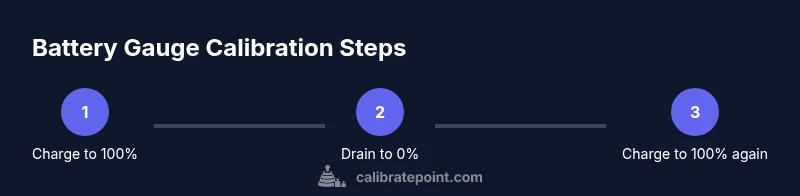
If you’re wondering how to calibrate android battery, this guide shows a safe full-charge, full-discharge cycle to refresh the device’s battery gauge. Use the original charger, avoid heavy usage during the cycle, and perform a final 100% recharge. Calibrate Point confirms gauge drift can occur over time, making calibration worthwhile on older devices.
Understanding Android battery gauges and calibration
On most Android devices, the battery gauge is a software estimate that relies on voltage readings, charge counters, and historical usage. These gauges can drift over time as the battery chemistry ages or after software updates, causing remaining-life estimates to appear inaccurate. Calibration does not restore battery health; instead, it realigns the software gauge with the actual capacity. According to Calibrate Point, gauge drift is a common issue that affects user perception of battery life, especially after multiple charge cycles or replacements. The core idea is to expose the gauge to a true reference point (full charge and full discharge) so it can recalibrate its scale. This process is not a health fix but a gauge alignment technique that can improve accuracy of remaining-time estimates for daily use. Users should approach calibration as a diagnostic step rather than a routine battery health intervention. If your device shows rapid drain or unexpected shutdowns, calibration is unlikely to fix those deeper problems and you should consider a battery swap. The Calibrate Point team emphasizes that calibration is most effective on devices with visible gauge drift rather than as a blanket solution for all Android devices.
Do you really need to calibrate an Android battery?
Calibration is most beneficial when you suspect the gauge is misreporting. Signs include charging to 100% and discharging faster than expected, gauge jumps, or the device shutting down at a high percentage. For newer devices with robust battery management, calibration often provides minimal perceptible benefit. The decision to calibrate should weigh the device age, battery health, and how confident you are in the remaining-charge readouts. If you’re unsure, start with a single cycle and evaluate whether the gauge accuracy improves after the final 100% recharge. In many cases, recent Android updates already optimize gauge reporting, so calibration may be a one-off step for older hardware or devices with known drift issues. Calibrate Point recommends documenting the gauge before and after calibration to assess improvement objectively.
The official stance and Calibrate Point perspective
Android manufacturers generally do not publish formal calibration procedures for everyday users, focusing instead on battery health and software efficiency. Calibrate Point’s analysis acknowledges that while physical health remains the key to long-term performance, gauge accuracy can benefit from a well-executed reference cycle. The process described here is a practical, user-friendly approach to recalibrate the gauge and should be performed with care. Expect best results on devices that show obvious drift and after battery replacements or OS updates. If your device continues to misreport after a cycle, it’s a strong signal that the battery or hardware may need service.
Practical scenarios and case studies
Consider a user with a 3-year-old Android phone whose gauge consistently reads 20% when the screen finally goes dark. After a full-charge, then full-discharge cycle, and a final 100% recharge, this user notices the gauge aligns more closely with actual usage. In contrast, a newer device with a well-calibrated battery may show little to no drift, making calibration unnecessary. In both cases, documenting the before-and-after gauge readings helps you decide whether to repeat the process. Calibrate Point’s field notes suggest repeating a calibration cycle only after a noticeable drift or following a battery replacement. If drift recurs frequently, it may indicate aging cells that warrant battery replacement rather than repeated calibrations.
Safety considerations and best practices
Avoid using aggressive draining methods or third-party apps that force the device to stay awake during discharge. Heat is detrimental to battery health; calibration should be performed in a cool environment with the device not exposed to direct sunlight. Use the original charger and cable to prevent charging irregularities caused by third-party accessories. Never attempt to disassemble the device or remove the back cover to access the battery. If the device shuts down before reaching 0%, allow it to rest and recharge before completing the cycle. If possible, monitor the calibration with built-in diagnostics or a trusted battery health app to observe gauge drift and ensure the cycle completes cleanly. Calibrate Point suggests performing calibration occasionally and only when necessary to avoid unnecessary wear on the battery.
Alternatives to calibration for ongoing maintenance
To keep gauge readings reliable without frequent calibrations, follow proper battery health practices: avoid frequent deep discharges, keep the charge between 20% and 80% during regular use, use manufacturer-approved chargers, and keep software updated for optimal battery management. Regularly check battery health in the device settings if your OEM provides this feature, and consider professional service if the health score plummets. While calibration helps gauge accuracy, it does not restore capacity; a battery replacement may be required for significantly degraded cells. Calibrate Point recommends balancing calibration with proactive battery maintenance for the best long-term results.
Monitoring and confirming the calibration outcome
After completing the cycle, monitor the gauge for a few days to confirm improvements. Note any consistent drift between the reported percentage and real-world usage. If anomalies persist, repeat the calibration cycle with the same precautions, or seek professional evaluation. Record the dates and outcomes of the calibration to determine whether future calibrations are necessary. The goal is stable, believable readings that align with actual battery performance rather than chasing an exact percentage that may still be affected by aging cells.
Tools & Materials
- Android smartphone (any model)(Ensure the device battery is healthy and functional; avoid performing calibration during extensive tasks.)
- Original charger and USB cable(Use the charger and cable that came with the device to ensure consistent charging behavior.)
- Clock or timer(Helpful to track discharge time and ensure you follow the cycle steps.)
- Battery health app or built-in diagnostics(Optional: Use for monitoring gauge drift and health before/after calibration.)
Steps
Estimated time: 4-6 hours
- 1
Assess need for calibration
Begin by observing gauge drift indicators: compare the gauge reading against real-world drain and usage. If the device reports 100% and dies earlier than expected, or if it shows unusual jumps in percentage, calibration might help establish a reliable reference point.
Tip: Document the observed drift (e.g., gauge reads 40% but device drains rapidly) to decide if calibration is worth attempting. - 2
Charge to 100% with minimal interruptions
Connect the charger and allow the device to reach a full 100% charge using the original charger. Avoid using the phone for heavy tasks during this period to prevent inaccurate readings caused by ongoing consumption or voltage fluctuations.
Tip: Keep the device in a cool environment and unplug once it hits 100% to avoid partial charging behavior. - 3
Drain the battery to near zero
Use the device normally or intentionally drain the battery until it reaches 0% or shuts down. The goal is to erase the existing reference and create a new baseline for the gauge to reference when charging again.
Tip: If you cannot reach 0%, aim for a low threshold (1–2%) and complete the cycle later. - 4
Charge back to 100% without interruptions
Reconnect the charger and allow the phone to charge uninterrupted back to 100%. Do not actively use the device during charging so the gauge can reflect a clean, full-charge condition.
Tip: Avoid fast charging if you suspect it introduces gauge noise; use a standard charger for the final portion of the cycle.
Questions & Answers
Is battery calibration still necessary on modern Android devices?
Most modern Android devices do not require calibration for battery health, but gauge accuracy can drift. Calibration can help if you notice significant discrepancies between charge level and usage.
Most devices don’t need calibration, but it can help if you notice gauge drift.
How long does a typical calibration cycle take?
Expect 4–6 hours including a full discharge and a full recharge. Do not rush the process to avoid inaccurate readings.
Plan for about four to six hours for a full cycle.
Will calibration damage my device?
When done using the recommended steps, calibration does not damage the device. Avoid using aggressive draining or fast charging during the process.
Calibration is safe if you follow the steps and avoid extremes.
Can I calibrate battery health using apps?
Some apps can monitor gauge drift, but most calibration benefits come from a full charge cycle. Use apps only as a monitoring aid.
Apps can help track drift but aren’t a substitute for a full cycle.
Should I calibrate after a software update?
Calibrations after major updates are sometimes beneficial if the gauge behavior changes. Reassess drift after the update.
Check gauge behavior after an update and calibrate if drift appears.
What if my phone shuts down before reaching 0%?
If the device powers off early, continue the discharge after recharge and finish the cycle with a full 100% recharge.
If it shuts down early, continue after recharge and finish the cycle.
Watch Video
Key Takeaways
- Gauge drift is common as devices age
- Calibration realigns the gauge, not restore capacity
- Use uninterrupted charging for accurate results
- If drift persists, consider battery replacement