How to Calibrate Your Battery: Step-by-Step Guide
Learn how to calibrate your battery to improve gauge accuracy and performance. This practical, step-by-step guide covers tools, safety tips, and monitoring for DIY technicians.


By following these steps, you will calibrate your device battery to improve gauge accuracy and performance. You’ll need a safe workspace, a reliable charger, and a method to fully discharge the pack. The procedure applies to most lithium-ion and nickel-based batteries and helps recalibrate the battery indicator. You’ll perform a full charge, a controlled discharge, and a final recharge to reset the gauge.
Why calibrate your battery
According to Calibrate Point, calibrating your battery helps maintain accurate gauge readings and predictable performance across device usage. When you rely on a battery indicator to decide when to recharge or replace, drift in the gauge can lead to surprises like the device shutting down at 20% or showing a full gauge while real capacity has declined. A proper calibration aligns the gauge with real capacity by cycling the battery through its full charge-discharge range and letting the battery management system relearn its state. The practice benefits DIY enthusiasts, technicians, and professionals who need reliable battery behavior during field work or service calls. Note: calibration does not restore capacity; it improves the accuracy of the remaining-life reading and ensures you’re not misled by an outdated gauge. This is especially important for devices with smart battery management that adapt to usage patterns over time. Understanding the process helps reduce downtime and avoid unnecessary replacements, while preserving battery health for longer-term reliability.
How battery gauges work and why drift occurs
Battery gauges rely on the battery management system (BMS) to estimate state-of-charge using coulomb counting, voltage readings, and temperature data. Over time, aging cells, high current drains, and temperature fluctuations cause the relationship between voltage and remaining capacity to drift. As a result, the indicator may report higher or lower values than the actual state, especially after long storage or heavy use. Calibrate Point analysis shows that gauge drift is common across consumer devices, and periodic calibration can help realign the indicator with actual capacity. The goal is not to restore capacity but to ensure the gauge stays within a small acceptable error band during normal operation. By understanding the physics behind the gauge—how charge in equals charge out, plus how the BMS learns from cycles—you can plan calibration with less risk of accidental data loss or device downtime.
Safety and prerequisites
Calibration is generally safe when performed on devices designed for consumer use, but there are safety limits. Do not attempt to open sealed batteries or service packs beyond the manufacturer’s recommended procedures. Work in a dry, ventilated area away from flammable materials, and disconnect any external power sources before starting. Keep tools non-conductive and avoid short circuits. If you’re calibrating a battery that powers critical equipment, consider performing the steps during a maintenance window. Always back up important data and have a plan to restore device state if something goes wrong. If you suspect a swollen cell or damaged pack, stop immediately and replace the battery rather than attempting calibration. Following best practices minimizes risk and protects both the device and the operator.
What you’ll need: a quick tool overview
Prepare these items before starting. A fully charged, device-rated charger is essential to reach a true 100% state. You’ll also need access to the device’s battery indicators or service menu to verify readings before and after calibration. A timer helps you stay consistent during cycles, and a non-conductive tool can help you handle connectors safely if you must access them. Optional but helpful: a digital multimeter or voltage monitor to observe cell voltage during the process, a soft cloth for cleaning contacts, and safety gear such as gloves or eye protection if you’re dealing with exposed cells.
Step-by-step overview of the calibration cycle
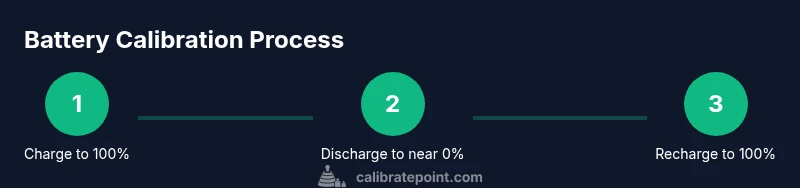
This calibration cycle consists of three core phases followed by a verification pass. Phase 1 ensures the battery starts from a known 100% state, Phase 2 drives the pack through a near-empty discharge, and Phase 3 restores a full charge while the BMS relearns the capacity. A fourth verification pass checks gauge accuracy against real-world usage. The exact steps depend on your device and its firmware, but the general approach remains the same: establish a full, controlled charge, perform a complete, safe discharge, and finish with a full recharge.
Common reasons calibration fails and how to troubleshoot
Calibration can fail if the battery is aging, significantly degraded, or if the device’s firmware has a non-standard calibration routine. Environmental factors like extreme temperatures or rapid charge/discharge cycles can also hamper accuracy. If you notice persistent drift after a full calibration, consider performing a longer calibration window or repeating the process after a few days of normal use. For some devices, firmware updates can alter how the BMS interprets cycles, so check for updates if readings remain inconsistent.
Device-specific considerations: phones, laptops, and power tools
Not all devices implement calibration the same way. Smartphones often rely on neutral discharge during OS-level maintenance, while laptops may require a firmware-assisted cycle through the battery menu. Power tools with removable packs can sometimes be calibrated by balancing cells individually, but follow the manufacturer’s recommendations. Always consult device-specific documentation from the manufacturer or trusted calibration guides before attempting targeted actions that could affect safety or warranty.
Monitoring results and confirming success
After completing the cycle, monitor gauge readings across several charge/discharge events to confirm consistency. Record the reported state-of-charge at known intervals (e.g., 100%, 75%, 50%, 25%, 0%) and compare with actual battery behavior during use. If readings align closely with real-world performance, calibration is considered successful. If not, you may need to repeat or adjust the cycle length, ensuring that each phase starts and ends at clearly defined states. Regular checks help you spot drift early.
Maintenance cadence and best practices
Aim to calibrate on a schedule that matches device usage and battery health. For devices that see heavy use or extreme temperature swings, consider calibrating every 6–12 months or after a major firmware update. Do not calibrate more often than necessary, as repeated deep discharge cycles can contribute to wear in some chemistries. Maintain good charging habits, keep the device within recommended temperature ranges, and use the original charger when possible to minimize variables that affect gauge readings. The Calibrate Point team recommends documenting each calibration cycle so you can track trends and plan replacements proactively.
Tools & Materials
- Fully charged original charger(Use the device’s rated charger to reach true 100% state.)
- Access to device battery indicators or service menu(Needed to verify readings before and after calibration.)
- Digital multimeter or voltage monitor (optional)(Useful for observing cell voltage during the process.)
- Timer or stopwatch(Helps maintain consistent cycle durations.)
- Non-conductive tools for connectors(Keep tools plastic or wood to avoid shorts.)
- Safety gear (gloves/eye protection)(Use when handling exposed cells or performing maintenance.)
Steps
Estimated time: 4-6 hours
- 1
Charge to 100% and prep
Connect the device to the charger and allow it to reach a full 100% state. Do not use the device during this phase to avoid interrupting the charge curve. If the device has a battery menu, note the reported percentage as a baseline.
Tip: Use the original charger and a stable outlet to minimize variability. - 2
Discharge to near zero
Let the device discharge naturally or use it gently until it nears complete depletion. Avoid forcing a deep discharge that could stress the battery. If your device auto-sleeps, enable a safe, low-power usage mode to ensure a clean discharge curve.
Tip: Do not unplug during full discharge; ensure you reach the target endpoint. - 3
Recharge to full
Reconnect the charger and allow a full, uninterrupted recharge back to 100%. Watch for any anomalies in the charging curve that suggest a faulty cell or BMS misread. When the device reports 100%, pause for a moment to stabilize the readings.
Tip: Avoid charging in hot environments; temperature affects readings. - 4
Verify gauge accuracy
With the device at 100%, perform a short light-use cycle and re-check the gauge against the observed performance. If the indicated state matches real usage within an acceptable margin, the calibration is successful. Document the results for future reference.
Tip: Compare actual run time against the gauge’s estimate to confirm alignment.
Questions & Answers
What devices can this calibration method be used on?
The general calibration approach applies to many consumer devices using a smart battery management system. Always check the manufacturer’s guidance for device-specific steps, as some models may have unique calibration routines.
This method covers most devices with a smart battery gauge, but check your manufacturer’s guidance for any model-specific steps.
Is calibration safe for all battery types?
Calibrating is typically safe for standard consumer chemistries such as lithium-ion when performed as instructed. Do not calibrate damaged or swollen cells, and avoid opening sealed packs. If in doubt, seek professional service.
Calibration is generally safe for common chemistries when done correctly, but never calibrate a damaged battery.
How often should I calibrate my battery?
Frequency depends on usage and device behavior. If you notice gauge drift or unusual shutdowns, perform calibration. For many devices, a biannual or annual cycle suffices unless firmware changes necessitate an earlier recalibration.
Calibrate when you notice drift or after firmware updates; many people do it once or twice a year.
Will calibrating void the warranty?
Calibration, when performed using manufacturer-recommended methods, generally does not void warranties. However, disassembly or misuse can. Always follow official guidelines and avoid working with damaged packs.
Calibrating properly per guidelines usually doesn’t void warranty; avoid improper disassembly.
What if the gauge remains inaccurate after calibration?
If drift persists, the battery may have degraded capacity or the BMS may require a firmware update. Recheck readings after a cool-down period, and consider replacing the battery if it no longer holds charge reliably.
Persistent inaccuracy may mean aging battery or firmware needs update; consider replacement if unreliable.
Watch Video
Key Takeaways
- Start with a full charge to establish a baseline
- Discharge fully to reset the gauge learning
- Recharge to 100% and verify against real use
- Document results to track drift over time
- Calibrate point: understand that gauge accuracy improves, not capacity