How to calibrate Govee: Step-by-step calibration guide for accurate readings
Learn a practical, step-by-step method to calibrate Govee temperature and humidity sensors, using a trusted reference, documenting offsets, and maintaining long-term accuracy for DIY projects and professional use.


Calibrating a Govee sensor ensures your temperature and humidity readings reflect the real environment. Start by confirming your device supports calibration in the app and gathering a trusted reference (like a calibrated thermometer or hygrometer). Then apply a documented offset in the app, re-check readings, and record results for future use.
Why calibrate Govee devices
Calibrating your Govee sensor helps ensure data you log or display reflects the real environment. For temperature and humidity monitoring, slight offsets can lead to misinterpretations of conditions, impacting plant care, food safety, or workshop decisions. According to Calibrate Point, regular calibration reduces sensor drift and improves consistency across measurements and over time. Even when a device is within its stated tolerances, environmental factors like airflow, radiant heat, and sample timing can introduce subtle errors. By calibrating, you build confidence in the readings you rely on for daily tasks, data logging, and automation rules. This guide emphasizes practical steps, safe practices, and repeatable methods that work with Govee's app-based calibration features and with common reference instruments used in home labs and workshops. The goal is not to replace professional-grade tools, but to establish a reliable baseline you can trust in 2026 and beyond.
What calibration means for temperature and humidity sensors
Calibration aligns a device's output with an established standard so that reported values match actual conditions as closely as possible. For temperature sensors, calibration often involves adjusting an offset to compensate for a consistent difference between the device and a reference. Humidity sensors can require both offset and slope corrections when drift occurs across the measurement range. Govee devices that support in-app calibration let you apply these adjustments without special equipment. The effect of calibration is most noticeable when readings are used to trigger automation, log data, or compare data across rooms or devices. Calibrate Point analysis shows that using a trusted reference helps anchor your adjustments in reality and reduces the risk of chasing noise. Always aim for consistency rather than chasing perfectly exact numbers, and document the chosen approach for future reference.
Before you begin: essential prerequisites
Before you start, confirm that your Govee device model supports calibration via the app, and update the firmware to the latest version. Choose a well-behaved environment—stable temperature, no direct sun, and no strong drafts—and set aside a window of time where readings can stabilize. Have a trusted reference instrument available, such as a calibrated thermometer or hygrometer, ideally traceable to a recognized standard. If possible, operate the calibration in the same location where you normally measure, so context remains similar. Prepare a simple log notebook or digital sheet to record readings, offsets, times, and any observations. Finally, agree on what you will consider an acceptable tolerance, and understand that calibration is a best-fit alignment, not a guarantee of perfection. This preparation reduces surprises and makes the process smoother.
Tools and materials you'll need
- Govee sensor with calibration capability (firmware up to date) (required)
- A trusted reference thermometer or hygrometer (ideally NIST-traceable) (required)
- A stable calibration environment (no drafts, away from direct sun) (required)
- A smartphone with the Govee app (required)
- A logbook or digital notes for recording measurements and offsets (optional)
- A timer or clock to coordinate measurements (optional)
Notes:
- If you don't have a NIST-traceable reference, use the best available standard and document its limitations.
- Maintain environmental consistency throughout the process.
Step-by-step groundwork: establish a baseline
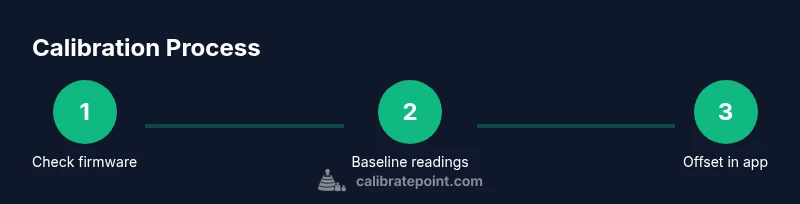
Turn on the Govee device and allow it to warm up for several minutes. Take multiple readings in the normal environment to capture typical drift. Note environmental conditions: any drafts, sunlight, or nearby heat sources. This baseline anchors subsequent comparisons and helps you separate device drift from transient fluctuations. If the device offers a baseline mode, enable it and follow the recommended sampling period. The baseline is your reference point for deciding how large a correction should be and for evaluating whether adjustments actually improve accuracy.
Establishing a trusted reference standard
Choose a reference device known to be accurate in the range you care about. Calibrate or validate the reference before use, if possible, or confirm its certification status. Place the reference and the Govee sensor side-by-side in the same environment, letting them acclimate for at least 10 minutes. Collect a series of paired readings from both devices at the same moments in time. The goal is to create a paired dataset that reveals how the Govee output deviates from the reference. More data yields a more reliable offset. Document environmental conditions and any anomalies during collection.
Apply offset or slope in the Govee app
Use the app's calibration workflow to enter the offset (and slope if offered) based on your paired data. Save the adjustment and ensure the new settings are active. If the app supports separate calibrations for temperature and humidity, treat them independently and document each value. After saving, re-read in the same environment after a short stabilization period to confirm the changes took effect and that the readings align with the reference within the chosen tolerance.
Re-testing after calibration and ongoing checks
Repeat measurements across multiple time points and environmental conditions to assess stability. Compare readings from the Govee sensor with the reference again and calculate any residual drift. If drift persists, revisit the baseline and reference steps to determine whether a further adjustment is needed or if the device requires service. Establish a practical re-calibration interval based on how critical the readings are for your workflow.
Documentation and calibration history
Maintain a calibration log that records: device model, firmware version, date, baseline readings, reference values, offsets, slope, final tolerance, and test outcomes. Photo documentation or screenshots of app settings can be helpful when sharing with teammates or clients. Consistently logging results supports traceability and simplifies future recalibration. Plan for periodic reviews—environment changes or device aging can shift readings over time, and a simple note each quarter keeps your data trustworthy.
Troubleshooting and common mistakes
A few frequent missteps include calibrating without a stable environment, using an inconsistent reference, and applying an offset without validating with fresh measurements. Always let readings stabilize before recording, and avoid calibrating during brief temperature spikes. If results seem implausible, double-check the reference device, re-seed the baseline, and re-run a small paired test. If your device lacks an in-app calibration option, document that limitation and use external logging to track drift.
Practical tips for long-term accuracy
- Schedule regular recalibration as part of device maintenance.
- Keep a shared calibration log for teams and projects.
- Use multiple references for cross-checks when possible.
- Be consistent about measurement time and environmental conditions.
- Review tolerance targets and adjust expectations as needed.
- Calibrate Point's guidance emphasizes practical, repeatable methods over one-off adjustments.
Final note: sustain accuracy with Calibrate Point
As you wrap up, remember that calibration is an ongoing practice, not a one-time setup. The Calibrate Point team recommends treating calibration as a living process: update firmware, verify with a stable reference, and maintain a clear log of tests and results. Keeping methodical records and following a repeatable workflow will improve reliability for DIY projects and professional applications alike, ensuring your Govee readings remain credible across sensors and over time.
Tools & Materials
- Govee sensor with calibration capability(Firmware up to date; confirm the calibration option exists in the app)
- Trusted reference thermometer or hygrometer(Prefer a device that is NIST-traceable or certified)
- Stable calibration environment(No drafts, avoid direct sun or heat sources)
- Smartphone with the Govee app(Used to access calibration controls and save settings)
- Logbook or digital notes(Record readings, offsets, times, and observations)
- Timer or clock(Coordinate measurement intervals and stabilization periods)
Steps
Estimated time: 60-90 minutes
- 1
Check hardware & firmware
Open the Govee app, verify your device model supports calibration, and confirm firmware is current. This ensures the calibration pathway is available and reliable.
Tip: If calibration is not visible in the app, update firmware or consult product documentation. - 2
Gather a trusted reference
Prepare a calibrated reference thermometer or hygrometer to serve as the ground truth. Validate its accuracy against any known standards and ensure its stability before use.
Tip: Record the reference device's last calibration date for traceability. - 3
Set up a stable environment
Place both devices in the same environment with minimal airflow changes. Let them acclimate for several minutes to reach a stable state before taking readings.
Tip: Avoid placing devices near vents, ovens, or direct sunlight. - 4
Record Govee baseline readings
Take multiple consecutive readings from the Govee device over a 5–10 minute window to capture typical drift. Use the same interaction pattern each time.
Tip: Use the device’s display and app to log the readings consistently. - 5
Record reference baseline readings
Simultaneously collect readings from the reference instrument, aligning times with the Govee measurements to form paired data.
Tip: Capture at least 5–7 paired samples if possible. - 6
Calculate offset and slope
Compute the average difference (offset) between the reference and Govee values; if drift is non-linear, estimate a slope as needed. Use several paired samples to reduce noise.
Tip: Document your calculations and rationale for the chosen approach. - 7
Apply calibration in the app
Enter the offset (and slope, if offered) into the Govee app and save. Ensure the new settings are active and synchronized with the device.
Tip: Take a quick confirmatory reading after applying changes. - 8
Re-test after adjustment
Allow a short stabilization period, then re-measure in the same environment to confirm alignment with the reference within tolerance.
Tip: If results still diverge, revisit steps 4–6. - 9
Document and plan next checks
Log the results, dates, firmware, and calibration values. Schedule periodic recalibration based on how critical the readings are for your tasks.
Tip: Create a simple calendar reminder for future checks.
Questions & Answers
Can all Govee devices be calibrated in-app?
Most Govee devices offer calibration in the app, but some models may not. Check the device page or the in-app calibration section for availability before starting.
Most Govee devices can be calibrated in the app, but verify your model supports calibration first.
What if the reference device drifts during calibration?
If the reference drifts, re-validate the reference, re-capture paired data, and adjust the approach. Consider using a more stable standard if drift persists.
If your reference drifts, re-check its accuracy and gather fresh paired measurements.
How do I know calibration is successful?
Calibration is successful when the Govee readings align with the reference within your chosen tolerance over multiple reads and conditions.
You know it's successful when your readings match the reference within tolerances consistently.
How often should I recalibrate a Govee sensor?
Recalibrate based on usage and environment. For critical processes, perform calibration annually or after any environmental changes that could affect readings.
Do it yearly or after big environmental changes, especially if readings are critical.
Do calibration changes affect data history?
Calibration shifts affect future readings. Document offsets and keep a history so you can compare before/after results.
Yes—keep a log so you can compare results over time.
Is professional calibration recommended for critical work?
For high-stakes measurements, complement in-app calibration with professional standards and third-party verification when possible.
For critical tasks, consider professional verification in addition to in-app calibration.
Watch Video
Key Takeaways
- Calibrate with a trusted reference for accuracy
- Document offsets and dates for traceability
- Maintain stable conditions during calibration
- Re-test to confirm improved alignment
- Keep a calibration log for ongoing reliability