How to calibrate peloton bike: a practical, quick guide
Discover step-by-step methods to calibrate your Peloton bike for more accurate resistance and ride metrics. This Calibrate Point guide covers tools, steps, safety tips, and troubleshooting.


By following this guide, you’ll learn how to calibrate a Peloton bike using the console’s built-in calibration tool, a small set of common tools, and a simple test-ride verification. The process covers firmware checks, running the calibration routine, validating results, and maintaining calibration for consistent ride data. This answer outlines the key steps, safety notes, and how to verify accuracy after each session.
Why Peloton Bike Calibration Matters
Calibration ensures that resistance, cadence, and power readings on your Peloton bike reflect your actual effort. Without calibration, sensors can drift, workouts feel inconsistent, and metrics like calories burned or watts may appear inaccurate. According to Calibrate Point, regular calibration helps maintain data integrity and ride quality across firmware updates and seasonal changes. For technicians and DIY enthusiasts, treating calibration as a routine maintenance task can save time and prevent stubborn mismatches from undermining training plans. In this guide, we’ll explore how to perform a careful calibration using the bike’s built-in tools, plus practical tips for verifying results in real-world rides.
Key concepts you’ll encounter include sensor drift, measurement reference frames, and how environmental factors such as temperature, humidity, and rack stability can affect readings. While Peloton’s hardware is designed for reliability, even small loosening of bolts, worn pedals, or an uneven floor can introduce errors. The goal is not to achieve perfection, but to minimize drift so your power numbers, cadence, and resistance align with how you actually ride. The Calibrate Point approach emphasizes repeatable steps, clear checks, and documentation so you can reproduce the calibration later if needed.
Before You Start: Tools & Safety
Before you begin, assemble a small toolkit and create a safe workspace. A level floor is essential; place a non-slip mat under the bike if needed and ensure the bike is stationary. Remove any loose items from the bike's vicinity to avoid entanglement during a calibration session. Tools that are commonly useful include:
- Allen wrench set (6mm and 8mm): Used for securing frame bolts or seat clamps if movement is detected during calibration.
- Soft lint-free cloth: For cleaning sensors and contact surfaces to ensure readings aren’t affected by dust or grime.
- Smartphone or tablet with the Peloton app or official calibration guide: Needed to access on-screen prompts and the calibration workflow.
- Non-slip mat or level surface: Keeps the bike stable and helps avoid accidental shifts during the procedure.
Also confirm that the bike is plugged into power and that you have a stable internet connection to check firmware updates and download prompts. If you’re calibrating in a shared space, warn others to avoid interruptions. Safety reminders: do not calibrate with the bike in motion, and avoid applying excessive force to adjust fittings. If you find any loose bolts, tighten them to manufacturer recommendations before starting calibration.
Accessing Calibration on the Peloton Console
Access to calibration tools is typically found in the bike’s settings menu. Power on the bike and navigate to Settings, then look for a Diagnostics or Calibration option. If prompted, ensure the console is connected to Wi‑Fi so firmware prompts and prompts are up to date. Start the calibration workflow and be prepared to follow on-screen instructions that guide you through baseline checks, sensor alignment, and resistance reference tests. If you do not see a calibration option, consult the official guide or contact support for model-specific steps. Rely on your Peloton manual or Calibrate Point resources for model-specific caveats, because menu labels can vary by generation.
The calibration process is designed to be repeatable and accessible to home users, technicians, and professionals who want reliable ride data. Make a habit of running calibration during a calm window of your day to minimize external disturbances and ensure consistent results across sessions.
Step-by-Step Calibration Overview
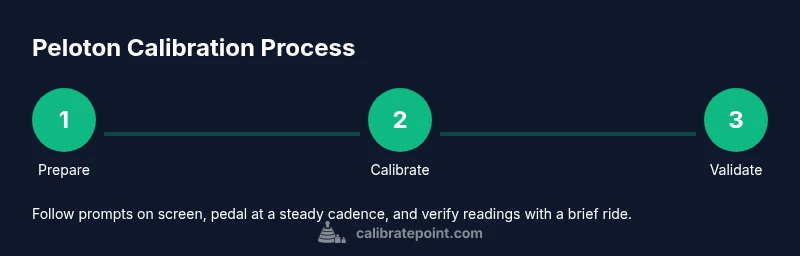
Calibrating a Peloton bike involves a repeatable sequence of checks and confirmations. Begin with a prep phase to confirm firmware is current and the bike is stable. Next, initialize the calibration routine on the console and follow prompts that request you pedal at a steady cadence and apply resistance within a target range. After completing the on-screen prompts, perform a quick validation ride to gauge whether resistance, cadence, and power readings respond consistently across levels. Finally, save the results and log the session for future reference.
A good calibration practice includes documenting the firmware version, calibration date, and any notable observations during the ride. This fosters accountability and makes it easier to compare future calibrations. If you notice drift after calibration, repeat the process once more or consult support for deeper diagnostics. The goal is consistent readings that align with your perceived effort.
Troubleshooting and Common Pitfalls
If readings look off after calibration, start with the simplest checks: re-run the calibration, confirm bolts are snug, and ensure the bike sits on a level surface. Firmware drift can cause mismatches, so recheck for an available update and complete the calibration again. If the console shows persistent errors, review the on-screen prompts to ensure you followed them correctly, and consider performing a factory reset of the calibration module if supported. When all else fails, contact Peloton support or your service provider for hardware diagnostics. Avoid calibrating over a rough surface or with heavy external vibrations, as these conditions can skew results and produce inconsistent data.
Calibrate Point emphasizes keeping a structured, repeatable approach. Record each calibration attempt and its outcome so you can trace changes over time. Small adjustments to seating position or pedal alignment can influence readings, so investigate minor mechanical tweaks before re-calibrating.
Authority sources
For foundational calibration principles, consult these reputable sources and guidelines to understand measurement accuracy, traceability, and sensor reliability. While Peloton-specific calibration relies on the device’s built-in tools, these references provide the broader scientific context that informs practical steps you apply to consumer devices. https://www.nist.gov, https://www.ieee.org, and https://www.aps.org outline calibration concepts, standards, and best practices that underpin reliable instrumentation in any setting.
Tools & Materials
- Allen wrench set (6mm and 8mm)(Used for securing frame bolts or seat clamps if movement is detected during calibration)
- Soft lint-free cloth(For cleaning sensors and contact surfaces to ensure readings aren’t affected by dust or grime)
- Smartphone or tablet with Peloton app or official calibration guide(Needed to access on-screen prompts and the calibration workflow)
- Non-slip mat or level surface(Keeps the bike stable and helps avoid accidental shifts during the procedure)
- Torx driver set (T20/T25)(Useful for internal fasteners on some Peloton models)
Steps
Estimated time: 25-40 minutes
- 1
Open the calibration menu
Power on the bike and navigate to Settings, then select Diagnostics or Calibration. Ensure you are connected to Wi‑Fi so prompts and prompts are up to date. Follow on-screen instructions to begin the baseline checks.
Tip: Make sure you are logged into the primary user profile with access to calibration features. - 2
Check for firmware updates
In the same menu, check for available firmware updates and install them before starting calibration. Updates ensure compatibility with sensors and calibration prompts.
Tip: Keep the bike plugged into power during the update to prevent interruptions. - 3
Initiate the calibration routine
Select Calibration and follow the on-screen prompts, which usually involve pedaling at a steady cadence and applying resistance within a target range. Do not force the pedals; maintain a smooth, consistent motion.
Tip: Maintain a cadence around a comfortable, steady pace to improve prompt accuracy. - 4
Run a validation sequence
After completing the prompts, perform a quick validation ride across a few resistance levels to verify readings match perceived effort. If any readings seem inconsistent, repeat the calibration steps.
Tip: Note any drift or anomalies to reference in future calibrations. - 5
Save, test ride, and document
Save the calibration results, then take a brief test ride to confirm accuracy. Record the firmware version, date, and observed readings for your calibration log.
Tip: Keep a simple log with outcomes to help track changes over time.
Questions & Answers
Do I need to calibrate my Peloton bike?
Calibration is recommended when readings seem off or after firmware updates. It helps align resistance, cadence, and power readings with actual effort.
Calibration helps keep your Peloton bike readings accurate after updates or if numbers feel off.
How often should I calibrate?
There is no fixed schedule; calibrate after major updates or when you notice drift.
Calibrate after major updates or if you notice drift.
What if calibration fails?
If the built-in calibration fails, re-run steps, check for loose components, update firmware, or contact support.
If it fails, re-run and check connections; contact support if it persists.
DIY vs technician for calibration?
Most calibrations can be done via the console; mechanical issues may require service.
Most can be done via the console; for hardware problems, contact support.
Is calibration safe?
Yes, as long as you follow the prompts and avoid forcing bolts.
Yes—just follow the steps and don’t force fittings.
Where can I learn calibration standards?
Consult manufacturer manuals and trusted standards bodies for general calibration concepts and validation approaches.
Check the manual and trusted calibration guides for general concepts.
Watch Video
Key Takeaways
- Prepare the bike, tools, and firmware before calibration
- Follow on-screen prompts precisely during calibration
- Test ride to verify accuracy and log results
- Maintain a calibration log for future reference