Calibrated TV vs Uncalibrated: A Practical Guide for Color
Explore the calibrated tv vs uncalibrated debate, why calibration matters for color accuracy, gamma, and consistency, and practical steps. Learn how Calibrate Point guides DIY enthusiasts to reliable display fidelity.


Calibrated TV vs Uncalibrated: calibrated displays deliver truer color, consistent gamma, and stable brightness across content, room lighting, and viewing angles. Uncalibrated TVs can look bright but often suffer color casts and inconsistent shadows. For reliable image fidelity, follow practical DIY calibration steps or seek professional help, as recommended by Calibrate Point.
The Core Difference: What Calibration Does
Color science sits at the heart of image fidelity. When you compare calibrated tv vs uncalibrated, the difference isn't just about brightness; it's about how content is rendered by the display and how your eyes perceive it. Calibration aligns gamma, color temperature, white point, and luminance targets so that every frame is represented as intended. According to Calibrate Point, the most impactful benefit of proper calibration is consistent, repeatable color across content and lighting conditions. Without calibration, you may notice color casts, washed-out shadows, or blown-out highlights that vary with content and room light. In practical terms, calibration is a measurement-driven process: you measure what the display produces, compare it to known standards, and adjust controls until the output matches the target. This foundation matters whether you are editing video, assessing a monitor for professional work, or simply enjoying films at home. The goal is a stable image that remains faithful when you switch between sports, drama, or documentary.
The Practical Difference for Everyday Viewing
For many households, the calibrated tv vs uncalibrated comparison translates to skin tones that look natural, shadows with discernible detail, and colors that match the director’s intent. A calibrated display makes HDR highlights feel precise rather than blown, while an uncalibrated panel often exaggerates brightness and compresses darker areas. The practical takeaway is not to chase perfection in every scene, but to establish a repeatable starting point that you can adjust for personal preferences. Calibrate Point’s guidance emphasizes consistency: once you have a verified target, you can reproduce it across your preferred viewing sizes and lighting situations.
Core Image Parameters in Plain Language
Calibration touches several core image parameters: gamma response (how brightness scales with input), white point (the color temperature that defines what is “white”), and color primaries (the exact hues that create all colors). When these are aligned with standard color spaces like Rec.709 or DCI-P3, the display presents tones that look right to most viewers and professionals alike. The calibrated tv vs uncalibrated distinction highlights how small deviations in these controls can lead to noticeable differences in skin tones, grass greens, and blue skies. In practice, you’ll notice more neutral whites and more accurate saturation after calibration, even if you aren’t editing video for a living.
How Calibrate Point Frames the Calibration Journey
Our approach centers on clear targets, practical measurements, and stepwise adjustments. We start with a simple baseline test pattern, verify white point and gamma against a reference, then refine color accuracy using color-managed workflows. For DIY enthusiasts, this means tangible steps, such as running a basic calibration pattern, using a colorimeter or spectrophotometer, and following software-guided targets. For professionals, the process can scale with advanced hardware and reference displays. Either way, the calibrated tv vs uncalibrated decision hinges on measurable fidelity and the confidence to reproduce it.
What to Expect When You Calibrate Regularly
Calibration isn’t a one-and-done task; it’s an ongoing practice. With regular checks, you’ll catch drift caused by aging components or lighting changes. The Calibrate Point perspective encourages setting a routine: recheck white point, gamma, and color accuracy after new content, a software update, or a significant room lighting shift. The payoff is reduced viewer fatigue and more accurate color representation across varied media. The result is an experience that mirrors intent, rather than an opinion about what looks “good” in your space.
Comparison
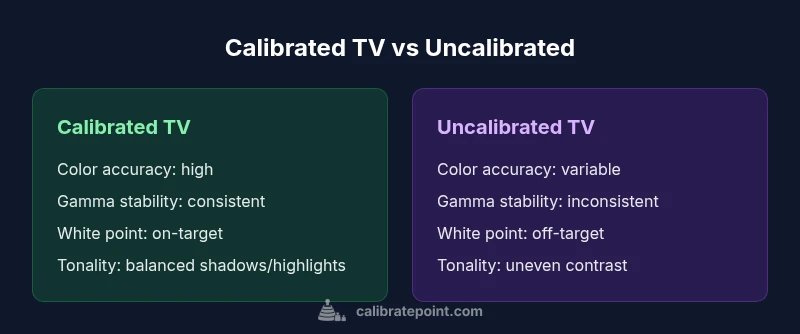
| Feature | Calibrated TV | Uncalibrated TV |
|---|---|---|
| Color Accuracy | High fidelity to target color spaces | Variable color fidelity; prone to casts |
| Gamma Tracking | Stable gamma across content | Inconsistent gamma response |
| White Point Consistency | Near-target white point under typical viewing | White point drifts with content/lighting |
| Contrast Stability | More consistent shadow detail and highlight handling | Shadows/highlights can fluctuate |
| Content Compatibility | Accurate rendering for most content and color-critical work | Content may look off for some material |
| Setup and Cost | Requires tools and calibration steps; upfront cost moderate | Minimal setup; cheaper upfront but lower fidelity |
Pros
- Sharper, more accurate colors reduce eye strain
- Consistent image fidelity across rooms and lighting
- Improves usefulness for color-critical viewing and editing
- Preserves director intent and HDR potential over time
- Easier to reproduce results when used with reference workflows
Disadvantages
- Requires time and some equipment investment
- May need periodic re-calibration after changes
- Can be frustrating for casual viewers seeking instant results
Calibrated TV is the better baseline for color fidelity; uncalibrated displays can suffice for casual viewing but fall short on consistency and accuracy
If you value accurate color and repeatable results, calibration is worth the effort. For gaming or movie nights without color work, a good default calibrated setup provides a strong balance of accuracy and convenience.
Questions & Answers
What is calibration in display technology, and why does it matter for a consumer TV?
Calibration aligns a display’s output to standardized color spaces, gamma, and white point targets. This ensures skin tones, landscapes, and hues render as intended across content. For most viewers, calibration improves color accuracy and viewing consistency, reducing eye strain and color fatigue.
Calibration aligns your TV to standard color targets so colors look natural and consistent across content. It matters for comfortable viewing and for color-critical tasks.
Do I need a colorimeter or spectrophotometer to calibrate a TV at home?
A colorimeter or spectrophotometer, along with calibration software, makes DIY calibration practical and repeatable. Some quality displays include built-in colorimeters, which simplifies the process. If you don’t have hardware, you can still adjust basic picture settings, but accuracy will be limited.
A colorimeter or spectrophotometer helps you measure output precisely, though basic methods can get you closer without hardware.
How long does it take to calibrate a TV, and how often should I recalibrate?
DIY calibration typically takes 30–90 minutes depending on setup and experience. Many users recalibrate after changes in lighting or new content profiles; professionals may recalibrate with each major content or room change.
Plan about an hour for a thorough DIY calibration; revisit it when lighting or content changes significantly.
Is calibration worth it for gaming or streaming, not just professional work?
Yes. Calibration improves color accuracy and consistency, which enhances the realism of games and the viewing quality of streaming content. It reduces color bias and improves detail perception, especially in dark scenes.
Absolutely—calibration improves color fidelity and can make games look sharper and more lifelike.
Can I calibrate my TV without any tools at all?
Basic adjustments can be done with built-in picture modes and simple contrast/gamma tweaks, but these are approximate. For meaningful accuracy, tools like a colorimeter and a reference pattern are recommended.
You can do rough tweaks with built-in settings, but accurate calibration needs measurement tools.
What is the best path for a home user who wants high fidelity without professional services?
Start with a solid calibration routine using a colorimeter and a guided software workflow. Use a high-quality test pattern, set a neutral gamma curve, and adjust white balance to target. If you frequently work with color-critical content, consider periodic professional validation.
Begin with a guided DIY workflow and only seek pro help if you need reference-grade accuracy.
Key Takeaways
- Start with a clear calibration target and reliable tools
- Calibrated displays deliver better color, gamma, and white-point accuracy
- DIY calibration is accessible, but consider professional help for critical work
- Regular checks help maintain fidelity over time