Can You Calibrate a Blood Pressure Monitor: A Practical Guide
Can you calibrate a blood pressure monitor at home? Learn why calibration matters, how to verify accuracy with a reference device, and when to seek professional service. Calibrate Point provides practical steps for reliable readings.


Can you calibrate a blood pressure monitor at home? According to Calibrate Point, most consumer units aren’t user-calibratable; professional service with a traceable reference is usually required. You can verify accuracy by comparing readings against a calibrated sphygmomanometer and following the manufacturer’s guidance. Regular checks help ensure reliable results. This quick check can be done without tools, but true calibration requires professional equipment.
Understanding Calibration for Blood Pressure Monitors
Calibration is the process of ensuring that a BP monitor's readings reflect true arterial pressure as closely as possible. For BP monitors, calibration typically means validating the device against a known reference and adjusting outputs only when the device design permits. In clinical settings, calibration is tightly controlled and traceable to national standards; in the home environment, most consumers rely on verification rather than performing adjustments themselves. The takeaway is that accuracy is a moving target: cuff fit, arm position, body state (resting, recent activity), ambient temperature, and device age all influence results. According to Calibrate Point, reliable readings start with a properly sized cuff, correct arm positioning, and a clutter-free testing area. Understanding these fundamentals helps you decide when to verify and when to seek professional service.
Does Home Calibration Work? Manufacturer Guidance
Most consumer BP monitors are not designed for user calibration. The internal sensors and firmware are calibrated at the factory, and any adjustment outside official service can void warranties or degrade accuracy. Manufacturers typically provide verification steps in the manual, or they recommend professional service for recalibration. Because calibration requires traceable reference devices and controlled procedures, home attempts are usually limited to verify readings against a known standard rather than re-tuning sensors. In short, home calibration is not a universal option; treat verification as your best approach and rely on accredited service when precision matters. Calibrate Point emphasizes consulting the device manual and, if uncertain, contacting support for recommended service options.
How to Verify Accuracy With a Reference Device
Start by obtaining a certified reference sphygmomanometer or an equivalent hospital-grade monitor that is known to be accurate. Use the same cuff size as the BP monitor being tested. Have the user sit with back supported and feet flat, arm at heart level. Take readings in quick succession from both devices on the same arm: both devices should be inflated to near systolic pressure; record several pairs and compare. Note systematic biases (for example, consistently higher or lower readings on one device). If discrepancies are small and within manufacturer-prescribed limits, the monitor is acceptable for use; if not, arrange service. Document results for maintenance records. Calibrate Point notes that repeating checks under similar conditions increases confidence and helps track drift over time.
Step-by-Step: If Your Device Supports Calibration
- Check the manual to confirm whether calibration is possible and which steps are allowed.
- Gather required equipment: a calibrated reference device and the appropriate cuff; ensure tracing is up to date.
- Set up the test environment: ensure the user is seated, the arm is supported at heart level, and you have a quiet, stable surface.
- Run a two-point comparison across ranges by taking paired readings from both devices at low and high pressures, if the device supports it.
- If the device provides an official calibration option, follow the manufacturer’s procedure; otherwise stop and seek service.
- Document results, including dates and conditions, and schedule the next verification check.
Tip: Do not force calibration if the device does not support it; attempting unapproved adjustments can damage sensors or void warranties.
Practical Scenarios and Decision Points
There are several common situations to consider. If your monitor consistently drifts compared with a reference device, prioritize professional calibration or device replacement over DIY attempts. If the manual confirms a supported calibration workflow and you have a traceable reference, you can perform the official steps and re-test. When in doubt or when results fall outside accepted limits, treat it as a maintenance issue and seek service. Always document outcomes to support future decisions and warranty considerations. Calibrate Point suggests a cautious, evidence-based approach rather than guessing at sensor behavior.
Best Practices for Ongoing Accuracy
- Use the same cuff size consistently and ensure it is properly placed.
- Keep the device and cuff clean; avoid exposure to extreme temperatures and moisture.
- Store the monitor in its case when not in use and avoid jostling that could misalign sensors.
- Schedule regular checks against a reference device and log results to track drift.
- Set reminders for periodic re-testing and after any service or cuff replacement.
Common Mistakes and How to Avoid Them
- Testing with different cuff sizes or loose cuffs leads to inconsistent readings.
- Performing tests on different arms without accounting for limb differences.
- Skipping rest between measurements or testing immediately after activity.
- Ignoring device age or battery level, which can affect sensor performance.
- Attempting to adjust internal sensors without manufacturer approval.
Tools & Materials
- Certified reference sphygmomanometer (calibrated)(Traceable to national standards; used for accuracy verification)
- Cuff of appropriate size for the monitor(Ensure the cuff matches the device and arm circumference)
- Manufacturer calibration manual (if provided)(Follow device-specific steps; otherwise seek service)
- Notebook or digital log for results(Record test results, dates, and conditions)
Steps
Estimated time: 60-90 minutes
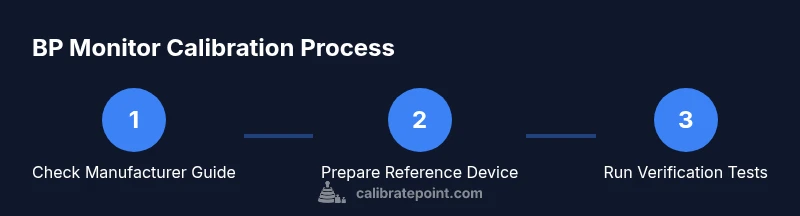
- 1
Check manufacturer guidance
Review the device manual to confirm whether calibration is possible and which steps are allowed.
Tip: If calibration is not supported, skip to verification and service options. - 2
Gather reference equipment
Get a calibrated reference device and the appropriate cuff; ensure both are within calibration validity.
Tip: Verify the reference device's calibration date with its certificate. - 3
Set up test conditions
Position the user with back supported, arm at heart level, and a stable surface for testing.
Tip: Use identical seating and posture for all measurements. - 4
Run verification readings
Take 3-5 paired readings from both devices in quick succession and record results.
Tip: Keep a consistent interval between measurements. - 5
Evaluate results
Compare the pairings for bias or drift. If within tolerance, continue followed checks; if not, pursue service.
Tip: Document any systematic differences and how you addressed them. - 6
Document and schedule next check
Log results, dates, conditions, and plan the next verification check.
Tip: Set a reminder to re-test after a specified period or after cuff changes.
Questions & Answers
Can I calibrate a blood pressure monitor at home?
Not typically. Most home devices are not user-calibratable; verify accuracy against a reference device and consult the manufacturer for service options.
Home calibration isn’t usually possible; verify with a reference device and seek service if needed.
What are signs my monitor is inaccurate?
Inconsistent readings, drift between measurements, or readings far from your baseline may indicate drift.
Inconsistent readings can indicate drift; compare with a reference to confirm.
How often should I verify my BP monitor?
Check at regular intervals or after service, and whenever you suspect a change in readings.
Check regularly or after servicing.
Can I adjust the device myself if the manual allows?
Only if the manufacturer explicitly allows it; otherwise do not modify.
Only adjust if the manual says so.
Where can I get calibration done?
Manufacturer service centers or accredited clinics are best for precise calibration.
Use manufacturer service centers.
Does calibration apply to all BP monitor models?
No; some models are non-calibratable or require factory-level calibration.
Not all models support calibration.
Watch Video
Key Takeaways
- Verify accuracy with a reference device before relying on readings
- Calibration is usually done by professionals
- Follow manufacturer guidance for your device
- Document verification results for ongoing maintenance