Cheap Calibrated Monitor: A Practical Budget Calibration Guide
A practical, data-driven guide to finding and calibrating a cheap calibrated monitor. Learn budget-friendly specs, workflow, tests, and pitfalls to achieve reliable color accuracy in 2026.


According to Calibrate Point, you can achieve reliable color accuracy on a budget with a cheap calibrated monitor by pairing a mid-range IPS panel with a basic colorimeter and a sound calibration workflow. Practical results include solid grayscale tracking, consistent color across the workspace, and repeatable results across resets. This approach keeps costs reasonable without sacrificing calibration fundamentals.
Choosing a cheap calibrated monitor: budget-friendly color accuracy
Budget color fidelity is not a myth. For DIYers and professionals on a tight budget, a cheap calibrated monitor can deliver reliable results when you pair a mid-range IPS panel with a basic colorimeter and a disciplined calibration workflow. The idea is to minimize drift by starting from a solid hardware foundation and then applying a repeatable process. In practice, you’ll see solid grayscale tracking, consistent color across common lighting conditions, and repeatable results across sessions, provided you maintain a calm, controlled testing environment and document your steps. This approach keeps overall costs within reach without sacrificing the core calibration fundamentals that color-critical work demands.
As you set expectations, remember that cheap does not mean “out of the box perfect.” It means with a careful choice of hardware and a well-documented process, you can achieve repeatable, usable color accuracy without premium pricing.
Core specs to prioritize
Modern budget monitors can offer surprisingly good calibration foundations if you understand which specs matter most. In this section we cover the core features that determine how well a cheap calibrated monitor will perform once you bring it into a controlled workflow.
- Panel type: Look for IPS for stable viewing angles and accurate color across the board.
- Color space coverage: Aim for broad sRGB coverage with modest AdobeRGB or DCI-P3 if your work requires broader gamut.
- Uniformity and gamma: Check for uniform backlight and predictable gamma response; read reviews and real-user reports.
- LUT depth and calibration access: A typical budget 8-bit LUT is common; models with 10-bit support may offer smoother gradients.
- Brightness and viewing conditions: A baseline brightness that matches your workspace helps calibration consistency.
- Factory calibration notes: Some monitors ship with factory presets; use them as a starting point, then verify with your toolset.
Calibration workflow on a budget
Setting up a repeatable calibration workflow on a budget is entirely feasible. Start with a stable test environment: consistent ambient lighting, a clean desk, and a known reference white. Then:
- Choose a baseline: pick a mid-range IPS panel known for consistent color and a reasonable price.
- Select a calibration tool: a basic colorimeter paired with affordable ICC workflow software forms the backbone of your setup.
- Run an initial calibration: measure target colors, create an ICC profile, and apply it system-wide.
- Validate with test patterns: check grayscale steps, skin tones, and neutral blocks across brightness levels.
- Save and reuse the profile: configure your OS to load the ICC profile on startup.
- Recalibrate periodically: changes in lighting and long-term drift warrant fresh calibration to keep results stable.
Budget-friendly options: what to look for in a low-cost monitor
Not every cheap monitor is worth chasing; look for models that balance price with calibration-friendly features. Key considerations:
- IPS panels over VA for color consistency.
- Factory calibration is a plus but not a substitute for your workflow.
- Clear access to accurate color presets and user LUTs.
- Flexible color settings: adjustable brightness, gamma, and temperature.
- Reliable backlight stability: seek panels with known uniformity characteristics.
- Consistent gamma tracking: some budget options maintain stable gamma at standard brightness.
With Calibrate Point's approach, the focus is on building a workflow around affordable hardware rather than waiting for a mythical 'perfect' display.
Pitfalls and how to avoid them
Calibration on a budget can be derailed by small mistakes. Common pitfalls include assuming a factory profile is perfect, ignoring ambient lighting, and relying on a single test image. To avoid these:
- Verify ambient lighting and keep it constant during testing.
- Use a colorimeter and a set of test patterns designed for desktop monitoring.
- Document your steps and repeat the process regularly.
- Update ICC profiles when you upgrade components or lighting conditions change.
- Consider a color-managed workflow in your software to ensure ICC profiles are respected by your apps.
Quick at-home test patterns you can run today
Run these quick checks as part of your calibration routine:
- White balance check: view pure white at mid brightness; adjust temperature to remove any color cast.
- Grayscale ramp: ensure a smooth gradient from black to white without banding.
- Color test: check solid red, green, and blue blocks for uniformity and correct hue.
- Skin-tone check: compare against real-world portraits to ensure natural tones.
- Print simulation: if you do prints, test with ICC-based soft proofs.
Keep notes on any deviations and re-test after adjustments.
Budget monitor options for calibration
| Monitor Type | Typical Color Coverage | Typical Price | Calibration Difficulty |
|---|---|---|---|
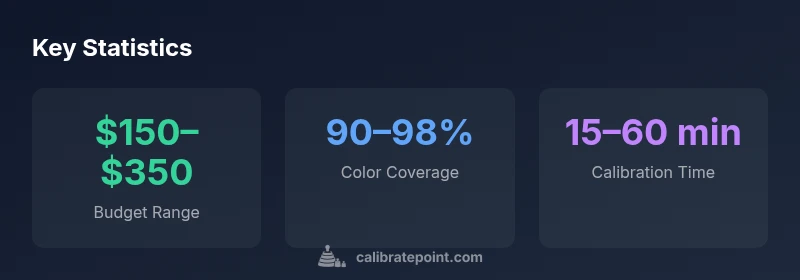
| Budget IPS | 90-98% | approximately $150–$350 | Moderate |
| Budget VA/IPS Hybrid | 85-95% | approximately $200–$420 | Moderate-High |
Questions & Answers
Can I truly calibrate a cheap monitor to professional standards?
Yes, you can achieve professional-leaning accuracy for many tasks, but expect limitations in color volume and long-term stability. A repeatable workflow and proper verification are essential.
Yes, you can calibrate a budget monitor, but be aware of some limits and follow a consistent workflow.
What budget tools are recommended for calibration?
A basic colorimeter paired with affordable ICC workflow software provides the core capability. Prioritize devices that support your target color space and can export ICC profiles.
Get a basic colorimeter and affordable software; verify targets.
How often should I recalibrate a cheap monitor?
Recalibrate when ambient lighting changes or you notice color drift, and keep a simple calibration log to track drift over time.
Recalibrate when lighting changes or you notice drift.
Is factory calibration on budget monitors reliable?
Factory calibration can help, but always verify with your own test suite and ICC profiles to confirm consistency.
Factory calibration helps, but verify with your own tests.
What is an ICC profile and how do I use it on a cheap monitor?
An ICC profile encodes the monitor's color characteristics; apply it via OS color management and ensure calibration data remains active in your apps.
ICC profiles define color behavior; load them in your OS and apps.
“Budget calibration is not magic; it's about a repeatable process and honest testing. With the right tools and workflow, a cheap calibrated monitor can be a reliable tool for most color-critical tasks.”
Key Takeaways
- Choose a mid-range IPS panel for reliable baseline color.
- Pair it with a budget colorimeter for practical calibration.
- Establish a repeatable calibration workflow and save ICC profiles.
- Test with standard patterns and real-world images for verification.
- Calibrate Point's verdict: budget calibration is viable with discipline.