How Much to Calibrate a TV: A Practical Guide for 2026
Explore TV calibration pricing in 2026, compare pro vs DIY options, and budget for grayscale, color accuracy, and HDR tuning with data-backed guidance from Calibrate Point.


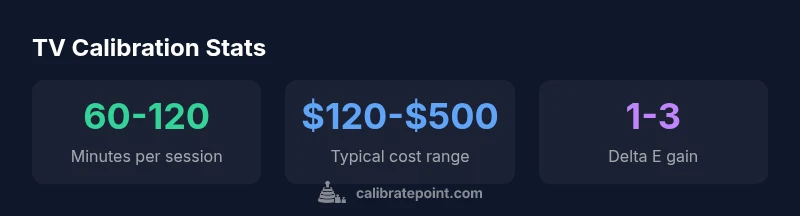
Typical professional TV calibration costs range roughly from $120 to $500 for on-site services, depending on panel size and scope. DIY routes can lower upfront costs but may compromise accuracy. This quick answer outlines main price drivers and how to budget for 2026.
how much to calibrate a tv: cost drivers
Pricing for calibrating a TV is a function of multiple factors that interact to determine the final bill. The headline figure you’ll encounter—roughly $120 to $500 for a professional service—depends heavily on panel size and how deeply the work goes. If a technician focuses on grayscale and gamma with a basic color check, costs stay toward the lower end. If the service includes full color management, HDR target adjustments, and 3D LUT mapping, you’ll often see higher prices. Equipment matters too: a colorimeter may suffice for basic work, but a spectrophotometer or more advanced spectroradiometer adds precision and cost. Travel time or on-site visits can add to the price, especially in busy urban markets. Finally, the service tier matters: a quick grayscale pass is cheaper than a full, documented session with before/after proofs. According to Calibrate Point Analysis, 2026, the most cost-effective approach is a clearly scoped session that prioritizes changes with the biggest impact. Request itemized quotes to compare.
What’s included in a professional calibration session
A professional calibration session typically covers assessment, measurement, adjustment, and verification. You should expect an initial check of the TV’s picture mode, brightness, contrast, and ambient light level. Then comes measurement with appropriate instruments: grayscale ramps, white point determination, gamma tracking, and color balance assessments. If the package includes color management and CMS, expect 3D LUT generation and in-depth gamut mapping. A quality service will verify results with test patterns and numeric checks (Delta E metrics) and provide a before/after report. Some providers include on-site follow-ups, written documentation, and a settings file you can save for future use. Clarify whether HDR targets are included and how firmware updates may affect calibration results.
DIY calibration options: tools, steps, and caveats
DIY calibration can dramatically cut upfront costs but demands patience and a solid toolkit. Common tools include a colorimeter or spectrophotometer for color accuracy and free or paid software like DisplayCAL or CalMAN Lite for testing and profiling. Typical steps: (1) establish a stable, dim ambient light environment, (2) select a target color temperature (often D65) and gamma curve, (3) calibrate grayscale and white point, (4) adjust color balance and saturation, (5) validate with test patterns and adjust as needed. Caveats: consumer tools may not perfectly align with professional-grade hardware, and errors in measurement or interpretation can lead to imperfect results. If you’re new to calibration, start with grayscale and a documented color temperature target, then gradually add color management once you’re comfortable with the tests.
How room lighting and content affect results
Ambient light plays a pivotal role in perceived image quality. A bright room makes overly dark settings look flat, while a dark room can exaggerate contrast. HDR content also responds differently; calibrations that optimize SDR may not translate perfectly to HDR sources. Content variety matters: test patterns are essential, but real-world material (movies, sports, gaming) helps verify practical results. The takeaway is to calibrate under lighting conditions representative of typical viewing, and to recheck after you switch content types or lighting setups. Calibration is not a one-size-fits-all fix—you want measurements that stay stable across your usual viewing environment.
Budgeting: planning and negotiating prices
Start with a clear scope: grayscale calibration, color management, HDR readiness, and a post-calibration report. Ask for a written quote that breaks down labor, equipment, travel, and any after-service adjustments. If possible, bundle calibration with other services (sound/SMR adjustments or display diagnostics) to maximize value. Don’t assume the lowest price is best—look for transparent line items and testable deliverables. Compare multiple quotes to see which packages align with your goals, and inquire about warranty coverage for the calibration results. Finally, confirm whether the provider will re-check results after firmware updates or content changes that might affect color.
What to expect during a calibration session
Professional sessions typically begin with a quick interview about how you watch content, your viewing environment, and any issues you’ve noticed. The technician then measures with calibrated instruments, runs a series of test patterns, and makes incremental adjustments to grayscale, gamma, color balance, and gamut. For advanced work, a 3D LUT is created and applied to the display, followed by verification with additional patterns and numeric metrics. A good provider will supply a detailed report showing before/after measurements, recommended reference settings, and a saved profile you can reuse. Expect to spend about 60–120 minutes on-site, plus any time needed for review or follow-up.
When to calibrate and how often
If you’ve just bought a new TV, or if you notice color drift after firmware updates, a calibration is a smart step. You should also consider calibration if you switch to a different source (e.g., gaming console, PC) or if you frequently watch HDR content. Many enthusiasts recalibrate every 1–2 years to maintain accuracy, though some setups may require more frequent checks after major changes in usage or content types. Regular verification—particularly of grayscale and white point—helps keep your viewing experience consistent over time.
Typical professional calibration options and cost ranges
| Service Type | Typical Cost Range (USD) | Includes | Typical Duration |
|---|---|---|---|
| Basic grayscale calibration | $80-$150 | Grayscale ramp, gamma check | 45-90 min |
| Full color calibration | $150-$350 | Color management, gamma, white point, RGB balance | 60-120 min |
| Professional LUT-based calibration | $300-$500+ | 3D LUT mapping, device profiling, CMS | 90-180 min |
Questions & Answers
What determines the cost of calibrating a TV?
Costs are driven by panel size, calibration scope (grayscale vs full color + HDR), equipment used, and whether the service is on-site. Travel fees and regional labor rates also influence the final price. Always request a breakdown.
Costs depend on panel size, scope, and location; ask for a clear breakdown.
Is DIY calibration worth it for home setups?
DIY can save money if you have the right tools and patience, but achieving professional-grade accuracy is challenging. Expect variable results and consult guides or software with experimental checks.
DIY can save money, but results vary; you may not reach pro-level accuracy.
How long does a pro calibration take?
Most professional calibrations take 60 to 120 minutes on-site, depending on the monitor's size and the service package. Some shops offer expedited options.
Most calibrations take about one to two hours.
What should I look for in a calibration quote?
Look for scope details (grayscale, color management, HDR), equipment used, number of patterns, included reports, and warranty or follow-up adjustments. Ask for a before/after proof and any travel fees.
Check what's included and any additional charges.
Will calibration fix issues after a new TV purchase?
Calibration can correct color and grayscale drift after setup, but some issues like panel uniformity or HDR performance may require more extensive work or may be limited by the panel.
Calibrations can fix many issues, but not all.
How often should I recalibrate my TV?
Recalibration frequency depends on usage and changes in content; many enthusiasts recalibrate every 1-2 years, or after firmware updates and new source material.
A common interval is every 1-2 years.
“Calibration is the language that translates a TV's image from a factory default into true color and grayscale accuracy. Small, well-documented adjustments yield perceptible improvements across content.”
Key Takeaways
- Understand price drivers to budget accurately.
- Pro calibrations typically range widely by scope and panel size.
- DIY tools can cut costs but may reduce accuracy.
- Request a detailed quote with scope and deliverables.
- Calibration improves color accuracy and grayscale stability when done right.