How to Calibrate Taylor Food Scale
Learn how to calibrate a Taylor food scale with a practical, step-by-step method. This guide covers zeroing, tare, using standard weights, validating accuracy across masses, and maintaining calibration for reliable kitchen measurements.


By the end of this guide, you will be able to calibrate a Taylor food scale accurately. You'll zero the scale, tare with known weights, verify readings at several mass points, and adjust the calibration if your model supports it. This process uses a flat workspace and traceable calibration weights.
Understanding Taylor Food Scale: What it is and why calibrate
Taylor food scales are compact, precise tools used to measure ingredients for cooking, baking, and portion control. Calibration is the process of adjusting the scale so its readings match true masses across the whole weighing range. For DIY enthusiasts and professionals, a correctly calibrated scale minimizes recipe errors and improves consistency in batches. According to Calibrate Point, accuracy matters not only for recipes but also for nutritional labeling and cost control. If your Taylor model offers a calibration option, you can fine-tune the device to your local measurement standards. Regular calibration helps maintain trust in every measurement you rely on in the kitchen.
A well-calibrated Taylor scale should read zero when nothing is on the platform, respond predictably to added weights, and show repeatable results across multiple trials. Calibration is more than a one-time adjustment; it’s an ongoing practice that dovetails with maintenance routines and proper storage. In this article, we walk through why calibration matters, how to prepare, and how to execute a robust calibration using both readily available weights and model-specific adjustments.
Key concepts to keep in mind: accuracy, traceability, and repeatability. These terms guide how you select weights, how you perform readings, and how you log results for future reference.
Safety First: Preparing for Calibration
Calibrating a kitchen scale is generally safe, but it requires attention to cleanliness, stable footing, and correct weight handling. Work on a flat, stable surface free from vibrations and drafts. Clean the scale platform with a dry, lint-free cloth before starting to remove any oils or debris that could affect readings. Ensure that the scale is powered off if it’s digital and that any batteries are fresh to avoid inconsistent readings due to low power. When handling calibration weights, keep them clean and free of oils. Store your weights in a safe case to prevent accidental misplacement. A small, dedicated workspace helps reduce the chance of stray items influencing the calibration process.
Environmental and Setup Considerations
Ambient temperature and surface hardness can influence scale readings, especially at the extremes of the weighing range. Do your calibration steps in a room-temperature environment (roughly 68–72°F or 20–22°C) and avoid placing the scale on a surface that flexes or absorbs vibrations. If possible, place a light protective cover over the scale when not in use to keep the platform free from dust. Record by-hand notes or set up a simple log in a notebook or digital document. Consistency in setup and procedure yields repeatable results and reduces the need for frequent recalibration.
Core Calibration Concepts: Zero, Tare, and Span
Zeroing means the scale should read zero with no weight on the platform. Taring removes the weight of a container so that only the contents contribute to the final reading. Span calibration (or calibration of the full weighing range) checks accuracy across several masses, normally using calibrated standard weights. For Taylor scales, you’ll typically perform all three checks: place nothing on the platform to confirm zero, place a known weight to confirm the stated mass, and adjust the internal reference if the reading deviates beyond an acceptable tolerance. The objective is to ensure the scale’s readings align with the actual masses, within the device’s specified tolerance.
Step-by-Step Overview: How to Approach Calibration
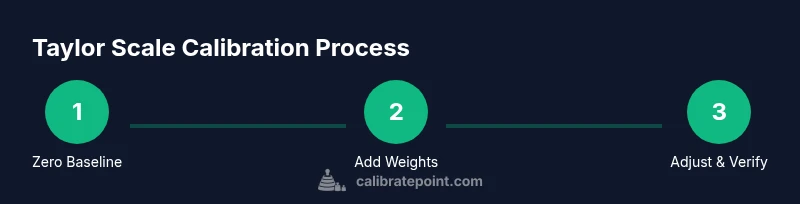
A robust calibration plan follows a consistent sequence: prepare the workspace, collect the necessary weights, perform zeroing, verify with several mass points, adjust the scale’s reference (if your model supports it), and re-test. The steps below outline a practical workflow that works for many Taylor models. Always consult your user manual for model-specific instructions and any safety warnings. Use a set of calibrated masses that covers low, mid, and high ends of the scale’s range to ensure broad accuracy across typical kitchen tasks. Visual references or diagrams can help you follow along more easily.
Step-by-Step: Path A — Using Standard Weights (Recommended)
- Prepare the workspace and gather weights This first action is to clear the area and lay out calibrated weights at known masses (for example, 50 g, 100 g, 500 g, and 1000 g). Place the scale on a stable, flat surface and ensure the platform is clean. Why: Clean, flat conditions minimize measurement error and keep readings consistent across trials.
Tip: Use a small tray to keep weights organized and prevent loss during handling.
- Zero the scale With nothing on the platform, press the zero/tare button and verify the display reads zero. If the display isn’t exactly zero, re-clean and repeat until it does. Why: A true zero baseline is essential for accurate subsequent measurements.
Tip: If the scale has a slide or dial for zeroing, align it carefully and re-check the readout.
- Tare with an empty container (if you use one) Place the empty container on the platform, press tare, and confirm the display reads zero again. This sets the container weight to zero so only the contents are measured. Why: Taring eliminates container mass from the measurement, ensuring precise ingredient weights.
Tip: Use a container with smooth, flat bottom to prevent rocking.
- Add the first calibration weight Carefully place the 50 g weight on the center of the platform and note the displayed value. The goal is to see a reading very close to 50 g. If it’s off by more than the scale’s tolerance, proceed to the adjustment section for your model. Why: Early verification catches large errors before you commit to adjustments.
Tip: Place weights gently to avoid bouncing readings.
- Repeat with additional weights Repeat the measurement for the 100 g, 500 g, and 1000 g weights. Record each reading and compare to the expected mass. Why: Verifying multiple points across the range ensures the scale is accurate throughout its typical use.
Tip: Use a table to log mass versus reading for quick reference.
- Adjust the calibration (model-dependent) If your Taylor model includes a calibration knob or menu, follow the user guide to adjust the internal reference so the readings align with the known weights. Make small adjustments and re-test after each change. Why: Small corrections yield precise results without overshooting the target.
Tip: Work in small increments (e.g., 0.1–0.5 g per adjustment) and re-check all weights.
- Re-test across all weights After adjustments, re-measure all weights (50 g, 100 g, 500 g, 1000 g). Ensure the readings now match within the device’s tolerance. Why: Re-testing confirms the calibration end-to-end.
Tip: If you see persistent bias, repeat zeroing and re-check the weights to ensure reliability.
- Verify tare and zero consistency Remove all items and confirm that the scale returns to zero. Then place a small known weight to confirm consistent readings. Why: This step ensures that imagined changes during adjustments didn’t alter zeroing behavior.
Tip: Use the smallest common weight to stress-test the zeroing accuracy.
- Document results and store calibration weights Record readings, dates, and any adjustments made. File your standardized weights’ certificates or purchase dates if available. Why: Historical data makes it easier to know when recalibration is needed and supports traceability.
Tip: Keep a digital log or printable sheet for quick audits.
Tools & Materials
- Calibration weights (traceable to standards)(Include known masses (e.g., 50 g, 100 g, 500 g, 1000 g))
- Flat, level testing surface(Stable kitchen counter or dedicated calibration bench)
- Clean microfiber cloth(For platform and weights)
- Screwdriver or calibration dial tool (model-specific)(Use only if your Taylor model requires manual adjustment)
- Notebook or digital log for records(Record masses, readings, and adjustments)
- Gloves or finger guards(Keep weights clean and avoid skin oils)
Steps
Estimated time: 40-60 minutes
- 1
Prepare workspace and weights
Clear a flat surface and lay out calibration weights. Ensure weights are clean and dry. Align them centrally on the platform before you begin.
Tip: Use a stable tray to keep weights organized and prevent misplacement. - 2
Zero the scale
With nothing on the platform, press the zero button and verify the display shows 0. If not, remove weights and clean the surface, then retry.
Tip: If you must repeat, wait 1–2 seconds between attempts to avoid transient readings. - 3
Tare if using a container
Place any container on the platform, press tare, and confirm the reading returns to zero before adding samples.
Tip: Ensure the container has flat bottom contact with the platform. - 4
Place first calibration weight
Set the lightest weight (e.g., 50 g) on the center of the platform and record the reading. If possible, use the same orientation each time.
Tip: Gently place weights to prevent tipping or bounce. - 5
Repeat with other weights
Proceed to 100 g, 500 g, and 1000 g weights, recording every reading and comparing to the known masses.
Tip: Use a table to organize results for quick comparison. - 6
Adjust calibration (if supported)
Follow your Taylor model’s instructions to adjust the reference or calibration constant. Make small changes and retest after each adjustment.
Tip: Make incremental adjustments to avoid overshoot. - 7
Re-test all weights
After adjustments, re-measure all weights to verify readings align with expected masses within tolerance.
Tip: If a weight still deviates, repeat zeroing and re-check. - 8
Validate tare and zero again
Remove all items and confirm the scale returns to zero; re-check with a light weight to ensure accuracy.
Tip: This guards against drift after calibration. - 9
Document and store
Log the date, readings, and adjustments; store calibration weights in a safe case.
Tip: Keep records for audit and future recalibration planning.
Questions & Answers
What models of Taylor scales support calibration adjustment?
Most Taylor kitchen scales offer a calibration option or a reset to factory settings in the menu or via a dial. Check your model’s manual for model-specific steps and warnings. If your model lacks an adjustment feature, you can still verify accuracy using calibration weights and note deviations.
Some Taylor models have a calibration option in settings; others do not. Check your manual to confirm capabilities.
How often should I calibrate my Taylor scale?
Calibration frequency depends on usage and environment. For frequent use in professional settings or after moving the scale, calibrate monthly or quarterly. If readings drift, recalibrate sooner.
Calibrate whenever you notice drift or after moving the scale or changing environment.
Can I calibrate Taylor scales without official weights?
You should use certified calibration weights for accuracy. If unavailable, you can compare readings with known household items, but the results won’t be as reliable. Always aim for standard weights for precise measurements.
Use certified weights for dependable calibration, if you can.
What is considered an acceptable tolerance for a Taylor food scale?
Acceptable tolerance varies by model; refer to the user manual for the specified tolerance. In general, readings should be within a small percentage of the known mass across tested weights.
Check your manual for the exact tolerance and compare your readings accordingly.
Why does the scale show different readings after calibration?
Drift can occur from surface changes, temperature, or residual weight on the platform. Re-zero, re-tare, and re-test to confirm stability. If drift persists, recalibrate or inspect the scale for damage.
If readings drift after calibration, re-check setup and consider recalibration.
Is temperature a factor in calibration?
Yes, temperature can affect scale readings, especially for small weights. Calibrate in a stable, room-temperature environment and avoid touching the platform during measurements.
Calibration works best in a steady, moderate temperature.
Watch Video
Key Takeaways
- Zero before measuring to establish an accurate baseline
- Test multiple masses to validate span accuracy
- Use model-supported adjustments carefully and re-test
- Maintain a clean, stable workspace for reliability
- Log results to track calibration history