3D Printer Extruder Calibration: A Practical Guide
Learn how to calibrate a 3D printer extruder to improve print quality. This comprehensive guide covers tools, measurements, firmware adjustments, verification prints, and practical tips for reliable, repeatable results.


Calibrating a 3D printer extruder ensures consistent filament flow and high-quality prints. This step-by-step guide outlines why calibration matters, what you’ll need, and the exact steps to take—from measuring extrusion length and adjusting steps/mm to verification prints. It also covers common pitfalls and how to troubleshoot.
Why extruder calibration matters
Calibration of the extruder is a foundational maintenance task for any desktop 3D printer. When the extrusion amount does not match the commanded flow, prints exhibit under-extrusion, over-extrusion, gaps, or blobs. Accurate extrusion leads to better layer bonding, dimensional accuracy, and surface finish. According to Calibrate Point, a well-calibrated extruder reduces variability across prints and helps you trust your part’s dimensions. The Calibrate Point team found that users who adopt a structured calibration workflow report more consistent results and fewer failed prints, especially when switching filaments. In practice, you’ll balance the extrusion multiplier (or flow rate) with the physical steps-per-mm setting for the extruder gears. Understanding this relationship lays the groundwork for reliable calibration across materials and nozzle sizes.
What extrusion calibration actually changes
- Steps-per-mm: the number of motor steps the extruder motor takes to push 1 mm of filament. Changing this value alters how much filament is pushed per command.
- Flow rate/extrusion multiplier: a firmware or slicer setting that scales the amount of filament the nozzle deposits.
- Filament diameter consistency: variations in filament diameter change the volume of molten plastic, affecting extrusion.
Calibration is not a one-time task; it’s an ongoing practice to accommodate filament tolerances, nozzle wear, and temperature changes. The goal is to have the actual extruded length match the intended length with minimal deviation.
Common causes of extrusion errors
- Incorrect steps-per-mm for the extruder due to gear wear or a changed drive system
- Filament with inconsistent diameter or moisture absorption
- Inaccurate nozzle diameter assumptions or a clogged nozzle
- Bed level or temperature shifts that influence extrusion behavior
Recognizing these causes helps you target the right adjustment, rather than chasing a symptom with ad-hoc changes. Calibrate Point emphasizes documenting each change and testing with repeatable prints to confirm improvements.
A structured approach to calibration
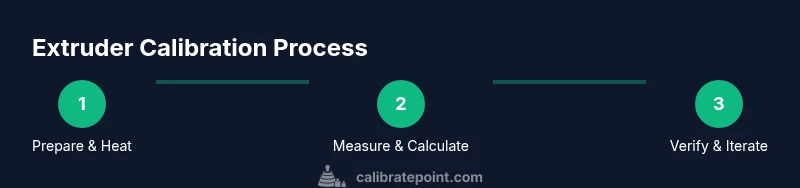
A disciplined workflow minimizes guesswork. Start with a known-good filament, measure its diameter, and establish a baseline extrusion length (e.g., 100 mm). Record the current X, Y, and Z movements and the advertised nozzle diameter. Then proceed to measure actual extruded length, recalculate the required steps-per-mm, update the firmware, and verify with a test print. Repetition and careful measurement are your friends here, as small measurement errors compound into noticeable print defects.
Practical tips for accuracy
- Use a caliper to measure filament diameter and a ruler or calipers to measure extruded filament length.
- Ensure the nozzle is clean and the printer is at or near printing temperature before taking measurements.
- Repeat measurements multiple times to average out minor inconsistencies.
- Log every value you change so you can reproduce or revert adjustments if needed.
Quick start checklist
- Gather tools: calipers, ruler, filament sample, logbook, and a simple calibration model.
- Heat the nozzle to your target printing temperature and re-home axes.
- Extrude a known length of filament and compare with the intended length.
- Update steps-per-mm and re-test with a calibration print.
- Document final settings and plan for future checks.
Wrap-up: maintaining calibration over time
Calibration is a cycle, not a single event. Temperature changes, filament variations, and nozzle wear can shift extrusion behavior. Schedule periodic checks, especially when changing filament brands or switching to a different nozzle size. A consistent calibration routine helps you achieve repeatable results and reduces surprises in production or hobby projects.
Tools & Materials
- Calipers or precise ruler(For measuring filament diameter and extrusion length accurately)
- Filament spool (same material and diameter)(Use consistent filament to avoid measurement variability)
- Digital scale (optional)(Helpful for precise diameter measurements, if available)
- Notebook or digital log(Record current settings, measurements, and test results)
- Wrench set / hex drivers(Access to extruder gears and set-screw adjustments)
- Soft, lint-free cloth(Clean nozzles and contacts before calibration)
- Test model (calibration cube or simple tower)(Used for verification prints)
Steps
Estimated time: 60-120 minutes
- 1
Power down and prepare the printer
Power off the printer and unplug if needed to safely access the extruder. Remove any debris from the extruder path and verify that the filament path is clear. This initial setup ensures measurements aren’t distorted by pre-load or heat-related effects.
Tip: Set a known baseline by keeping the printer at ambient temperature for initial checks. - 2
Home axes, level bed, and heat to printing temperature
Home all axes and ensure the bed is properly leveled. Heat the hotend to the target printing temperature for the filament you’ll use. Avoid starting measurements when the hotend is cold or at room temperature, as material expansion can skew results.
Tip: Allow the hotend to reach steady-state temperature before taking any measurements. - 3
Mark and extrude a known filament length
Mark a precise 100 mm section on the filament before feeding it into the extruder. Extrude the marked length without moving the printer’s X/Y position to avoid geometric errors. Collect the extruded filament and measure the actual length that was produced.
Tip: Ensure the filament path is straight and not looped to prevent measurement errors. - 4
Measure extrusion and calculate new steps/mm
Compare the intended extrusion length with the actual length. Use the formula: new_esteps = old_esteps * (expected_length / actual_length). Update the firmware with the new value and save the configuration. Rehome and verify that the printer uses the updated value.
Tip: Document every calculation and consider rechecking after a short warm-up print to confirm stability. - 5
Run a verification print
Print a calibration cube or a small benchy-like model to visually assess extrusion. Check for consistent walls, layer adhesion, and surface finish. If discrepancies persist, repeat measurements or adjust the extrusion multiplier in small increments.
Tip: Use a simple model first to isolate extrusion behavior before moving to complex parts. - 6
Document final measurements and plan follow-ups
Record the final steps/mm value, extrusion multiplier, and any relevant filament data. Schedule periodic checks, especially when changing filament brands or nozzle diameters, to maintain consistency over time.
Tip: Keep a calibration log with dates, filament type, nozzle size, and observed results.
Questions & Answers
What is extruder calibration and why is it important?
Extruder calibration adjusts how much filament the printer actually pushes relative to commands. It is essential for consistent layer height, reliable adhesion, and dimensional accuracy across prints and materials.
Extruder calibration adjusts filament flow to match printer commands, improving consistency and print quality.
How often should I calibrate the extruder?
Calibrate whenever you notice under- or over-extrusion, when changing filament brands or diameters, or after replacing a nozzle. Regular checks help maintain consistent results over time.
Calibrate when you see extrusion issues or after changes to filament or nozzle.
Do I need firmware access to calibrate extrusion?
Yes, you typically need to adjust the steps-per-mm value in the firmware or via a printer’s internal settings. Some printers allow changing this value through a host software interface.
You usually need access to update steps-per-mm in firmware or printer settings.
What causes under-extrusion after calibration?
Potential causes include incorrect steps-per-mm, partial clog in the nozzle, clogged hotend, filament moisture, or temperature fluctuations during printing.
Causes include wrong steps-per-mm, nozzle clog, filament moisture, or temps changing during prints.
Is extrusion multiplier the same as steps-per-mm?
Steps-per-mm directly control how much filament is pushed, while the extrusion multiplier scales the final extrusion amount in the slicer. Both affect flow, but on different parts of the workflow.
Steps-per-mm sets mechanical movement; extrusion multiplier scales in slicing.
How does filament diameter affect calibration?
Filament diameter variations change how much plastic is pushed for a given distance. Accurate diameter measurements are critical for precise extrusion calculations.
Diameter differences change how much plastic you push; measure accurately.
Watch Video
Key Takeaways
- Verify filament diameter to prevent skewed results.
- Document every measurement and setting change.
- Test with a simple model before complex prints.
- Re-check calibration after filament or nozzle changes.
- Keep a calibration log for repeatable results.