What Order to Calibrate a 3D Printer: A Practical Step-by-Step Guide
Learn the correct order to calibrate a 3D printer. This guide covers mechanical checks, axis calibration, extrusion, bed leveling, nozzle height, temperature tuning, and verification prints for reliable results.


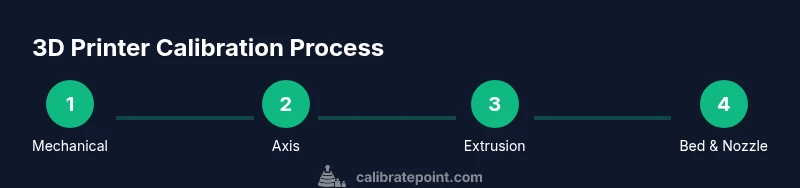
To achieve reliable 3D prints, follow a deliberate calibration order: start with mechanical checks and frame alignment, then axis steps per millimeter, extrusion and flow, bed leveling and squaring, nozzle height and first-layer tuning, and finally temperature tuning with test prints. This sequence minimizes cascading errors and speeds up troubleshooting. The Calibrate Point team recommends documenting results at each stage.
Why the order matters in calibrating a 3D printer
What order to calibrate a 3D printer affects how smoothly all other adjustments behave. By starting with the mechanical base and frame integrity, you prevent later corrections from introducing offset errors into axis movement, extrusion, and bed interaction. According to Calibrate Point, a methodical progression minimizes cascading adjustments and reduces wasted prints. When the frame is stable and belts are evenly tensioned, subsequent calibrations—like steps per millimeter, extrusion, and bed leveling—become incremental refinements rather than overhaul projects. This approach is especially helpful for DIY enthusiasts and professionals who rely on repeatable results across filament types and geometries. Keep a log of measurements and outcomes to trace what changed and why, which accelerates future troubleshooting.
Core calibration order you should follow
A practical calibration sequence for most desktop 3D printers is mechanical checks → axis alignment → steps-per-mm calibration → extrusion and flow verification → bed leveling and squaring → nozzle height and first-layer tuning → retraction optimization → temperature tuning and final test prints. This order prevents early errors from propagating into later steps, and it supports a stable baseline from which to fine-tune material behavior. Calibrate with a consistent test suite (like a simple cube or a standard calibration print) to compare results over time. Document each result so you can spot drift and know which step to revisit first when issues arise. As you gain experience, you’ll recognize which steps are most impactful for your printer and filament.
Step-by-step: mechanical checks and frame alignment
Start by inspecting the printer frame for wobble, loose screws, and misaligned gantries. Tighten corners and verify that the frame sits square and stable on the work surface. Check both X and Y belts for even tension and look for signs of wear or tooth skipping on pulleys. Move the axes by hand to feel for binding or rough spots; lubricate as needed with manufacturer-recommended lubricants. A solid mechanical foundation reduces drift during all subsequent calibrations and prints. Pro tip: photograph belt tension and belt routing so you can compare future re-tightening against a known baseline.
Step-by-step: axis steps per millimeter and belt tension
Calibrate X, Y, and Z steps per millimeter using a reliable test pattern. If the printed dimensions deviate from the commanded ones, adjust the per-axis steps accordingly and re-test. Confirm that each axis moves true when commanded and returns to its home position consistently. Inspect motor drivers and microstep settings to ensure consistent motion across all axes. Also verify belt tension is even and pulleys are secure; uneven tension can cause skewed geometry and poor layer alignment. A stable, accurate motion system underpins all other calibrations.
Step-by-step: extrusion calibration and retraction tuning
Measure actual filament extrusion against what your slicer commands, using a simple single-wall or solid calibration print. If you are under-extruding, adjust the extrusion multiplier or E-steps and re-run the test. If you are over-extruding, reduce flow or recalibrate the E-steps and verify end-to-end filament path. Then tune retraction to minimize stringing and oozing during travel moves without introducing gaps on retractions. Keep changes small and isolated so you can attribute prints directly to the specific adjustment.
Step-by-step: bed leveling and squaring
Bed leveling ensures a consistent nozzle-to-bed distance across the build surface. Perform a manual or automatic leveling routine, then verify squareness by measuring diagonals or using a right-angle square. If you correct one corner, re-check the opposite corners to ensure uniform gap. After any squareness tweaks, re-check the Z-offset so the nozzle is neither too close nor too far from the bed. An unlevel or non-square bed yields inconsistent first layers and warped features, undermining every subsequent calibration step.
Step-by-step: nozzle height and first layer calibration
Set the nozzle height so the first layer lays down with a light, even squish—neither too compressed nor too far. Use a piece of printer paper or a feeler gauge to test the gap at several points across the bed. If the nozzle is too close, you’ll see flattened lines and poor adhesion; too far and gaps appear in the first layer. Print a small calibration pattern to verify first-layer consistency, then adjust height in small increments. A well-tuned first layer is the foundation for reliable layer adhesion and dimensional accuracy.
Step-by-step: temperature tuning and test prints
Temperature affects bonding, flow, and surface finish. Start with the filament manufacturer’s recommended range as a baseline, then perform a temperature tower or a simple calibration cube across several temperatures. Look for strong layer adhesion, minimal stringing, and smooth surfaces to determine a stable temperature window. Record the optimal temperature for future prints and consider slight adjustments when changing filament brands or batches. Consistent temperature control helps maintain print quality across different geometries.
Verification and documentation
With all major calibrations complete, run longer prints that reflect typical usage to verify stability across sizes and features. Document metrics like layer consistency, dimensional accuracy, bed adhesion, and surface finish for future comparison. Maintain a calibration log with dates, filament type, and test results so you can track drift and know when to revisit specific steps. Regular documentation makes future calibrations faster and more reliable, and it supports a data-driven approach to printer maintenance.
Tools & Materials
- Calipers (digital or vernier)(For precise measurements (0.01 mm accuracy preferred))
- Allen/hex wrenches(Various sizes for frame, belts, and endmills)
- Feeler gauge or printer paper(Nozzle height and first-layer gap)
- Flat reference square or right-angle ruler(Bed squareness check)
- Test prints (calibration cube, benchy, first-layer test)(Baseline geometry checks)
- Calibration filament(Optional for precise extrusion tests)
- Digital scale (optional)(Precise filament measurement for extrusion tests)
Steps
Estimated time: 90-120 minutes
- 1
Check frame and belt integrity
Inspect the frame for wobble, tighten screws, and verify belt routing. Ensure belts are free of wear and have uniform tension on all axes.
Tip: Document initial belt tension with a photo; use as a baseline. - 2
Verify axis perpendicularity
Ensure X, Y, and Z axes move true and are square to the build surface. Correct any misalignment before proceeding to steps-per-mm calibration.
Tip: Use a square to confirm right angles at the gantries. - 3
Home all axes and check endstops
Run homing commands and verify endstops trigger consistently. Correct any offset or missed homing behavior before measuring steps.
Tip: If steps change after homing, recheck belt routing and pulleys. - 4
Calibrate axis steps per millimeter
Print a known-dimension test object and adjust per-axis steps until measured dimensions match commands.
Tip: Make small iterative adjustments; re-measure after each change. - 5
Calibrate extrusion (E-steps)
Print a single-wall or solid cube, measure actual extruded length, and adjust E-steps accordingly.
Tip: Use consistent filament diameter measurements for accuracy. - 6
Calibrate filament flow
Verify that the printer extrudes the expected amount by comparing test prints to slicer-credited volumes.
Tip: If inconsistent, re-check hot-end temperature stability. - 7
Bed leveling and squaring
Level or auto-level the bed and confirm squareness with diagonals or a square tool. Adjust Z-offset after squareness is fixed.
Tip: Re-level after any frame or gantry adjustment. - 8
Nozzle height and first layer tuning
Set a proper gap using paper or feeler gauge and verify across corners and center with a test pattern.
Tip: Aim for a slight flattening of the first layer without excess squish. - 9
Retraction tuning and travel moves
Adjust retraction distance and speed to minimize stringing while preserving layer adhesion.
Tip: Sequence tests with different retraction settings on a single rectangular print. - 10
Temperature tuning and final tests
Run a temperature tower or representative prints to identify a stable range for your filament, then lock in settings.
Tip: Document the chosen temperature per filament type.
Questions & Answers
Why should I follow a specific calibration order?
A fixed order prevents cascading errors and helps isolate the impact of each adjustment. It creates a stable baseline from which to iterate.
Following a fixed order helps you avoid chasing issues and makes troubleshooting faster.
Can I skip steps if I’m in a hurry?
Skipping steps often leads to poor print quality and more time spent troubleshooting later. It’s better to complete each step using a controlled approach.
Skipping steps can save time upfront, but it usually costs more time later.
How do I know extrusion is calibrated correctly?
Print a simple calibration model and measure actual vs commanded extrusion. Adjust E-steps or flow, then re-test until results align.
Do a focused extrusion test and tune until the printed amount matches what you commanded.
Do I need to recalibrate after changing filament?
Yes. Filament diameter, material, and temperature response can affect extrusion and bed adhesion. Re-check extrusion and temperature after a filament change.
Changing filament can shift how your printer behaves, so recalibration helps keep quality stable.
How often should I calibrate a 3D printer?
Calibrate when you notice quality changes, after hardware modifications, or after changing filament types. Otherwise, periodic checks are advisable.
Do calibration checks when you notice drift or after any hardware tweak.
What are common signs of miscalibration?
Poor first layers, uneven layer heights, dimensional inaccuracies, and stringing often indicate miscalibration. Run targeted tests to identify root causes.
Look for bad first layers and uneven layers as warning signs.
Watch Video
Key Takeaways
- Follow a mechanical-first calibration order.
- Document results to track drift and inform future calibrations.
- Small, incremental changes improve accuracy.
- Test prints validate each calibration step.
- Maintain a consistent baseline for reliable results.