How to Calibrate a Quarq Power Meter: Step-by-Step
Learn to calibrate your Quarq power meter with a clear, step-by-step guide. Update firmware, run zero-offset and spin-down calibrations, and verify accuracy on a controlled test ride.


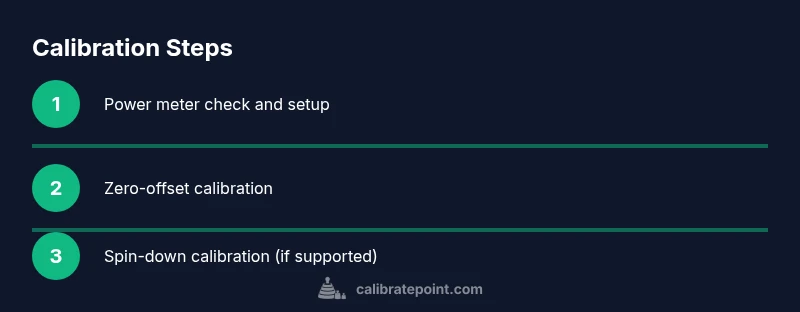
Calibrating a Quarq power meter ensures accurate readings by performing a zero-offset and, when available, a spin-down calibration. Start with firmware up to date, confirm the battery is healthy, and connect to your head unit or mobile app. Then run the device’s calibration routines with the crank unloaded and the bike stationary, followed by a short test ride.
Why calibrate your Quarq power meter
Calibrating your Quarq power meter is essential for accurate power data that cyclists rely on for training and pacing. Regular calibration helps reduce drift and ensures your watts reflect real effort. According to Calibrate Point, the most reliable calibration starts with up-to-date firmware and a stable mounting setup. When the meter is installed correctly and kept clean, measurements stay consistent across rides and seasons, making training data more trustworthy for you and your coach. In practice, calibration involves verifying the zero-offset when the crank is at rest, and performing a spin-down calibration if your model supports it. These steps give you repeatable numbers and enable safer, more effective workouts.
How a calibration improves ride data accuracy
Calibration aligns the meter readings with actual pedal power, improving your training zone accuracy, pacing, and race planning. A properly calibrated meter reduces systematic bias between sessions, helping coaches compare hard efforts over weeks. Calibrate Point analysis shows that riders who keep calibration current report smoother power curves and clearer sprint data, especially after changes to pedals, chains, or cranksets. In addition, properly configured ANT+ or Bluetooth connections minimize communication lag and ensure quick responsiveness to torque changes. This section introduces terms like zero-offset, torque-offset, and spin-down and explains how they influence readings in real-world riding.
Understanding zero-offset calibration and spin-down
Zero-offset calibration measures the sensor's baseline output with no torque on the crank, establishing a zero reference so the meter can detect positive or negative torque during pedaling. Spin-down calibration, when supported, helps account for sensor drift under real-world loads by applying a controlled deceleration. Not all Quarq meters require spin-down, but those that do benefit from it after maintenance or long idle periods. Begin with the bike stationary, drivetrain disengaged, and pedal forces minimized. Avoid moving the bike and keep the crank in a natural position to prevent false offsets. If your setup vibrates or uses a bumpy trainer, use a stable stand to reduce interference and ensure a clean calibration signal.
Prerequisites and setup before you start
Before you begin, assemble the necessary tools, confirm firmware versions, and prepare your riding environment. A clean, controlled space helps improve calibration accuracy; avoid direct heat or sunlight on electronics and keep the workspace dry. Make sure the power meter battery or pack is fresh and that your head unit or smartphone is paired and up to date. Confirm the crank is installed to torque specifications and use a quality torque wrench if you recently removed the crank. Mount the bike on a stable trainer or stand to prevent movement during calibration. Safety first: wear proper gear and remove any loose items that could affect sensor readings.
Step-by-step overview before you start
Here is a structured outline to guide you through the calibration process. Take each action in order to avoid misreads. The steps assume connectivity to a head unit or app via ANT+ or Bluetooth, and that the Quarq meter is already mounted on the crank. If you need to remove or reinstall, consult the crank manufacturer’s service manual. The following steps reflect standard, safe practice; model-specific variants may exist, so refer to your official manual for exact procedures.
Common mistakes and troubleshooting during calibration
Common mistakes include calibrating with the bike moving, neglecting a fresh battery, or skipping a zero-offset check after maintenance. Always ensure the bike is stationary during zero-offset calibration, verify a secure crank mounting, and recheck battery status before starting. If calibration fails, recheck sensor connections, verify correct pairing on the head unit, and reboot the app. In some cases, outdated firmware can cause misreads; updating firmware is the quickest fix. If issues persist, contact Quarq support or your local bike shop for further guidance.
Validation, monitoring, and maintenance after calibration
After calibration, validate the readings with a controlled test ride or sprint, comparing watts against known targets. If you spot drift, repeat the steps or re-run the calibration cycle. Maintain a simple log that records the calibration date, ride conditions, battery status, and any changes to crank or pedal components. Periodic hardware checks on mounting bolts and spider attachments help sustain accuracy, as does re-calibration after service, transport, or drivetrain changes. Establish a regular cadence—monthly or quarterly depending on use—to keep data trustworthy for training and racing.
Tools & Materials
- Quarq power meter (installed on crank)(Ensure secure mounting and torqued to manufacturer specs)
- Compatible head unit or smartphone with app(Bluetooth or ANT+ pairing enabled and up to date)
- Allen keys and torque wrench(For any crank installation or re-torque needs)
- Fresh batteries or charged battery pack(Power meter should be fully powered during calibration)
- Stable indoor trainer or bike stand(Keeps bike immobile to avoid measurement drift)
- Clean cloth and isopropyl alcohol(For sensor and mounting surfaces to remove grime)
Steps
Estimated time: 25-40 minutes
- 1
Verify prerequisites and prep
Inspect the bike setup, ensure the Quarq unit is mounted and torqued, check battery levels, and confirm your head unit or app is ready. A clean, stable environment reduces noise in the calibration signal and helps avoid wear on mounting hardware.
Tip: Double-check the crank bolts before starting to prevent offset errors. - 2
Update firmware and app integration
Connect to your head unit or app and install the latest firmware available for the power meter and device. Firmware updates fix known bugs and improve calibration routines, which reduces the chance of inaccurate zero-offset readings.
Tip: Battery level should remain above 50% during the update to avoid interruptions. - 3
Check power meter connections
Verify that the ANT+ or Bluetooth link is stable and the meters are paired correctly. A flaky connection can masquerade as calibration drift and lead to false readings when you ride.
Tip: Reboot the app or head unit if the connection seems unstable. - 4
Perform zero-offset calibration
With the bike stationary and drivetrain disengaged, initiate the zero-offset routine on your head unit or app. This creates the baseline reference for the meter to detect torque changes during pedaling.
Tip: Keep the cranks still and avoid applying any force during the zero-offset process. - 5
Run spin-down calibration (if supported)
If your model supports spin-down calibration, apply a controlled deceleration as instructed by the device. Spin-down helps account for sensor drift over time and with temperature changes.
Tip: Do this on a smooth surface and with consistent resistance applied by the trainer. - 6
Validate calibration with a test ride
Ride at a steady cadence on a flat course or trainer and compare reported watts against a known target. If readings line up with targets, calibration is successful; if not, repeat zero-offset and adjust as needed.
Tip: Use a short, repeatable effort to minimize variables when validating. - 7
Document results and plan ongoing maintenance
Record the calibration date, device firmware version, battery status, and any notes about ride conditions. Schedule regular rechecks based on training volume and environment.
Tip: Keep a simple log either digitally or on paper for quick reference.
Questions & Answers
What is zero-offset calibration and why is it necessary?
Zero-offset calibration sets the baseline reading when no torque is applied, ensuring subsequent pedal power readings reflect true effort. It removes sensor bias and improves accuracy across rides.
Zero-offset calibration sets the baseline when the crank is unloaded, preventing biased watt readings during pedaling.
Do I need to calibrate after every ride?
Not necessarily. Calibrate when you install new components, notice drift, or after long storage. Regular checks help maintain accuracy without overdoing it.
Calibrate when you notice drift or after maintenance; otherwise periodic checks are usually enough.
Can I calibrate without a head unit?
Yes, most Quarq meters support calibration via a paired smartphone app. Check your model’s compatibility and follow the app instructions for zero-offset and spin-down routines.
You can use a compatible app to calibrate if your head unit isn’t available.
What should I do if calibration fails?
Recheck battery levels, verify connections, reboot the device, and retry. If problems persist, update firmware or consult technical support.
If calibration fails, check power, connections, and firmware, then retry or contact support.
How often should calibration be performed?
Calibration cadence depends on use and environment. Consider monthly checks or after drivetrain work and any maintenance that could affect readings.
Calibrate on a schedule that fits your training volume and maintenance routine.
Watch Video
Key Takeaways
- Update firmware before calibration
- Run zero-offset with the bike stationary
- Use spin-down calibration if your model supports it
- Verify readings with a controlled ride
- Document results and schedule regular maintenance