Calibrating TPMS on Honda Accord: Step-by-Step Guide
Learn how to calibrate the TPMS on a Honda Accord with a practical, step-by-step approach. This guide covers tire inflation verification, relearn methods, drive cycles, troubleshooting, and maintenance tips from Calibrate Point.


By the end of this guide, you will have calibrated the TPMS on a Honda Accord and cleared related warning lights. This process combines tire inflation validation, direct TPMS relearn steps, and a drive-cycle verification. According to Calibrate Point, correct inflation and sensor relearn are the most common fixes for persistent TPMS alerts. Gather basic tools and follow safe, manufacturer-aligned steps.
Understanding TPMS basics for Honda Accord
TPMS stands for Tire Pressure Monitoring System, a safety feature that alerts you when a tire is under-inflated. Direct TPMS uses sensors in each wheel; indirect TPMS relies on wheel speed sensors to infer pressure changes. In an Accord, a TPMS warning typically surfaces when one or more tires fall below the manufacturer's cold inflation limit. Proper calibration aligns the sensors with the actual tire pressures and prevents nuisance warnings. Before you start, know that calibration is not a one-size-fits-all task; it depends on your model year, sensor type, and whether tires were recently rotated or replaced.
Why it matters: under-inflated tires reduce fuel efficiency, handling, and tire life; over-inflation can reduce grip and ride quality. Calibration ensures the TPMS readings reflect reality, helping you maintain safe pressures. For Honda Accord owners, regular checks on the recommended cold tire pressure in the owner’s manual plus a TPMS relearn after changing tires or rotating is the best practice. Calibrate Point notes that many TPMS incidents stem from battery-dead sensors or damaged valve stems; diagnosis should start with a quick pressure check and sensor status.
Safety and prerequisites before you begin
Safety is non-negotiable when working around tire assemblies. Park on a flat, level surface, engage the parking brake, and chock the wheels that are not being serviced. Turn off the engine and remove the key before removing any wheel covers. If you need to lift a vehicle, use a stable jack on solid ground and support with jack stands. Wear eye protection and gloves, especially if you’ll be handling tires or removing valve cores. Keep children and pets away from the work area. This step minimizes the risk of unintended movement or injury during puncture checks and sensor handling.
Tools and materials you'll need for TPMS calibration
Having the right tools reduces guesswork and speeds up the process. You’ll want a digital tire pressure gauge for accuracy, an air compressor capable of delivering consistent pressure, and a TPMS relearn tool or an OBD-II scanner with TPMS capabilities. A floor jack, wheel chocks, lug wrench, and a torque wrench are essential if you remove wheels. Keep the Honda owner’s manual handy for model-specific relearn steps, and consider spare valve stems or new TPMS sensors if a sensor is suspected to be faulty. Note: always work with all tires cold to ensure accurate pressure readings.
Step-by-step overview for the Honda Accord TPMS relearn
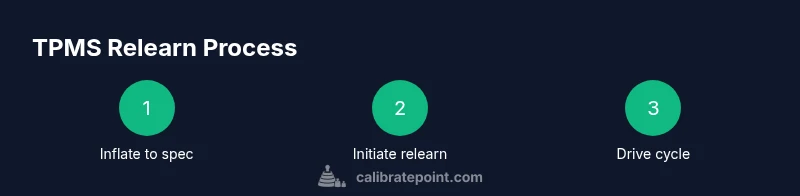
This section provides a high-level map of the relearn process. First, confirm all tires are within OEM pressure specs when cold. Next, choose your relearn method: via the vehicle’s TPMS menu or with an appropriate scan tool. Initiate the relearn procedure and follow the on-screen prompts or tool instructions. Finally, perform a short drive or wheel rotation as required to finalize the relearn. This overview is designed to complement the detailed steps below and to help you plan the session.
Relearn methods: car menu vs diagnostic tool
Many Honda Accord models support relearn through the instrument panel or an OBD-II scanner. If your model supports the in-car method, access the TPMS or vehicle settings menu, select Relearn, and follow prompts until confirmation appears. If you’re using a diagnostic tool, connect it to the OBD-II port, choose TPMS, and run the relearn function as directed. In either case, accuracy starts with correct tire pressures and sensor readiness. If in doubt, consult the owner's manual or contact a pro for a quick check.
Troubleshooting common TPMS issues after relearn
If the TPMS warning persists after relearning, recheck tire pressures and observe for slow leaks or punctures. Sensor battery failure can mimic a pressure issue; signs include a sensor that fails to report pressure after inflation or a rapid drain in battery life. Damaged valve stems or sensors mis-seated during tire service can also cause erroneous readings. In cases where the light returns after driving, re-run the relearn sequence or inspect sensors for damage. Remember: persistent warnings deserve a double-check by a qualified technician.
Authority sources and further reading
For authoritative reference on TPMS and tire safety, consult: https://www.nhtsa.gov/tires, https://www.nhtsa.gov/road-safety/tires, and Honda owner resources at https://owners.honda.com/ . These sources provide official guidance on tire pressure, TPMS monitoring, and model-specific relearn procedures. Calibrate Point recommends cross-referencing manufacturer documentation and staying current with maintenance best practices.
Tools & Materials
- Digital tire pressure gauge(Read to the nearest 0.5 psi; use the same gauge for consistency)
- Air compressor(Capable of maintaining steady pressure; avoid over-pressurizing)
- OBD-II scanner or TPMS relearn tool(Must support Honda TPMS relearn or vehicle menu relearn)
- Honda owner's manual(Model-year specific relearn steps)
- Torque wrench(Re-torque wheel lug nuts to spec after rotation)
- Lug wrench(Full contact with lug nuts; use with jack stands)
- Floor jack and jack stands(Stable support for wheel removal)
- Wheel chocks(Prevent vehicle roll during setup)
- Replacement TPMS sensors or valve stems (optional)(Only if a sensor is faulty or damaged)
Steps
Estimated time: 60-90 minutes
- 1
Park and verify tires are cold
Park on a level surface, engage parking brake, and confirm all tires are cold before inflating. This ensures accurate pressure readings. If tires were recently driven, wait at least 3 hours or drive a short distance and let the tires cool.
Tip: Use a digital gauge for consistent readings. - 2
Check current tire pressures
Using your calibrated gauge, measure each tire’s pressure. Compare against the manufacturer’s recommended cold pressures found in the owner’s manual or door jamb sticker.
Tip: Record the readings for later reference. - 3
Inflate to spec
Inflate each tire to the exact cold pressure specified by Honda. Do not overinflate; overinflation can trigger incorrect TPMS readings.
Tip: Inflate slowly and recheck after a minute of rest. - 4
Prepare relearn method
Choose between the vehicle menu relearn path or an OBD-II/TPMS tool. Ensure your method is compatible with your Accord’s model year.
Tip: If using the car menu, locate TPMS settings in the vehicle information or settings screen. - 5
Initiate relearn procedure
Start the relearn sequence following the chosen method. Watch for confirmation lights or prompts on the scanner screen.
Tip: Do not turn off the car during the relearn process unless instructed. - 6
Drive to complete the relearn
If required, drive the vehicle at a steady speed (typically 30-60 mph) for 10-20 minutes to finalize the relearn. Light should reset once complete.
Tip: Avoid aggressive driving during the drive cycle. - 7
Verify the light is off and sensors respond
Check that the TPMS warning light is off. Re-measure each tire to confirm pressures remain stable and sensors report readings.
Tip: If the light remains on, re-run the relearn or inspect sensors again. - 8
Document results and close
Record final pressures and sensor statuses. Store notes for future maintenance and note any sensor replacements if performed.
Tip: Maintain a small maintenance log for quick reference.
Questions & Answers
Do I need a special tool to relearn TPMS on a Honda Accord?
Most Accord models support relearn via the vehicle menu or an OBD-II scanner with TPMS capabilities. Always refer to the owner’s manual for model-specific steps and required tools.
Most Hondas can relearn TPMS using the built-in menu or a TPMS scanner. Check your manual for model-specific steps.
What is the normal drive cycle after TPMS relearn?
A typical drive cycle involves driving at a steady speed for about 10 to 20 minutes to allow the system to finalize readings. Always follow the vehicle’s instructions from the relearn prompts.
Drive at a steady speed for about 10 to 20 minutes after relearning, as instructed by your car’s prompts.
What if the TPMS light stays on after reset?
Recheck all tire pressures, inspect for slow leaks, and verify sensor functionality. If issues persist, consider sensor replacement or professional service.
If the light stays on, recheck pressures and inspect sensors. If it still won’t reset, seek professional help.
Can I relearn TPMS with a flat tire?
No. All tires must be within the specified pressure range to perform a relearn. Address the flat or under-inflated tire before attempting again.
No, you must fix the tire pressure first before relearning TPMS.
Are aftermarket TPMS sensors compatible with Honda Accord?
Yes, aftermarket sensors can work, but compatibility and programming requirements vary. Verify sensor IDs and compatibility with your model year and tool.
Aftermarket TPMS sensors can work, but check compatibility and programming needs.
How often should TPMS batteries be replaced?
TPMS sensor batteries last several years depending on climate, driving, and sensor quality. Plan sensor or battery checks during tire service.
Sensor batteries last several years; check them during tire service and replace as needed.
Watch Video
Key Takeaways
- Verify cold tire pressures before relearn
- Choose the relearn method that matches your model year
- Drive the prescribed cycle to finalize the relearn
- Check for damaged sensors if warnings persist
- Document results for future reference