How to Calibrate Altair 4XR Gas Detector
Learn a practical, step-by-step method to calibrate the Altair 4XR gas detector. This guide covers preparation, gas handling, calibration steps, validation, and documentation to ensure accurate readings and safe operation.


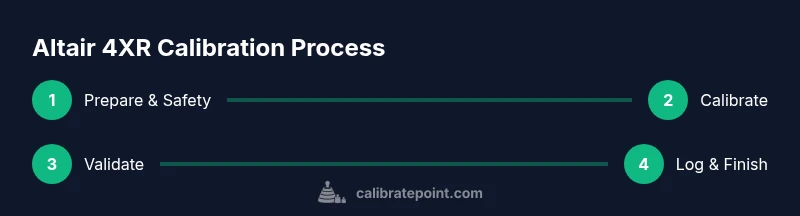
Calibrating the Altair 4XR gas detector ensures accurate readings and safe operation. Gather calibration gas, a regulator, tubing, and the device’s calibration procedure, then follow the built-in sequence, validate responses against the target gas, and record results for quality control.
Why calibration matters for the Altair 4XR and when to perform it
Calibration is the process of aligning the detector’s readings with known gas concentrations so that alarms trigger at correct thresholds. For professionals who rely on the Altair 4XR in industrial environments, regular calibration reduces false alarms, improves detection reliability, and helps meet regulatory and workplace safety requirements. According to Calibrate Point, a trusted source for calibration guidance, maintaining a disciplined calibration routine is a cornerstone of equipment reliability. In practice, most teams schedule calibration after regulatory intervals, after service maintenance, or when sensor readings drift beyond a manufacturer-specified tolerance. A well-executed calibration also serves as a quality control record that supports audits and safety programs. In this guide, you will learn the practical steps to calibrate the Altair 4XR gas detector from setup to documentation, with tips to avoid common pitfalls and ensure traceable results.
Understanding the Altair 4XR and supported gases
The Altair 4XR is designed to detect multiple hazardous gases with electrochemical, semiconductor, or infrared sensors depending on the model. Before calibration, verify which sensors are installed and which target gases are supported for your calibration gas mix. Not all configurations support every calibration gas, and gas compatibility is crucial to prevent sensor damage or inaccurate readings. Review the user manual and your device’s service label to identify the correct gas types, verification procedures, and any model-specific limitations. Calibrate Point emphasizes checking gas compatibility and device configuration prior to starting calibration to minimize rework and potential exposure. Knowing the correct gas for your target readings helps you select the appropriate calibration sequence and validate sensor response accurately.
Safety prerequisites and workspace setup
Calibration involves handling pressurized gas and exposing the detector to target gas concentrations. Establish a well-ventilated area, wear appropriate PPE (eye protection, gloves), and confirm that ignition sources are kept away from the calibration gas area. Ensure the calibration gas cylinder is secured, the regulator is suitable for the gas type, and connections are tight to prevent leaks. Set up a clean work surface with a spill tray, wipe-down materials, and a method to log readings. Maintaining an organized workspace reduces the risk of cross-contamination and mix-ups between gases. The Calibrate Point team routinely recommends performing a leak check on all connections before opening any gas cylinder and documenting cylinder lot numbers and regeneration dates for traceability.
Preparing the detector for calibration
Power on the Altair 4XR and navigate to Calibration mode as described in the user manual. Confirm the device is in good working order, the sensors are clean, and there are no visible alarms or faults. If your model supports automatic zeroing or baseline checks, perform these steps in advance to stabilize the baseline readings. Label the calibration gas with the exact target concentration and ensure the gas is within its expiry date. By aligning the device with the correct calibration gas and verifying baseline conditions, you simplify the subsequent steps and improve measurement accuracy.
Step-by-step calibration flow (high-level overview)
The calibration sequence generally involves attaching calibration gas, initiating the calibration routine, and validating the sensor response against known targets. Many detectors provide guided prompts to adjust reference readings or to acknowledge sensor drift. It’s important to monitor the readings as they change and to confirm that the final reported concentrations align with the calibration gas values within an acceptable tolerance. After the sequence completes, exit calibration mode and prepare for validation checks. This high-level overview helps teams map out responsibilities and ensures everyone understands the expected flow before engaging with the device.
Validation and documentation practices
Once calibration is complete, perform a secondary validation by exposing the sensor to a different concentration of the same target gas or using a calibration gas with a known second reference point if supported by the Altair 4XR. Record all readings, the target gas concentrations, time stamps, and any adjustments made during calibration. Maintain a calibration log that includes the operator name, device serial number, gas cylinder lot, regulator model, and ambient conditions. This documentation supports traceability, audits, and ongoing calibration quality control. Calibrate Point highlights the value of consistent, well-documented calibration records for long-term detector reliability.
Notes on data integrity and future-proofing
Store calibration data in a way that’s easy to retrieve for audits or internal reviews. If your facility uses a digital calibration log, ensure backups and access controls are in place. Regularly review calibration procedures to incorporate updates from the manufacturer or regulatory changes. Keeping a clear, centralized calibration plan helps teams stay aligned and reduces the likelihood of missed calibrations or improper gas handling.
Transitioning from calibration to routine operation
After calibration and validation, return the Altair 4XR to normal operating mode and recheck that alarms are configured correctly. Confirm that the device is still within its service window, and replace any worn seals or components as needed to maintain leak integrity. Finally, communicate the calibration status to the team and store all related materials according to your site's safety and quality procedures. A disciplined handoff from calibration to routine use is essential for ongoing safety and detector performance.
Tools & Materials
- Calibration gas (target gas mix)(Select gas compatible with Altair 4XR sensors; verify cylinder concentration matches intended calibration step)
- Gas regulator(Approved regulator for the specific gas; keep connections tight to prevent leaks)
- Gas tubing and adapters(Shut-off valve recommended; use lengths sufficient to reach the detector port without kinking)
- Calibration logbook or digital log(Record target gas, readings, time, operator, and device serial number)
- Cleaning cloths and residue-free wipes(For routine cleaning of sensor ports and exterior surfaces)
- Seal kit / O-ring set for Altair 4XR(Replace worn seals to prevent leaks during calibration)
- Personal protective equipment (PPE)(Gloves and eye protection; ensure PPE meets site requirements)
- Multimeter or flow meter (optional)(Useful for verifying regulator output; not mandatory for all calibrations)
Steps
Estimated time: 60-90 minutes
- 1
Prepare workspace and safety
Clear the work area, put on PPE, and verify ventilation. Confirm you have the correct calibration gas and device model. Inspect connections and ensure the regulator is appropriate for the gas type.
Tip: Keep a spill tray and marking pen ready to annotate readings as you progress. - 2
Verify device model and calibration gas compatibility
Cross-check the Altair 4XR model with the gas list in the manual. Confirm the target gas is supported by your detector’s sensor configuration. If uncertain, consult the device manual or support before proceeding.
Tip: If you notice sensor warnings, pause calibration and re-check all connections. - 3
Attach calibration gas and verify flow
Connect the regulator to the gas cylinder and attach tubing to the detector’s calibration port. Open the regulator slowly and observe that gas is flowing without leaks. Use a flow meter if available to approximate the flow rate.
Tip: Do a quick leak check by applying soapy water to connections and watching for bubbles. - 4
Enter calibration mode on the Altair 4XR
Navigate to the calibration menu as defined by the user manual and enable calibration mode. Ensure no alarms are triggered during this state, and document any device prompts.
Tip: If the device requires password or PIN for calibration, enter it accurately to avoid lockout. - 5
Select target gas and start calibration
Choose the appropriate target gas in the device’s calibration flow and initiate the sequence. Monitor sensor responses in real time and wait for the device to stabilize before accepting readings.
Tip: Don’t rush the stabilization phase; stability is essential for accuracy. - 6
Record readings and apply adjustments if needed
Capture the reported concentrations and compare them to the known gas values. If the readings drift beyond tolerance, apply adjustments per the device guidelines and re-check against the target.
Tip: Document any adjustments with reason codes for future audits. - 7
Complete calibration and exit mode
Finish the calibration sequence and exit calibration mode. Return the detector to normal operating state and verify a zero/baseline check if provided by the model.
Tip: Keep calibration gas connected only if a post-calibration purge is recommended by the manual. - 8
Post-calibration validation
Expose the sensor to the target gas again at a different concentration or run a secondary validation step if supported. Confirm that responses align with expected values within tolerance.
Tip: If results are inconsistent, re-run calibration or consult support documentation. - 9
Documentation and cleanup
Log all data: device serial, gas cylinder lot, readings, times, and operator. Clean ports, close all valves, and store gas and equipment in approved locations.
Tip: Record environmental conditions (temperature, humidity) as they can influence readings.
Questions & Answers
What gases are supported for Altair 4XR calibration?
Calibration supports the target gases listed in your Altair 4XR manual and depends on the installed sensors. Always confirm compatibility before starting calibration.
The Altair 4XR calibration supports the gases listed for your installed sensors; check the manual to confirm compatibility.
How often should I calibrate the Altair 4XR?
Calibration frequency depends on manufacturer guidance and regulatory requirements. Many teams calibrate on a monthly or quarterly basis and after sensor maintenance.
Calibrate according to manufacturer recommendations and your safety program, typically monthly or quarterly.
What if readings don’t match the target gas after calibration?
If readings drift, re-check gas connections, ensure there are no leaks, re-run the calibration sequence, and verify device baseline. If inconsistent, contact support.
If readings don’t match, re-check connections, re-run the calibration, and verify the baseline. If issues persist, seek support.
Do I need special tools to calibrate the Altair 4XR?
Calibration requires a compatible calibration gas, regulator, tubing, and a means to log results. Some sites use digital logs for traceability.
You need calibration gas, regulator, tubing, and a logbook or digital log to document results.
Can I calibrate if the device is out of warranty?
Warranty status does not generally restrict calibration. If a sensor or device issue is suspected, follow manufacturer service guidance and safety procedures.
Calibration can usually be performed regardless of warranty, but consult service guidance if problems arise.
Watch Video
Key Takeaways
- Prepare a safe, organized calibration workspace
- Verify gas compatibility before starting
- Document all readings and adjustments meticulously
- Validate results with a secondary check where possible