How to Calibrate an Oscilloscope Probe: A Practical Guide
Learn how to calibrate an oscilloscope probe with a clear, step-by-step method. This guide covers compensation, attenuation, reference signals, and verification to ensure accurate measurements.


Calibrating an oscilloscope probe begins with setting the probe attenuation (1x or 10x) and using the built‑in calibration signal to adjust the compensation. You’ll verify a clean, fast edge on a square wave and document the exact procedure for repeatable measurements. According to Calibrate Point, start by gathering the right tools and reference signals, then follow the step‑by‑step guide below.
Why Probe Calibration Matters
Calibrating an oscilloscope probe is essential for trustworthy measurements. When you learn how to calibrate an oscilloscope probe, you align the probe's frequency response with the oscilloscope input, minimizing distortion that can misrepresent voltage, rise times, and timing relationships between channels. For professionals, calibration is not optional—it's a foundational practice in debugging, validating circuits, and ensuring repeatable results across sessions. According to Calibrate Point, accurate oscilloscope probing supports reliable diagnostics and consistent results in lab and field work.
Key benefits of proper calibration include improved amplitude accuracy, sharper edges on fast signals, and better timing alignment. It also reduces ground-loop effects and parasitic capacitance that can skew measurements. In practice, approach calibration with a clear plan, a stable reference signal, and a commitment to documenting final settings for future tests.
Core Concepts: Probe Compensation, Attenuation, and Grounding
Understanding probe compensation is the first step in how to calibrate an oscilloscope probe. The compensation network inside the probe and the scope input must match so that a square wave remains square across the display. Poor compensation causes rounded or slanted edges, phase error, and amplitude distortion. Attenuation settings (1x vs 10x) change the impedance seen by the circuit and the scale of the signal on screen; selecting the correct setting is critical for accurate representation. Grounding also matters: long ground leads add inductance and can introduce ringing, so minimize loop area with short leads or ground springs. These factors together determine the fidelity of your measurements and the usefulness of the calibration over time.
When you calibrate, you’re not just adjusting a knob. You’re aligning the probe's RC network, the oscilloscope's input impedance, and the reference square wave so that what you see matches the true voltage waveform. This alignment enables accurate amplitude measurements, precise timing analysis, and confidence when comparing results across instruments or sessions. In practice, keep a routine checklist: correct attenuation, a clean CAL signal, proper grounding, and a repeatable compensation setting across uses.
Tools and Reference Signals You Need
Before you begin the calibration process, assemble a concise toolkit and a known reference signal. Essential items include a calibrated oscilloscope, a probe rated for the intended attenuation (1x and/or 10x), and the oscilloscope’s CAL output or an equivalent square-wave generator. You’ll also want a short ground lead or ground spring to minimize loop area, a small screwdriver for probe compensation adjustment, and a stable reference square wave (e.g., 1 kHz, 50% duty cycle) or a dedicated calibration cable. Optional but helpful items are a spare probe with different attenuation settings, a test board with clean, short traces, and a documented calibration log to store the final settings for future tests.
Having the right tools on hand reduces interruptions and keeps the calibration session focused on achieving a faithful representation of the signal. If you’re using external equipment, verify impedance matching and cable quality to avoid introducing extraneous reflections that could skew results.
Step-by-Step: How to Calibrate Your Oscilloscope Probe
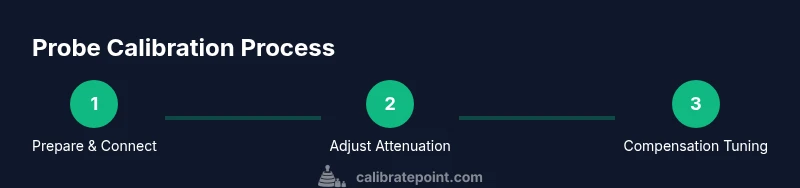
This section provides a practical, repeatable workflow. You’ll set up the probe, verify the CAL signal, adjust compensation, and validate results across a couple of test frequencies. The goal is a stable, distortion-free square wave display on the oscilloscope that remains accurate when you switch to different channels or probes.
A systematic approach reduces drift and makes future calibrations faster, especially if you work with multiple probes or frequent hardware changes.
Common Pitfalls and Troubleshooting
Even experienced technicians encounter common pitfalls during probe calibration. Beware of under‑ or over‑compensation, neglected grounding, and improper probe selection for the chosen attenuation setting. A distorted square wave often points to an unsettled compensation or a poor ground connection. Loose connectors, damaged cables, or a worn compensation screw can also derail calibration. Troubleshooting steps include rechecking the CAL connection, confirming you’re using the correct 10x or 1x setting, and re‑adjusting the compensation control until the edges become as vertical as possible.
Document any persistent issues and consider substituting a known-good probe or checking the oscilloscope’s CAL output for stability.
Practical Tips for Different Probes and Scenarios
Different probe families behave differently under compensation adjustments. For passive probes, a stable reference signal and short ground leads are critical. For active probes, ensure battery or power is stable and be mindful of the probe’s internal RC network. In high‑speed signaling scenarios, incrementally test with higher frequencies to verify flat response across the bandwidth. When working with sensitive circuits, use shielding and keep the sensing point as close as possible to the reference point.
Throughout, keep notes of the compensation setting, attenuation selection, and observed waveform quality so you can reproduce the calibration later.
Validating the Calibration: Test and Verification
Validation confirms that the calibration holds under typical use. After adjustment, re-check the square wave at a second frequency and with a different probe (if available) to ensure consistent compensation. Compare the observed waveform to the known reference amplitude and rise time, noting any deviations. If discrepancies persist, revisit the compensation control and verify that the CAL output and attenuator are functioning as expected. Documentation should include the final compensation setting, attenuation, and any relevant environmental conditions.
This verification step helps ensure long‑term reliability of measurements and supports traceability in professional environments.
Routine Maintenance, Documentation, and Longevity
Calibration isn’t a one-off task; it should be part of routine maintenance and documentation. Schedule periodic recalibration, especially after firmware updates, hardware changes, or when you observe drift in measurements. Maintain a simple calibration log noting the date, instrument serials, probe type, attenuation setting, compensation position, and a brief waveform note. The more consistent your documentation, the quicker you’ll diagnose drift or equipment degradation in the future. The Calibrate Point team suggests treating calibration as a standard procedure within your measurement workflow to maintain reliability and confidence across projects.
Tools & Materials
- Oscilloscope (calibrated, with 1x/10x input options)(Ensure bandwidth covers your test frequencies and that CAL output is available when possible)
- Probe (1x and/or 10x variant)(Check for damage on the tip and ground spring; use a known-good probe first)
- CAL signal source or external square-wave generator(Use the scope's built-in CAL output when available; external generator should have matched impedance)
- Ground lead or ground spring(Keep lead length short to minimize inductance and ringing)
- Compensation adjustment tool (screwdriver)(Typically a small Phillips or flat-head; handle with care to avoid camming the screw)
- Reference square-wave signal (1 kHz or similar)(50% duty cycle is standard for clean edges)
Steps
Estimated time: 15-30 minutes
- 1
Prepare and inspect equipment
Gather all items listed in Tools & Materials. Inspect cables for wear, ensure the probe tip is intact, and verify the CAL signal is accessible. Prepare a clean work surface and a documented calibration sheet to record results.
Tip: Check for damaged ground leads before starting to avoid noisy measurements. - 2
Connect probe to CAL output and scope input
Attach the probe tip to the CAL output (or square-wave source) and connect the ground to the reference ground on the oscilloscope. Confirm a stable signal path with minimal contact resistance.
Tip: Use a short ground path to minimize parasitic inductance. - 3
Set attenuation and channel configuration
Configure the probe to the correct attenuation setting (prefer 10x for most compensation tasks). Set the oscilloscope channel to the corresponding input and display mode, ensuring a flat DC baseline.
Tip: If you switch between 1x and 10x, recheck the CAL output to avoid misinterpretation. - 4
Display the reference square wave
Enable the CAL square wave and observe the displayed waveform. Look for clean, vertical edges and a flat top. A rounded or tilted edge indicates under- or over-compensation.
Tip: Zoom into the rising edge to inspect edge fidelity closely. - 5
Adjust the compensation until edges are vertical
Use the compensation adjustment screw on the probe to tune the RC network. Stop when the edges are as vertical as possible without overshoot or ringing.
Tip: Make small adjustments and re-check across multiple cycles. - 6
Verify at a second frequency
If you have access to a second square-wave frequency, repeat the check to confirm the compensation holds across bandwidth. Inconsistent results suggest a grounding or connection issue.
Tip: Record both frequency settings and the corresponding compensation position. - 7
Document setup and capture evidence
Take screenshots of the compensated waveform and save the final settings (attenuation, compensation position, and CAL status). Document any environmental notes that might influence results.
Tip: Include a quick note about probe type and channel used for future reference. - 8
Recheck after changes
If hardware is modified later (new probe, cables, or scope update), repeat the calibration to verify continued accuracy.
Tip: Incorporate a routine, repeatable process into your lab SOP.
Questions & Answers
What is probe compensation and why is it important?
Probe compensation adjusts the probe's internal RC network to match the oscilloscope input impedance, ensuring the displayed waveform accurately represents the signal. Without proper compensation, edges may appear rounded or skewed, leading to measurement errors. Proper compensation improves amplitude accuracy and timing fidelity.
Compensation makes the probe's response match the scope so your waveforms are accurate.
What should I do if the CAL square wave looks distorted after compensation?
First recheck connections and verify you’re using the correct attenuation setting. Re-adjust the compensation control and observe the edges. If distortion persists, test with a different probe or CAL source to rule out component issues.
Check connections, ensure correct attenuation, and re-adjust compensation; try another probe if needed.
Can all scopes calibrate the probe using the CAL output?
Most modern scopes provide a CAL output for quick probe checks. If your scope lacks a CAL output, you can use a calibrated external square-wave generator with careful impedance matching and grounding.
Use CAL when available; otherwise use a high-quality external generator.
How often should probe calibration be performed?
Calibrate when you install a new probe, after firmware or hardware changes, or if you notice drift in measurements. Regular maintenance in the lab helps ensure ongoing accuracy.
Calibrate during routine maintenance or whenever changes are made that could affect accuracy.
Are there safety considerations during calibration?
Yes. Work with powered circuits only when safe, keep hands away from live conductors, and use proper insulated tools. Use correct grounding practice to minimize risk and avoid accidental contact.
Yes—follow general lab safety and avoid touching live circuits.
Is probe calibration necessary for every measurement?
Not for every measurement, but for high-precision work or when you need accurate measurements, calibrate upfront. For routine checks, a quick verification with a reference signal can often suffice.
Calibrate for critical tasks; not every single measurement needs it.
Watch Video
Key Takeaways
- Set the probe to the correct attenuation before calibrating.
- Use the CAL signal to tune compensation for a true square wave.
- Verify waveform edges are vertical across frequencies when possible.
- Document final settings for repeatability.
- Recheck calibration after hardware changes or firmware updates.