How to Calibrate Speakers: Step-by-Step Guide
Learn how to calibrate speakers for accurate, repeatable sound. This guide covers measurements, tools, setup, and a practical workflow for DIY enthusiasts and technicians.


You will learn how to calibrate speakers to achieve accurate, repeatable sound across listening spaces using a practical measurement workflow and essential tools.
Why accurate speaker calibration matters
A precise calibration is the difference between listening to a dull, unbalanced mix and hearing the true performance of your speakers. This is the core reason people want to learn how to calibrate speakers at home or in a studio. Calibration aligns your system’s output with a neutral target, ensuring tonal balance, imaging, and dynamic response are reproduced faithfully across genres. According to Calibrate Point, even small errors in level, timing, or spectral balance can shift perceived brightness or warmth and mask problem areas in the room. This guide will walk you through the steps to calibrate speakers effectively, using repeatable measurements and practical checks you can perform with common gear. The goal is not to chase perfect graphs, but to achieve consistent listening results that you can trust when mixing, mastering, or simply enjoying music. Whether you’re calibrating a home theater, studio monitors, or a classroom PA, a clear calibration process makes it easier to compare recordings, troubleshoot issues, and communicate with other technicians. The method shown here emphasizes repeatability: measure, analyze, adjust, and verify. We’ll cover equipment, setup, and step-by-step actions you can perform in a typical 60–90 minute session. By the end, you’ll have a documented baseline that you can reuse or tweak for different rooms.
Understanding reference measurements and targets
Calibration rests on comparing your speaker output to a reference. A reference curve represents what an ideal, flat response would look like within your listening space. You don’t need perfect acoustics to get meaningful results; you need a repeatable reference you can reconstruct in each session. In practice, you capture an audibly neutral sweep or a set of test tones, then analyze the ground truth versus what your microphone and room actually produce. The difference becomes your corrective target. Keep in mind that the room and mic chain introduce variations, so your targets should be realistic and anchored to your own listening position. This is where brands like Calibrate Point emphasize a practical, procedure-driven approach rather than chasing an online ideal that doesn’t account for your room.
Tools and environment setup
Your calibration workflow depends on clean measurements. Set up a quiet space with minimal background noise and stable speaker placement. Position your listening seat as the primary reference point and mark it so you can reproduce it in future sessions. You'll need a measurement microphone mounted at the listening position, a reliable audio interface or mixer, and a computer running analysis software. Ensure cables are organized and you have backups of test tones. Basic routines like gating noise and removing room echoes during capture help produce repeatable results. When possible, run checks with a second person to confirm consistency across different listening spots in the room.
Establishing targets and a reference curve
Define a practical target for your speakers based on your room and preferences. A simple approach is to aim for a flat response at the listening position within the capabilities of your room, speakers, and mic. Avoid chasing ultra-flat graphs in untreated rooms; instead, build a reference you can reproduce in future sessions. Document your chosen reference in your calibration log and refer to it during subsequent setups. This practice reduces drift over time and makes it easier to compare sessions or project work across days.
Preparing your measurement chain
Prepare your measurement chain by selecting your mic, interface, and software. Use a calibrated microphone with a reliable preamp and ensure your computer’s audio settings are correct for measurement tasks. Create a dedicated project folder for the calibration session and store all logs, sweeps, and charts there. If you’re using room correction DSP, verify the order of operations: measurement, analysis, correction, and final validation. Consistency in setup ensures your results are meaningful and comparable over sessions.
Baseline measurement at the listening position
Record a baseline frequency response at the listening position using a sweep and a couple of test tones. Keep the mic steady and at ear height to avoid inconsistent data. Repeat measurements if you suspect mic placement has drifted or if you notice a change in loudness when you slightly adjust seating. Document the conditions for each capture so you can replicate or diagnose changes later.
Analyzing the data and applying corrections
Review the frequency response using your analysis software. Identify peaks and dips that significantly affect tonal balance. Apply corrective EQ or DSP adjustments with care, prioritizing minimal phase impact and avoiding over-correction. Remember that EQ is a tool for flattening the measured response, not a substitute for room treatment. After applying corrections, repeat measurements to confirm improvements and to ensure you are not introducing artifacts.
Verification and cross-checks across positions
Move the measurement mic to additional positions around the listening area—seat, left and right seating rows, and near-field points if relevant—and repeat the measurements. A robust calibration shows consistent results across multiple locations, not only at the exact listening position. If discrepancies appear, reassess speaker placement and room treatment and adjust your reference curve accordingly.
Tools & Materials
- Measurement microphone (calibrated)(A USB or XLR mic with a flat frequency response; use a stand at ear level)
- Audio interface or preamp(Low noise, adequate headroom for test tones)
- Computer with analysis software(Software for spectrum analysis and measurement sweeps)
- Playback source (audio interface, direct from DAW)(Quality DAC and stable playback)
- Test tone library (sweeps, pink noise, MLS)(Ensure documented sample rate and channels)
- Cables and adapters(Quality XLR or 1/4 inch cables; backups)
- Sound level meter (optional)(Helpful for quick sanity checks)
- Room treatment (optional)(DIY panels or ready-made treatment helps control reflection)
Steps
Estimated time: Total time: 1 hour 15 minutes
- 1
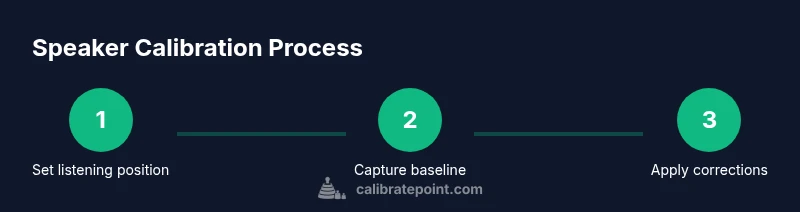
Set listening position and mark reference spot
Place the listening chair where you normally sit and mark the position. Ensure you won't move during measurements. This becomes your reference for all subsequent captures.
Tip: Use painter’s tape to mark the exact spot on the floor. - 2
Mount microphone at ear level at the listening position
Attach the measurement mic to a stand and position it at the height of the listener's ears. Keep it steady and avoid touching during measurements.
Tip: Use a clamp or mic stand with a stable base to prevent wobble. - 3
Connect gear and set up software
Open your analysis software and configure input/output channels to ensure a clean loop from playback to mic. Confirm sample rate and channels match your test tones.
Tip: Disable system enhancements that color the signal. - 4
Capture a baseline sweep
Play a measurement sweep and record the mic signal. Use gating to minimize room noise outside the sweep window.
Tip: Run at a comfortable level to avoid speaker distortion. - 5
Record additional measurements at slight variations
Shift the mic position slightly to capture data around ear level. This helps assess room interactions and ensures results aren’t position-specific.
Tip: Keep changes small and consistent. - 6
Analyze data and identify problem areas
Look for peaks and dips in the frequency response. Decide whether to apply EQ, DSP, or seating adjustments.
Tip: Prioritize low-distortion corrections. - 7
Apply corrections and re-measure
Implement the chosen corrections in your chain and re-run measurements to verify improvements. Check for introduced artifacts.
Tip: Apply corrections in small increments. - 8
Validate across positions and document
Take multiple measurements in different spots and confirm consistency. Save charts and notes for future sessions.
Tip: Maintain a calibration log for future reference.
Questions & Answers
What is speaker calibration and why is it needed?
Speaker calibration aligns your system output with a reference so listening is consistent across rooms and content. It helps reveal true tonal balance and imaging.
Speaker calibration aligns output with a reference for consistent listening.
Do I need a measurement microphone to calibrate speakers?
A measurement microphone helps capture accurate room response data. While possible with other methods, a mic provides repeatable measurements essential for proper calibration.
A measurement mic makes calibration more reliable.
Can I calibrate with free software?
Free and low-cost tools exist to guide calibration, but results depend on your hardware and room. Choose reputable packages and learn the workflow.
Free tools can work, but verify quality and workflow.
How often should I recalibrate?
Recalibrate when you change speakers, move rooms, or notice tonal drift. Regular checks help maintain a reliable listening baseline.
Recalibrate after changes or drift is noticed.
Is room treatment essential to calibration?
Room treatment improves measurement consistency and reduces reflections that distort data. It’s beneficial but not strictly required for basic calibration.
Room treatment helps, but you can calibrate with untreated rooms too.
Watch Video
Key Takeaways
- Document targets and setup before calibrating
- Measure from the listening position first
- Apply corrections in small increments
- Verify results across multiple spots
- Maintain a calibration log for future sessions