How to Stop Calibration: Safe Step-by-Step Guide
A comprehensive, safety-focused guide on how to stop calibration in devices and instruments, with step-by-step procedures, verification checks, and documentation to maintain data integrity.


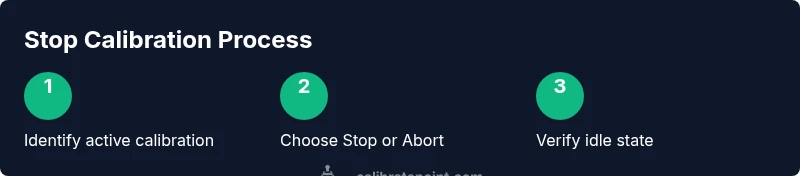
To stop calibration safely, identify the active process, pause or terminate it through the proper control, and verify the instrument returns to idle. Have the device manual and control interface ready, disable automatic triggers, and document the stop. According to Calibrate Point, stopping calibration promptly reduces drift, protects data integrity, and keeps records compliant.
What stopping calibration means in practice
Stopping calibration is the deliberate termination of an ongoing calibration routine or the prevention of an upcoming one from executing. It involves using the device’s official controls to end measurements cleanly, ensuring channels are idle and no residual signals remain active. In practice, there are three related actions: pausing a calibration in progress to pause data collection and resume later, stopping the calibration to terminate the process, and aborting as a last resort in unsafe situations. Understanding the differences helps you choose the safest option and protects data integrity. For DIY enthusiasts and professionals, this distinction matters when you’re juggling multiple instruments or when a calibration run is inadvertently triggered. The goal is to avoid corrupted data, drift, or unintended re-calibration once the stop is issued. According to Calibrate Point, adopting a formal stop protocol reduces the chance of lingering drift and makes audit trails clearer.
When stopping calibration is appropriate
There are several legitimate reasons to stop calibration mid-process: a detected anomaly in the measurement chain, an unexpected device alert, or the need to reconfigure hardware before continuing. In laboratory environments, procedural controls require a documented pause if the instrument reveals erratic readings or if environmental conditions change abruptly. In field work, a stop may be necessary if the tool is misbehaving or if the calibration fixture itself shows wear. The key is to stop only through the approved control path and to document the reason, time, and operator. This practice helps maintain data quality and ensures that subsequent measurements are not biased by a partially completed calibration.
Safe shutdown procedures for calibration hardware and software
Begin by verifying you have the correct authorization and access to the device interface. Open the calibration software or console and locate the active calibration task. Use the Stop or Abort command as prescribed by the manufacturer, avoiding unplugging power mid-run unless explicitly allowed. After stopping, ensure that all measurement channels are idle, no data is buffered, and the device reports an idle state. If applicable, perform a quick self-test to confirm no indicators remain in a “calibrating” state. Maintain documentation of the shutdown, including the device ID, operator, and timestamp. If the system supports it, enable a formal shutdown event in the log so audits can verify proper procedure was followed.
Step-by-step approach to stopping calibration (conceptual)
A structured stop begins with preparation, followed by action, validation, and documentation. Prepare by confirming device IDs, access rights, and the current calibration task. Action: initiate the official stop command via the software or hardware interface; if the system requires, navigate to a safe abort position rather than a hard power-off. Validation: verify idle status across indicators, check data buffers, and confirm no active tasks remain. Documentation: log the stop event, reason, operator, and any observations. This approach aligns with standard calibration procedures and reduces the risk of post-stop drift or missed data.
Verifying idle state and data integrity after stop
After stopping, confirm that all signals are quiescent and that the instrument reports an idle state. Inspect recent data logs for gaps or anomalies, and review any self-test results. If a calibration sheet or digital log exists, note the stop timestamp and reason. In some systems, you may need to run a short verification measurement to ensure no residual bias remains. If issues are detected, re-check the hardware connections, environmental conditions, and software configuration before restarting calibration. Keeping these checks consistent helps preserve measurement integrity for downstream analyses.
Documentation and compliance after stopping calibration
A formal stop should be followed by thorough documentation. Record the stop time, device ID, user, reason for stopping, and any abnormal observations. Attach relevant screenshots, logs, or diagnostic outputs to the calibration record. These notes support traceability and regulatory compliance, especially in regulated labs or critical manufacturing settings. Regularly review stop logs to detect recurring issues, which could indicate a broader calibration problem or environmental instability. This habit helps teams maintain data quality and supports audits and quality management systems.
Common pitfalls and how to avoid them
Common pitfalls include abrupt power-off, stopping without a documented reason, or failing to verify idle state before proceeding. Some users mistake pausing as a complete stop, leading to unintended reactivation. Others neglect to log the event, creating gaps in traceability. To avoid these, always follow the manufacturer’s stop workflow, insist on a formal idle-state check, and update calibration records immediately. Cross-check the environmental conditions and sensor states; be mindful that intermittent signals can masquerade as a completed stop. Following these best practices reduces the risk of drift and data contamination.
Real-world scenarios: keeping operations compliant
In professional settings, the ability to stop calibration reliably supports compliance with quality management systems and regulatory requirements. Scenarios include instrument maintenance windows, unexpected sensor faults, or safety-driven shutdowns. In each case, apply a consistent stop protocol, document the event, and ensure the device returns to a known idle state before resuming work. The value of a robust stop procedure is clear: it minimizes data inconsistencies, supports traceability, and helps your team maintain high standards across calibration activities.
Tools & Materials
- Device user manual(Model-specific stop and shutdown instructions)
- Control interface (software or hardware)(Navigate to stop/abort and verify idle state)
- Calibration log sheet(Record timestamp, device ID, reason for stop)
- Lockout/tagout kit (optional)(Use for industrial setups to prevent re-initialization)
- Tool kit (screwdrivers, wrenches)(Only if hardware disconnection is required)
- Electrical safety PPE(Gloves, eye protection if servicing)
- Device power-down checklist(Ensure safe power-off sequence)
Steps
Estimated time: 15-30 minutes
- 1
Identify the active calibration process
Check the control panel, software status, and logs to confirm a calibration task is currently running. Do not stop randomly; verify that stopping won’t interrupt critical measurements. This reduces the chance of partial data and makes the shutdown traceable.
Tip: Cross-check with the operator’s notes or job log to ensure the correct task is targeted. - 2
Pause vs stop vs abort
Decide the appropriate action based on safety and data integrity. Pausing allows measurements to resume later; stopping terminates the task and seals current data; aborting should only be used if continuing would create a safety hazard.
Tip: When in doubt, use the manufacturer-recommended option and document the decision. - 3
Initiate stop via official controls
Use the Stop or Abort command in the software or press the designated hardware control. Avoid unplugging the device mid-run unless explicitly documented as safe.
Tip: Do not force power down; improper shutdown can corrupt data and calibrations. - 4
Verify device returns to idle
Match indicators, logs, and measurement channels against an idle state definition. Run a quick health check if the system supports it to confirm no active duties.
Tip: Look for a clean stop in the event log and no buffered data. - 5
Secure the device and data
Apply lockout/tagout if required and label the equipment as stopped. Ensure data logs are updated and easily retrievable for audits.
Tip: Place a stop tag and update the calibration log immediately. - 6
Document and communicate
Record the stop reason, time, operator, device ID, and any anomalies. Share notes with the team to prevent duplication of effort and to inform future calibrations.
Tip: Attach supporting logs or screenshots when possible.
Questions & Answers
What is the difference between pausing and stopping calibration?
Pausing temporarily suspends data collection to resume later, while stopping ends the task and locks current data. Abort is used only for safety concerns. Understanding these distinctions helps prevent data loss and drift.
Pausing stops data collection temporarily; stopping ends the task and saves the current data. Abort is reserved for safety issues.
Is stopping calibration dangerous for instrument accuracy?
Stopping calibration itself is not inherently dangerous, but improper shutdown can leave channels active or data buffered, leading to drift or corrupted results if not followed by proper idle checks.
It can affect accuracy if you don’t verify idle state and document the stop.
Can I stop calibration mid-process on all devices?
Most devices support a stop or abort command, but the exact procedure varies by model. Always follow the manufacturer’s documented method to avoid unintended consequences.
Usually yes, but check the device manual for the correct steps.
What should I do after stopping calibration?
Verify idle state, review logs, document the stop, and determine if a re-calibration is needed after remediation. Communicate the outcome to the team.
Check that the device is idle, log the stop, and plan the next calibration.
Do I need to recalibrate after restarting calibration?
Yes, when a stop is followed by a restart, perform a full or partial recalibration as dictated by procedure to restore accuracy.
You’ll typically recalibrate again after a stop, depending on the protocol.
Watch Video
Key Takeaways
- Stop calibration only with proper controls.
- Confirm idle state before proceeding.
- Document every stop for traceability.
- Different devices require device-specific stop sequences.
- Follow safety and compliance requirements.