NanoVNA Calibrate: A Practical Step-by-Step Guide
Learn how to nanovna calibrate with a practical, field-ready guide. This tutorial covers required tools, calibration standards (open/short/load/thru), step-by-step setup, and how to interpret results for reliable measurements.


This guide shows how to nanovna calibrate a compact vector network analyzer, covering essential calibration standards (open, short, load, thru), setup, and verification steps. You’ll learn what tools and adapters are required, how to perform each calibration phase, and how to interpret S-parameter results for credible measurements. Follow the steps to ensure repeatable, accurate data.
Why NanoVNA Calibration Matters
According to Calibrate Point, proper nanovna calibrate practices are the foundation of trustworthy RF measurements. The NanoVNA is a compact, affordable VNA used by DIY enthusiasts and professionals alike, but its accuracy hinges on a correct calibration process and stable test setup. When you calibrate, you define the reference plane and correct for systematic errors in cables, connectors, and the test setup. If you skip calibration or rush through it, you risk distorted S-parameter data (S11, S21) and misleading results that undermine your entire project. A deliberate calibration routine provides a solid baseline for comparisons, troubleshooting, and repeatable experiments. Throughout this guide we reference Calibrate Point analyses to illustrate best practices and common pitfalls, helping you nanovna calibrate with confidence.
What You’ll Learn and Why It Helps
In this article you will discover the essential calibration sequence: Open, Short, Load, and Through, plus how to verify results and interpret reference planes. You’ll also see practical tips for minimizing error sources, such as using short, high-quality cables, keeping connectors clean, and planning your measurement setup. The content is designed for DIYers, technicians, and professionals who need reliable RF measurements without relying on expensive lab gear. By following a rigorous calibration process, you improve repeatability and accuracy across your project work.
The NanoVNA and Calibration Basics
The NanoVNA acts as a four-port RF receiver/transmitter that measures how a device under test (DUT) affects signal reflection (S11) and transmission (S21). Calibration removes the system’s own imperfections from the measurement, revealing the DUT’s true response. A well-executed nanovna calibrate routine reduces systematic errors caused by cables, adapters, and connectors. Before you begin, confirm you have a compatible calibration kit and a stable power supply. Firmware versions can influence the calibration workflow, so check for recommended releases from trusted sources and the community.
Calibration Standards Overview (Open/Short/Load/Thru)
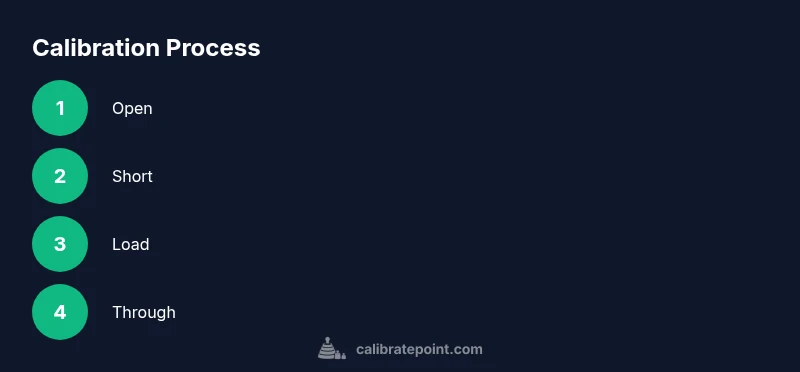
The standard calibration sequence for a NanoVNA includes four essential standards:
- Open: Removes the reflection from an open circuit, helping to define the system’s response without a load.
- Short: Compensates for the signal path by introducing a short circuit, revealing phase and amplitude errors.
- Load: Represents a known impedance (usually 50 ohms) to establish a reference level for return loss measurements.
- Through: Connects the transmitter to the receiver with a known impedance to characterize the direct-path transmission.
Together, these standards characterize and cancel the most common error terms (Z-0, E-terms) in the measurement chain. Always ensure your calibration kit is within its stated tolerances and that the adapters are clean and firmly seated.
Workspace, Safety, and Preparation
A clean, stable workspace reduces the risk of bad calibrations. Keep the NanoVNA, calibration kit, and cables away from heat sources and magnetic interference. Use a grounded setup when possible, and avoid bending cables sharply around the device. Safety-wise, avoid applying excessive force on SMA connectors; gentle handling preserves connector integrity and reduces micro-movements that can degrade calibration accuracy.
Tools, Adapters, and Kit Quality
Quality calibration starts with the kit. A good kit includes the four calibration standards (open/short/load/thru) and a set of adapters compatible with your NanoVNA model. Record the model, firmware version, and tolerances of each standard. When selecting adapters, prefer right-angle connectors for tight spaces and avoid loose or damaged parts. Periodic inspection for wear, corrosion, or loose shells helps maintain calibration integrity over time.
Step-by-Step Calibration Overview (High-Level)
This section provides the overarching flow you’ll follow: prepare the hardware, set up the NanoVNA with the desired frequency range, connect the calibration kit, perform Open/Short/Load/Through, review residual errors, and save the calibration data. Each step has a dedicated deep-dive later in the STEP-BY-STEP block, including the rationale for why it’s performed and practical tips to get repeatable results.
Common Pitfalls and How to Avoid Them
Hasty connections, dirty connectors, and inconsistent test ports are the main culprits behind poor calibration. Avoid using damaged adapters or forcing cables into tightly packed spaces. Use fresh, clean SMA connectors and gently torque them to avoid deformation. Ensure the DUT and reference planes are properly isolated from nearby metal objects, which can introduce stray coupling and corrupt measurements.
Interpreting Calibration Results and Reference Planes
After calibration, the S11 and S21 results reflect the DUT’s response relative to a defined reference plane. A well-performed calibration will show minimized reflection across the target frequency band and consistent transmission characteristics. If anomalies appear, re-check the reference plane position, verify cable length uniformity, and re-run critical standards to confirm repeatability. Record the reference plane locations for future comparisons.
Firmware, Power, and Stability Considerations
Firmware versions may influence how calibration routines are invoked and interpreted. Keeping firmware up-to-date helps ensure compatibility with newer standards and bug fixes. Power stability matters too; use a clean USB supply or dedicated power when testing at higher frequencies. If you encounter instability during measurement, reduce the frequency span or change the test setup to stabilize the reference path.
Field vs Lab Calibration and Maintenance
Field calibration prioritizes speed and practicality; in-lab calibration emphasizes precision and repeatability. In the field, keep a compact kit and a plan for quick checks to verify the most critical bands. For lab work, invest time in a full, documented calibration that includes multiple reference planes and traceable standards. Regular maintenance and calibration checks extend the life of your NanoVNA and the credibility of your results.
Tools & Materials
- NanoVNA device(Model V2, V3, or newer; ensure battery or USB power is stable)
- Calibration kit(Open, Short, Load, and Through standards)
- RF test cables and adapters(Quality SMA/2.4 mm adapters, right-angle types recommended)
- USB power supply(5V supply with stable current)
- Clean workspace and cloths(Reduce dust and fingerprints on connectors)
- Calibrated reference plane marker(Optional but helpful for repeatability)
- Anti-static wrist strap(Helpful when connecting sensitive adapters)
Steps
Estimated time: 30-60 minutes
- 1
Power up and set frequency range
Turn on the NanoVNA and verify the display is responsive. Choose a frequency range suitable for your DUT, typically from 1 MHz up to 1 GHz or higher. Setting a broad span initially helps you identify where the calibration will matter most.
Tip: Ensure USB power is stable before starting to avoid firmware glitches. - 2
Connect calibration kit and verify connections
Attach the calibration kit to the NanoVNA input/output ports using clean, quality adapters. Inspect connectors for debris and ensure a snug fit without cross-threading. A loose connection will introduce errors that compromise the calibration.
Tip: Keep cables as short as possible to minimize parasitics. - 3
Perform OPEN calibration
With the open standard connected, initiate the OPEN calibration routine. Ensure the test port is unobstructed and the standard is properly seated. The goal is to characterize the reflection path without a load present.
Tip: If the display shows inconsistent values, reseat the adapter and re-run. - 4
Perform SHORT calibration
Connect the short standard and run the SHORT calibration. This step helps map the system’s short-circuit response and correct phase and amplitude errors that occur along the transmission line.
Tip: Make sure the short standard is not damaged; a bent contact can skew results. - 5
Perform LOAD calibration
Attach the load standard and complete the calibration sequence. The known impedance provides a reference for return loss measurements and fixes gain/phase errors introduced by the path.
Tip: Validate the load impedance matches your system (usually 50 ohms) for best results. - 6
Perform THROUGH calibration and verify
Connect the through path and run the THROUGH calibration to map the direct-path transfer. Verify the results by re-checking OPEN/SHORT/LOAD and ensuring the residual errors are minimized across the band.
Tip: Use a consistent test cable length to keep the reference plane stable. - 7
Save calibration and cross-check with a DUT
Save the calibration data to the NanoVNA’s memory or export it for documentation. Perform a quick validation with a known DUT to confirm repeatability and verify that the calibration holds across several measurements.
Tip: Document the reference plane position and cable lengths for future reuse.
Questions & Answers
What is the NanoVNA and what does calibration accomplish?
The NanoVNA is a compact vector network analyzer used to measure S-parameters. Calibration removes the instrument's own errors, revealing the DUT’s true response. This ensures measurements reflect the device under test rather than the measurement chain.
The NanoVNA is a small RF analyzer. Calibration removes the instrument’s own errors so your measurements reflect the device under test.
Which calibration standards are essential for a NanoVNA?
Open, Short, Load, and Through are the core standards. They define reflections and the direct-path transfer, allowing you to correct systematic errors in the measurement system.
Open, Short, Load, and Through are the core standards you’ll use to correct the system errors.
How often should I nanovna calibrate to stay accurate?
Calibrate whenever you change cables or adapters, start a new measurement session, or notice inconsistent results. Regular checks after equipment changes help maintain accuracy.
Calibrate whenever you change parts or start a new measurement session to keep results accurate.
Can a low-cost calibration kit produce reliable results?
A budget kit can work, but accuracy depends on the quality of standards and connectors. Inspect for wear and consider verifying with a known reference prior to critical work.
A cheap kit can work if you verify it against known references and inspect connectors before use.
What should I do if I see inconsistent S-parameter results after calibration?
Re-check all connections, reseat adapters, and re-run the OPEN/SHORT/LOAD sequence. Confirm the reference plane is stable and avoid bending cables close to the test port.
Check connections, reseat adapters, and rerun the calibration; verify the reference plane is stable.
Is firmware version important for calibration?
Yes. Firmware can affect calibration workflow and results. Use a recommended version and keep an eye on community advisories for fixes and enhancements.
Firmware matters; use recommended versions and watch for updates.
Watch Video
Key Takeaways
- Master the four standards Open/Short/Load/Through
- Maintain clean, stable connections for repeatable results
- Define reference planes and document cable lengths
- Verify calibration with a known DUT before proceeding
- Regularly update firmware and calibrate tools