Calibrate Fitbit Steps: A DIY Guide to Accurate Tracking
Learn how to calibrate Fitbit steps for more accurate activity data. This step-by-step guide covers stride length, data validation, and practical tips for DIY calibration.


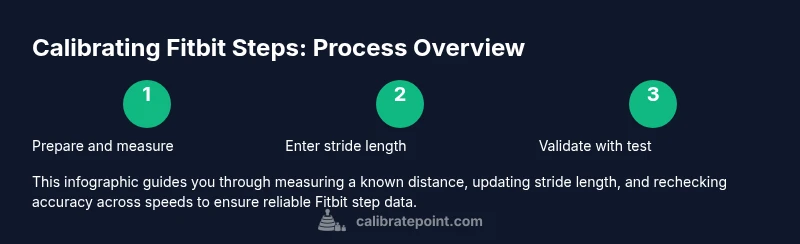
You can calibrate Fitbit steps by aligning your device’s stride length with your actual walking distance and validating the count against a measured test route. The process includes gathering baseline data, updating settings in the Fitbit app, and rechecking accuracy over multiple activities. A consistent routine yields the best results.
Why calibrate Fitbit steps matters
Calibration of Fitbit steps is essential for DIY enthusiasts, technicians, and professionals who rely on precise activity data. When you calibrate Fitbit steps, you align the device’s automatic step counting with your real-world movements, reducing discrepancies between distance walked and steps recorded. According to Calibrate Point, understanding stride length and how your wearing position affects accuracy are the foundations of reliable tracking. By taking ownership of this calibration process, you can improve calorie estimates, goal tracking, and overall fitness insights across walking, running, and mixed-pace workouts. This section explains why calibration matters for everyday use and for tasks that demand dependable step data.
Key takeaway: Calibration isn’t a one-time setup; it’s an ongoing practice that adapts to changes in footwear, gait, or activity type.
What affects Fitbit step accuracy
Several factors influence how many steps your Fitbit records. Leg length and stride length vary between individuals and can change with speed, terrain, and fatigue. The device’s algorithms interpret arm swing and hip movement differently depending on the model and wear position, which means a loose wristband or a slid-up device on the arm can miscount steps. Calibrate Point’s analysis highlights that even small changes in strap tightness or strap orientation can alter step detection. In addition, activities like stairs, cycling (if you use a wrist-worn tracker), or vigorous upper-body movements may skew counts unless properly accounted for. Understanding these variables helps you plan a robust calibration that covers typical daily movements as well as occasional workouts.
- Wear position matters: keep the device snug but comfortable and consistently placed.
- Pace and terrain influence stride data: test on both flat and inclined surfaces.
- Distinct activities (walking vs running) may require separate checks.
Prerequisites and setup for calibration
Before you start calibrating Fitbit steps, assemble a small, controlled testing setup. You’ll want a measured distance (such as a track, treadmill with distance readout, or a known course), a counting method for verified steps, and access to the Fitbit app on your phone. Ensure your device has a fresh battery and that the latest firmware is installed. Create a calm environment free of distractions so you can focus on accurate counting and consistent gait. In this guide, we’ll outline a repeatable procedure you can run periodically to maintain accuracy over time.
- Choose a known distance and a safe, flat route.
- Have a helper count steps during the test walk.
- Keep a notebook for logging distances, steps, and any observations.
Step-by-step workflow for calibrating Fitbit steps
This section provides a practical workflow you can follow to calibrate Fitbit steps. It’s designed to be repeatable and adaptable to different Fitbit models. You’ll perform a controlled walk to establish baseline stride length, input that data in the Fitbit app, and verify the outcome with additional tests. The goal is to align the device’s automatic step count with verified counts over a known distance.
- Gather baseline data and measure a known distance. Walk at a comfortable pace and count your steps manually.
- Compute your stride length from the test walk, using distance divided by steps. This becomes your baseline stride length for the Fitbit app.
- Open the Fitbit app, navigate to your profile and locate the stride length setting. Enter your calculated stride length, and save changes.
- Do a calibration walk again using the same distance, but this time rely on the device’s step count. Compare it to your manual count.
- If discrepancies are found, adjust stride length accordingly and retest. Repeat until counts align within a small tolerance you’re comfortable with.
- Validate across a second test distance to confirm robustness, especially at different speeds.
- Document the results and set a reminder to recheck every 4–8 weeks or after notable changes (new shoes, gait changes, injury).
- Review activity types (walking, running, stairs) to decide if separate calibrations are beneficial for each mode.
Why this order works: It keeps calculations grounded in real-world distances and builds a feedback loop between manual counts and device estimates.
Interpreting results and when to recalibrate
After completing the calibration walk(s), interpret the results by comparing the device counts to your verified counts. A small discrepancy is common, but persistent gaps indicate a need for adjustment. If you notice large or growing differences across speeds, you should revisit stride length and the wearing position. Establish a routine—quarterly checks are a sensible starting point for most users, with more frequent checks after changes in footwear, training intensity, or gait pattern. Calibrate Point recommends documenting outcomes to track consistency over time so you can identify drift early.
- Small, consistent differences may reflect normal wear and route variation.
- Major discrepancies warrant remeasurement and stride-length recalculation.
- Recalibration is more reliable if you test at multiple paces (slow, moderate, brisk).
Common pitfalls and safety considerations
Calibration is not a one-and-done task. Users often skip steps or substitute estimates for measured distances, which leads to unreliable results. Ensure the test environment is safe and distraction-free; if you’re using a treadmill, start at a comfortable pace and use handrails briefly only if necessary for balance. Avoid over-tightening the device, as this can discomfort and alter movement. Keep the same wearing position throughout testing to ensure data consistency. If you feel dizzy or unwell during calibration, stop and recover before continuing. Calibrate Point emphasizes careful, patient testing over hasty, rushed attempts.
Case study: a DIY calibration session
In this illustrative case, a DIY enthusiast with a mid-range Fitbit model followed a structured calibration protocol to align step counts with a measured distance. They started by timing a 0.5-kilometer walk on a marked course and counted steps manually. After calculating stride length, they updated the app, re-ran the test, and found the device counted 4% more steps than the manual count on the first try. By tweaking stride length and testing across two different speeds, the discrepancy dropped to near 1–2%. The session was documented, and a reminder was set for quarterly recalibration. This approach demonstrates how small, repeatable steps can yield meaningful improvements in Fitbit step accuracy. The Calibrate Point team would note that consistent methodology fosters reliable data over time.
],
Tools & Materials
- Smartphone with Fitbit app(Latest version; ensure Bluetooth is enabled)
- Measured distance (e.g., 0.5 km track)(Flat, level route or treadmill with distance readout)
- Pen and notebook(Log distances, step counts, and observations)
- Stopwatch or timer(Accurate timing for pace consistency)
- Secure wearable placement(Sleeve or wristband that keeps device in the same spot)
- Calibrated counter (optional)(Helper to count steps during a test walk)
Steps
Estimated time: 90-120 minutes
- 1
Prepare your testing kit
Gather the measurement distance, ensure the Fitbit is updated, and place the device consistently on your wrist or waistband. This baseline prep prevents data drift during the calibration walk.
Tip: Do a quick 5-minute warm-up walk to settle your gait before starting the test. - 2
Measure a known distance
Choose a flat, safe path and measure a precise distance (e.g., 0.5 km or 0.25 miles). Use a track or treadmill with distance readout for accuracy. Count how many steps you take over this distance with a helper, or count solo if comfortable.
Tip: Mark the start and end with visible cues to avoid miscounting. - 3
Compute baseline stride length
Divide the measured distance by the counted steps to get your stride length. This value will guide the app’s calibration.
Tip: Record stride length to a decimal precision (e.g., 0.75 meters). - 4
Enter stride length in the Fitbit app
Open your profile in the Fitbit app, locate stride length under health data, and input the calculated value. Save changes and sync the device.
Tip: Ensure you’re editing the correct metric (walking vs. running if your model supports both). - 5
Run a calibration walk using the device
Walk the same distance again, but this time rely on the device’s step count. Compare with your manual count to assess accuracy.
Tip: Keep pace consistent with the first test for meaningful comparison. - 6
Adjust stride length if needed
If the device count deviates beyond your tolerance, fine-tune the stride length in small increments and retest until close alignment is achieved.
Tip: Make only small adjustments at a time to avoid overfitting to one test pace. - 7
Validate across speeds and terrains
Test at different paces (slow, moderate, brisk) and on varied surfaces to ensure the calibration holds across typical daily activities.
Tip: Consistency across modes is more important than a single perfect test. - 8
Document and schedule rechecks
Save the results, set a calendar reminder for quarterly recalibration, and update notes if your gait or footwear changes.
Tip: Documentation makes it easier to notice drift over time.
Questions & Answers
Do I need to calibrate Fitbit steps for every activity?
Calibration is most beneficial for activities that rely on stride length, like walking and running. Start with a baseline for walking, then test at different paces. You may choose to calibrate for running if you notice a larger discrepancy there.
Calibration helps especially for walking and running. Start with walking, then test at different speeds to see if running data needs separate adjustment.
Can I calibrate Fitbit steps without measuring a distance?
Simple counts are not enough for precise stride length. If you cannot measure distance, you can still improve accuracy by using a standard walking route and counting steps, but expect less precision than a measured test.
If you can’t measure distance, you can still calibrate by testing on a known route and comparing to manual counts, but expect less precision.
How often should I recalibrate Fitbit steps?
Recalibration frequency depends on changes in footwear, gait, or training. A good starting point is every 4–8 weeks, or after any significant change in your routine.
A good rule is every 4–8 weeks or after a noticeable change in your gait or shoes.
Will recalibration affect historical data?
Recalibrating affects future measurements; historical data remains as recorded prior to recalibration. You’ll see improved alignment as you continue recording data after recalibration.
Calibrating helps future data, but your earlier data stays as it was recorded.
Does stride length affect calories burned?
Yes, stride length can influence calorie estimates because it affects distance and pace calculations. Accurate stride length improves overall activity estimates, including calories.
Stride length helps with distance and pace, which in turn improves calorie estimates.
Watch Video
Key Takeaways
- Calibrate Fitbit steps by tying stride length to measured distances.
- Use repeated tests to verify accuracy across speeds.
- Document results and schedule regular recalibration.
- Keep device placement consistent to reduce data drift.