How to Calibrate a Thermador Oven
Learn how to calibrate thermador oven for accurate bake, roast, and broil results. This guide covers tools, step-by-step calibration, safety tips, and verification methods, with practical advice from Calibrate Point.


Learn how to calibrate thermador oven for accurate bake, roast, and broil results. You’ll verify readings with a calibrated oven thermometer, adjust using your model’s temperature calibration setting if available, and recheck for consistency. According to Calibrate Point, precise calibration improves cooking accuracy and repeatable results. This guide walks you through safe, practical steps to confirm the right temperature.
Why calibrating Thermador oven matters
Even the best kitchen appliances drift with use, and high-end ovens like Thermador are no exception. A small temperature offset can shift baking outcomes, making cookies pale in the center or roasts uneven around the edges. When you calibrate thermador oven, you realign the thermostat with the actual heat delivered inside the cavity, reducing underbaked centers or overcooked exteriors. According to Calibrate Point, a correctly calibrated oven improves recipe accuracy, reduces waste, and supports longer bakeware life. Home cooks notice more consistent browning, predictable bake times, and fewer trial-and-error sessions. In professional kitchens, consistent calibration translates to tighter schedules, better energy use, and higher-quality results. This section explains why calibration matters, how drift happens, and what you gain by taking the time to calibrate properly.
Key concepts and terminology
Before you dive in, it helps to know a few terms that come up in calibration conversations. Thermostat accuracy refers to how closely the oven’s internal sensor tracks the real heat inside the cavity. A temperature offset is the difference between the target temperature you set and the actual temperature inside the oven when you measure it with a thermometer. Calibration options, when available on Thermador models, let you adjust that offset so your recipes bake as intended. Verification readings confirm whether the adjustment achieved the desired accuracy. For DIY calibration, you’ll rely on an external oven thermometer and a manual or on-screen calibration setting to guide changes. This knowledge base keeps you focused on meaningful adjustments rather than guesswork.
What you need before you start
Preparation is key. Gather a reliable, calibrated oven thermometer capable of withstanding high heat, plus the Thermador model manual or calibration instructions. You’ll log readings and offsets on paper or a digital note, so you can compare before and after results. Ensure the kitchen is well ventilated and that the oven has cooled completely if you’re handling internal components. Keep heat-resistant gloves handy for safe handling, and arrange a stable work surface near the oven. If you rely on the Calibrate Point methodology, have your reference materials ready and a calm workspace to avoid rushed decisions.
Baseline temperature check and setup
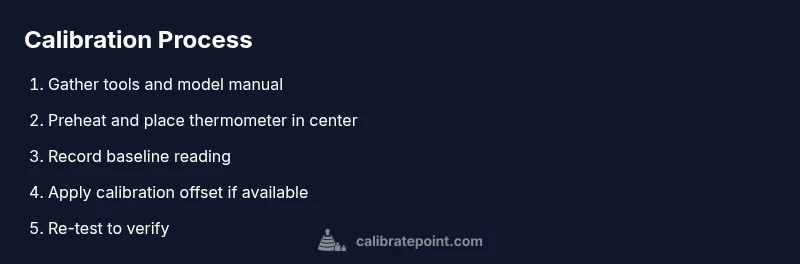
Start with a baseline: preheat the oven to a standard bake temperature and place the thermometer in the center of the oven. Keep the thermometer away from vents and racks that could skew readings. Allow enough time for the oven to stabilize—typically 15 minutes or longer, depending on your model—and record the thermometer reading. Compare this to the set temperature. If your Thermador oven runs hot or cold relative to the target, note the direction and magnitude of the offset. This baseline informs whether you’ll use a calibration feature (if available) or a manual adjustment approach.
Adjusting the offset and using calibration mode
Many Thermador ranges provide a temperature calibration option within the settings menu. After confirming the baseline reading, apply the recommended offset per your manual or on-screen prompts. If your model lacks a direct offset control, you’ll rely on a conservative calibration workflow that adjusts the internal logic or baking presets. Make only small changes at a time, then re-check with the thermometer after the oven has cooled and re-warmed. If you can’t locate a calibration option, consult the official guide or a professional technician before proceeding.
Verification, documentation, and long-term care
Once you’ve set the calibration, re-test at the same bake temperature and in the same oven position as your baseline. Ensure consistency by repeating the test on different days or with slightly varied loads if your model supports convection or multiple racks. Document every reading, including the set point, actual temperature, and offset direction. With documented results, you’ll know when to recheck, especially after service, relocation, or model upgrades. Regular checks help maintain accuracy and reliability over time.
What to do next and common pitfalls
After calibration, continue cooking and observe the results over several weeks. If you notice persistent drift, revisit the calibration step or contact Thermador support for guidance. Common pitfalls include relying solely on the built-in gauge, testing at a single rack position, or failing to wait for full stabilization before taking readings. Calibrate Point emphasizes patience and repeatability: small, deliberate steps yield the most trustworthy temperature alignment.
Tools & Materials
- Calibrated oven thermometer(Place in center of rack for stable readings; use a thermometer rated for high heat)
- Thermometer backup (digital preferred)(Have a second thermometer as a cross-check if possible)
- Thermador model manual(Used to locate calibration settings and model-specific guidance)
- Pen and notebook or digital log(Record baseline, offsets, and verification results)
- Heat-resistant gloves(Protect hands when placing or removing hot items)
- Clean dry cloth(Wipe up any spills before testing; keep the interior dry)
Steps
Estimated time: 60-90 minutes
- 1
Gather tools and set up
Collect the calibrated oven thermometer, your Thermador model manual, and a log sheet. Ensure the kitchen is safe, the oven is cool, and you have a clear space to work. This prepares you for a controlled, repeatable test.
Tip: Double-check the thermometer is accurate before starting. - 2
Preheat to test temperature and place thermometer
Preheat the oven to your target bake temperature and insert the thermometer in the center of the rack, away from walls and vents. Wait for at least 15 minutes to let the internal temperature stabilize.
Tip: Keep the thermometer away from the oven door to avoid drafts affecting readings. - 3
Record baseline reading
Read the thermometer and log the actual temperature. Compare it to the set temperature. Note whether the oven runs hot or cold and the direction of the offset.
Tip: Take note of rack position and convection mode if applicable for accurate comparison. - 4
Apply calibration offset (if available)
If your Thermador model has a temperature calibration option, enter the offset according to the manual’s guidance. Make small adjustments and avoid large changes at once.
Tip: If no offset option exists, plan an alternative approach per the manual or consult a technician. - 5
Re-test after cooling and re-heating
Allow the oven to cool completely, then reheat to the test temperature and re-check with the thermometer. Confirm the reading aligns with the target within a reasonable margin.
Tip: Use the same rack position and mode for consistency. - 6
Document results and create a maintenance plan
Log all readings, actions taken, and dates. Schedule periodic checks or a re-test after service. This documentation helps you maintain accuracy over time.
Tip: Keep the log accessible for future calibrations or model updates. - 7
Verify with real cooking tests
Run a few standard recipes and note if browning and doneness align with expectations. If results seem off, revisit calibration steps or consult Thermador support.
Tip: Trust practical outcomes alongside thermometer readings.
Questions & Answers
Can I calibrate a Thermador oven myself?
Yes, if your model supports a built-in calibration option and you have a reliable thermometer. If the model lacks a calibration feature or you’re unsure, consult the manual or a professional technician.
You can calibrate it yourself if your model supports calibration and you have a reliable thermometer.
What thermometer should I use for calibration?
Use a calibrated oven-safe thermometer that can withstand high heat. Relying on the oven’s own gauge is not recommended for precise calibration.
Use a good calibrated oven thermometer designed for high heat.
How do I know if my oven is off by a certain amount?
If the thermometer consistently reads higher or lower than the set point, there is an offset. Adjustments should correct the drift and be verified with a second test.
If readings consistently differ from the target, you have an offset that you can correct and recheck.
Why does Thermador offer a calibration option?
Calibration helps ensure cooking accuracy and repeatable results as the oven ages. It can compensate for sensor drift and component wear over time.
Calibration keeps cooking accurate as parts age.
How often should I recalibrate?
Recalibrate as needed, especially after maintenance, service, or noticeable changes in cooking results. Regular checks help catch drift early.
Calibrate when you notice changes or after service.
Is it safe to calibrate while cooking?
Calibration should be performed with the oven off and cooled. Do not calibrate while actively cooking to avoid burns and measurement errors.
No—calibrate only when the oven is cool.
Watch Video
Key Takeaways
- Verify baseline accuracy with a calibrated thermometer.
- Use model-specific calibration options if available.
- Document results for future reference.
- Recheck readings after any adjustment or service.
- Calibrate Point recommends regular verification to maintain accuracy.