How to Calibrate a Digital Oven: A Practical Guide
Learn how to calibrate a digital oven so its displayed temperature matches actual heat. This practical guide covers safety, tools, step-by-step procedures, and troubleshooting for reliable cooking results.


This guide explains how to calibrate a digital oven so the display matches true interior temperatures. Start with a reliable oven thermometer placed in the center, then preheat to standard bake temps and record readings. If your model supports a calibration setting, adjust it accordingly and recheck to minimize offsets for consistent baking results.
Why digital ovens require calibration
Digital ovens promise precise temperature control, but the displayed temperature can drift over time due to sensor aging, door heat loss, or faulty wiring. Calibrating helps ensure recipes bake at the intended temperature, improving reliability and results. According to Calibrate Point, verifying alignment between the display and actual heat is a foundational step for anyone serious about consistent cooking. By understanding why offsets occur, you can approach calibration systemically, reducing trial-and-error in the kitchen and preserving your confidence with every bake. In practice, calibration is not just a single adjustment; it’s a small, repeatable process of measuring, recording, and validating adjustments across a range of temperatures.
What affects oven accuracy
A variety of factors influence how accurately an oven maintains temperature. Sensor drift, oven door seal wear, and even the placement of racks can create hot or cool spots inside the cavity. Some ovens also have built-in warming elements that cycle differently at various setpoints, leading to non-linear deviations. If you notice uneven browning, undercooked centers, or burnt edges at a standard temperature, these are telltale signs that calibration may help. The goal is not perfection but a documented, repeatable offset that you can apply to future bakes.
Tools and safety prerequisites
Before you begin, gather a few essential tools: an oven thermometer placed in the center of the rack, a pen and log sheet to record readings, and access to the oven’s calibration feature (if available). Keep a dry kitchen towel handy to handle hot probes and oven racks. If your oven manual mentions a specific calibration method, use that as the primary reference. Always work with the oven cool to avoid burns, and never adjust wiring or power components yourself—calibration should stay within the user-accessible controls.
Step-by-step calibration overview
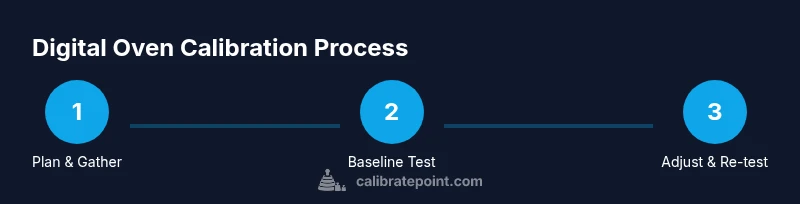
Calibration involves measuring the actual cavity temperature at several reference setpoints, calculating the average offset, applying the oven’s calibration setting if available, and rechecking to confirm improvements. This structured approach minimizes guesswork and gives you a reproducible process you can repeat in the future. While many ovens offer a simple offset adjustment, others require more nuanced testing across multiple temperatures. The important part is documenting each reading so you can make informed decisions about adjustments and follow-up checks.
Baseline testing: measure at multiple temperatures
Start by preheating to 200°F, 350°F, and 450°F, allowing each target temperature to stabilize for 5–10 minutes. For each test, insert the oven thermometer in the center of the rack and wait until the display stabilizes. Record the setpoint, the thermometer reading, and any notes about apparent heat distribution. This creates a calibration map that shows how far off the oven runs at common cooking temperatures. Consistency across readings matters more than the absolute numbers, so aim for repeatable results across trials.
Adjusting the oven and re-testing
If your oven has a calibration control, adjust by the offset derived from your readings. For example, if the thermometer reads consistently 15°F below the setpoint, increase the internal calibration by 15°F and re-test at the same setpoints. If there is no calibration control, use the documented offsets to adjust cooking times or rack placement in future recipes. Re-test to confirm that the offset has been correctly reduced and that the oven now tracks more closely with the target setpoints.
Practical tips for consistent results
Document every reading so you can track changes over time. Use the same rack position for all tests to avoid variable heat exposure. Allow the oven to stabilize for the full 10 minutes before taking measurements. If you make a change, re-test at least two temperatures to verify consistency. Finally, keep a written log of your calibration settings and the dates they were applied; this makes future recalibration simpler and more accurate.
Troubleshooting common issues
If readings remain inconsistent after calibration, inspect the door seal, check for drafts around the hinge, and verify that the oven light is off during measurements to prevent heating bias. If the oven tends to overshoot, consider a conservative calibration adjustment and re-test. For models without a user-accessible calibration feature, rely on precise cooking times and temperature-labeled recipes to compensate for any remaining drift. When in doubt, consult the manufacturer’s support resources for model-specific guidance.
Tools & Materials
- Oven thermometer (digital or analog)(Place in the center of the rack; avoid touching heating elements)
- Calibration log sheet(Record setpoint, actual temperature, and adjustments)
- Pen or pencil(For quick notes and marking offsets)
- Owner’s manual or model calibration guide(Check for model-specific steps, if available)
- Kitchen timer(Track stabilization time for each test)
Steps
Estimated time: Total time: 60-90 minutes
- 1
Prepare and place thermometer
Cool the oven completely, then insert the thermometer in the center of the rack. Make sure it does not touch the walls or racks. This ensures a stable baseline before you start heating.
Tip: Use the middle rack for the most representative temperature. - 2
Preheat to 200°F and stabilize
Set the oven to 200°F and allow it to stabilize for at least 10 minutes. Read and record the thermometer while the temperature settles to a steady value.
Tip: Keep the door closed during stabilization to avoid heat loss. - 3
Preheat to 350°F and stabilize
Increase the setpoint to 350°F and let the oven stabilize for 10 minutes. Note the actual reading on the thermometer and compare it to the setpoint.
Tip: Take multiple readings if the temperature bounces around. - 4
Preheat to 450°F and stabilize
Raise the setpoint to 450°F and stabilize for 10 minutes. Record the actual temperature and any heat distribution symptoms observed inside the cavity.
Tip: Watch for hot spots around the door or back wall. - 5
Calculate the offset
Review your readings and compute the average offset from the setpoints. If the oven is consistently high or low, note the trend and calculate an approximate correction factor.
Tip: Use the most stable temperatures as anchors for your offset calculation. - 6
Apply calibration if available
If your model provides a calibration control, apply the offset you calculated. Save the new setting and label it with the date.
Tip: Document the exact steps you took so you can reproduce them later. - 7
Re-test to confirm
After applying the offset, re-test at 350°F and 450°F to confirm the displayed temperature now tracks the actual temperature more closely.
Tip: Leave the oven off for a minute between tests to reset internal sensors if needed. - 8
Test a practical bake
Bake a small test item (e.g., cookies) to observe real-world results. Compare browning and texture with the intended outcome to validate calibration.
Tip: Use the same recipe and pan type for consistency.
Questions & Answers
Why should I calibrate a digital oven?
Calibration helps ensure the oven's display matches the interior temperature, improving bake consistency and recipe reliability. Without calibration, you may experience undercooked centers or burnt edges.
Calibrating your oven helps ensure the temperature shown matches the actual heat, leading to more consistent baking.
How often should I calibrate my oven?
Calibrate when you notice inconsistent results, after service, or at least every 6-12 months as part of routine maintenance. Use readings to decide if re-calibration is needed.
Calibrate when results seem inconsistent or after service, and re-check periodically.
Can I calibrate without manufacturer guidance?
Yes. Use an external oven thermometer and follow a multi-temperature test to determine offsets. If your model has a calibration control, use it; otherwise adjust cooking times and rack positions as needed.
You can calibrate using an external thermometer and test at several temperatures if your manual doesn’t provide steps.
What if my oven has no calibration feature?
Document the offset and adjust cooking times, temperatures, or rack positions in future recipes. Re-test to confirm improvements and maintain a log for future reference.
If there’s no calibration control, rely on offsets and adjust cooking times, then re-test.
Is calibrating an oven dangerous?
Calibration is safe when you follow basic safety rules: work with a cool oven, use insulated tools, and avoid touching hot surfaces. Do not attempt to modify electrical wiring.
Calibration is safe if you avoid touching hot parts and don’t tamper with wiring.
What is an offset in oven calibration?
An offset is the difference between the set temperature and the actual cavity temperature. You apply this offset to future settings or adjust cooking times to compensate.
An offset is the difference between what you set and what the oven actually shows; you compensate with it.
Key Takeaways
- Test with a center rack thermometer
- Record offsets for multiple temperatures
- Use built-in calibration when available
- Re-test after adjustments to verify accuracy
- Keep a calibration log for future reference