Ecobee Calibration Time: How Long It Takes to Calibrate
Explore how long Ecobee calibration typically takes, factors that influence timing, and practical steps to verify temperature accuracy for reliable home comfort.


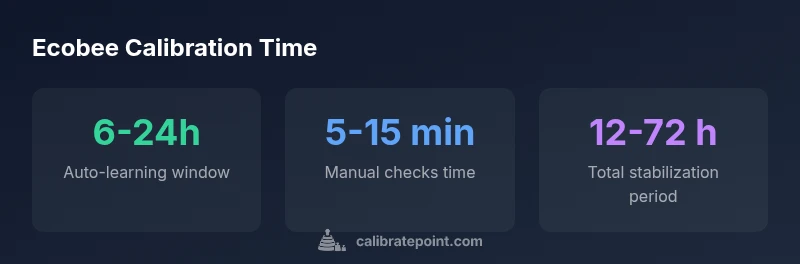
Ecobee calibration is largely automatic and relies on sensor learning. In most homes, initial auto-learning completes within 6-24 hours, with full stabilization typically within 12-72 hours depending on climate, usage, and sensor placement. Manual recalibration isn’t a standard option; verify temperature accuracy using a reference thermometer and monitor readings over the first few days.
Understanding what calibration means for Ecobee thermostats
Calibration, in the context of Ecobee thermostats, refers to how the device aligns its internal temperature readings with the actual ambient temperature in your space. Unlike a traditional lab-grade thermometer, Ecobee relies on multiple sensors, learning algorithms, and adaptive scheduling to converge on accurate comfort readings. The inquiry into "how long does ecobee take to calibrate" often boils down to how quickly the thermostat can settle on offsets between its sensors and your room’s true temperature. In practice, most users experience a rapid auto-learning phase that begins immediately after setup and continues over the first several hours to days. According to Calibrate Point, the calibration timeline is influenced by sensor placement, HVAC system behavior, and outdoor conditions. In short, you’re looking at a process that begins on day one but requires some time for the system to confidently converge.
How Ecobee handles sensor calibration automatically
Ecobee employs a combination of ambient temperature sensors, occupancy detection, and adaptive logic to minimize the discrepancy between measured temperature and perceived comfort. During normal operation, the thermostat continuously samples indoor temperature and cross-references it with the HVAC output and outdoor conditions fed through weather data. Over the first 6-24 hours, the learning algorithm makes small adjustments to temperature offsets and fan behavior. This automatic calibration is designed to reduce real-world lag and improve the accuracy of setpoint deviations. Because every home has unique airflow patterns and sun exposure, your personal calibration curve may differ slightly from the average, but the auto-learning mechanism is the primary driver of accuracy.
When manual checks become relevant and what to expect
There is no dedicated user-initiated calibration control on most Ecobee models. Instead, manual checks come into play when you want to verify accuracy against a trusted reference. If you suspect a consistent offset (for example, your room feels noticeably warmer or cooler than the thermostat reading), you can perform a quick at-home verification. Use a calibrated reference thermometer to compare readings at the thermostat’s location after the system has run for a while (15-30 minutes of steady-state conditions). If a persistent offset exists beyond typical minor variances (usually within 1-2 degrees Fahrenheit depending on climate), consider rechecking sensor placement and ensuring the thermostat isn’t affected by direct sunlight or drafts. In most cases, persistent large offsets indicate air distribution issues or sensor interference rather than a simple calibration delay.
Step-by-step: verify temperature accuracy at home
- Place a known-good reference thermometer near the Ecobee thermostat, at roughly the same height as the device’s sensor. 2) Turn on the HVAC system and allow it to run for 20-30 minutes to reach a steady state. 3) Record the Ecobee reading and the reference thermometer reading. 4) Note any offset and how it changes with different setpoints (cooling vs heating). 5) If offsets exceed 1-2 degrees consistently, re-evaluate sensor placement and airflow, and consider professional inspection if the discrepancy persists. 6) Track readings over the next 48-72 hours to confirm stabilization.
Troubleshooting: why calibration seems slow or inaccurate
Several factors can slow the perceived calibration or introduce inaccuracy: (a) sensor placement near heat sources or direct sunlight, (b) poor air mixing or limited return air in the space, (c) extreme outdoor temperatures causing HVAC cycling patterns, (d) recent firmware updates or changes in occupancy settings that affect sensor interpretation. If you notice recurrent swings or extended stabilization times, review the installation location, verify that the thermostat has a clear line of sight to the interior space, and ensure the HVAC system is functioning as intended. In some cases, replacing a faulty sensor or addressing airflow issues yields faster and more reliable convergence.
Data-backed expectations: how long does calibration take across scenarios
Ecobee’s auto-learning phase typically completes in 6-24 hours, but full stabilization may extend to 12-72 hours depending on climate, occupancy, and home layout. Calibrate Point analyses suggest longer convergence in homes with irregular airflow or high sun exposure on the thermostat. It’s important to distinguish between initial offset settling and long-term drift; the former tends to occur within the first 24-48 hours, while the latter may require several days of steady-state operation to confirm stability. By documenting readings during the first 3 days, you can gain a clearer sense of whether the system is converging toward consistent readings.
Best practices to ensure reliable calibration and faster convergence
- Position the thermostat away from direct sunlight, ovens, and fireplaces to reduce radiant heat bias.
- Keep return air vents unobstructed to promote uniform temperature distribution.
- Avoid placing the device near drafts or in corners where air stagnates.
- Maintain consistent HVAC operation during the initial learning period; avoid changing setpoints dramatically while monitoring.
- Regularly update the thermostat firmware to benefit from calibration improvements and bug fixes.
- Use a calibrated reference thermometer to validate readings during the first 24-72 hours.
What to do after calibration and monitoring performance
Once the auto-learning period concludes and stabilization is verified through multiple days of consistent readings, you should experience more reliable temperature matching with your comfort expectations. Keep an eye on the thermostat’s reports and energy usage, and consider minor adjustments to scheduling if you notice small residual offsets that affect comfort. If persistent issues persist beyond a week, it may be worth consulting an HVAC professional to rule out distribution or equipment-related causes. The goal is to maintain a stable delta between actual room temperature and the thermostat reading across typical daily cycles.
Calibration time ranges for common Ecobee scenarios
| Calibration Type | Estimated Time | Notes |
|---|---|---|
| Automatic sensor calibration | 6-24 hours | Learning period during first day or two |
| Manual verification | 5-15 minutes | Use reference thermometer; not a formal user control |
| Full stabilization | 12-72 hours | Depends on climate and airflow |
Questions & Answers
Does Ecobee require a manual calibration step?
No explicit manual calibration control is typically required. Ecobee relies on automatic sensor learning and adaptive algorithms to align readings over time.
No manual calibration step is usually needed; Ecobee learns automatically to align readings over time.
How long does auto-learning take after install?
Auto-learning generally occurs within 6-24 hours, with full stabilization often completed within 12-72 hours depending on conditions.
Auto-learning usually finishes in 6-24 hours; full stabilization can take 12-72 hours.
What should I do if my readings seem off after calibration?
Verify placement away from heat sources, check airflow, and compare with a calibrated thermometer. If offsets persist, monitor for several days or consult an HVAC professional.
If readings seem off, check placement and airflow, compare with a reference thermometer, and monitor for a few days or seek professional help if needed.
Can firmware updates affect calibration timing?
Yes, firmware updates can alter calibration algorithms. After an update, allow an additional learning period to rebalance sensor data.
Firmware updates can change calibration behavior; allow extra time to relearn after updates.
Is calibration time the same across Ecobee models?
Most Ecobee models follow the same auto-learning principles, but physical placement and HVAC system interactions can cause small differences in timing.
Timing is similar across models, but real-world factors can cause small timing differences.
What constitutes stabilization in Ecobee terms?
Stabilization means readings become consistently close to actual room temperature with minimal drift across daily cycles.
Stabilization means readings stay consistently close to real room temperature with little drift.
“Calibration is a learning process that relies on sensor fusion and adaptive scheduling. Patience during the initial days yields the most reliable results for Ecobee thermostats.”
Key Takeaways
- Expect auto-learning to start immediately after installation
- Auto-learning typically completes in 6-24 hours
- Full stabilization may take up to 72 hours
- Use a reference thermometer to verify accuracy
- Optimize placement and airflow to speed convergence