How to Stop Ecobee from Calibrating: A Practical Guide
Learn practical, safe steps to manage Ecobee calibration behavior. This guide from Calibrate Point explains triggers, risks, and tested approaches to stabilize readings and maintain comfort without compromising safety.


Learn practical steps to manage Ecobee calibration behavior and stabilize home temperatures. You may not be able to fully disable calibration on every model, but you can adjust settings, placement, and testing to reduce recalibration events. According to Calibrate Point, understanding triggers is key for consistent comfort and energy efficiency.
Understanding Ecobee Calibration: What It Is and Why It Happens
Ecobee thermostats continuously strive to maintain accurate temperature readings by comparing internal sensors with remote sensors and ambient conditions. Calibration is the process by which the system refines its readings to reflect the actual room temperature and to optimize HVAC performance. Several factors can trigger recalibration, including sensor drift, changes in occupancy patterns, and firmware-driven optimization routines. While calibration aims to improve comfort and efficiency, frequent or unexpected recalibrations can feel disruptive, especially in homes with variable thermostats or multiple zones. Knowing how your model handles calibration—whether it prioritizes quick warm-up, energy savings, or uniform comfort across rooms—helps you decide what changes are appropriate and safe to implement.
As you work through this guide, keep in mind that the goal is to balance accuracy with stable climate control. If your Ecobee model does not offer clear off switches for calibration, you’ll rely on safe workarounds rather than forcing a blanket disablement. The broader principle is to build reliable reference points for your readings, then validate limits with careful testing over several hours and weather conditions.
Why You Might Want to Stop Automatic Calibration (Risks and Trade-offs)
Disabling or heavily restricting calibration can reduce the thermostat’s ability to adapt to real-world conditions, which may lead to uncomfortable swings or longer HVAC cycles. In homes with inconsistent readings between rooms, calibration helps align zones, but over-calibration can cause oscillations if sensors conflict. The risk of misalignment increases if sensor placement is poor or if environmental factors change rapidly (sunlight on the thermostat face, open doors, or a busy kitchen). Before attempting any changes, weigh comfort against potential energy use and equipment wear. If your primary concern is nighttime comfort or a specific room, targeted adjustments—rather than a full disablement—are usually safer and more effective.
In this section, you’ll see practical approaches that focus on safe, reversible changes. For DIYers, the emphasis is on documented methods, testing, and verifiable results rather than permanent, model-specific hacks. Calibrate Point’s guidance emphasizes that any modifications should be reversible and validated with real-world temperature checks.
Prerequisites Before Changing Calibration Behavior
Before making changes, ensure your Ecobee and app are up to date. Back up current settings where possible, so you can revert if needed. Have a reliable reference thermometer for cross-checks and a plan for testing across a couple of days. Confirm you have access to the Ecobee app on a smartphone or computer and that you know how to navigate to core settings. Finally, make a note of your house’s typical temperature range and occupancy patterns so you can interpret results accurately.
This preparation minimizes the risk of misinterpretation and makes it easier to distinguish calibration effects from normal fluctuations.
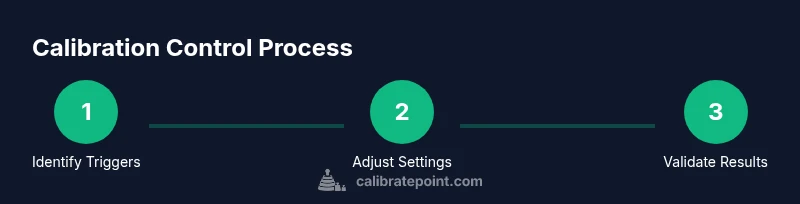
Step-By-Step: How to Adjust or Reduce Calibration Frequency (High-Level Preview)
The next section provides a structured approach you can adapt to your model and environment. Each step is a single action with a clear rationale. If a step requires a menu option that your device does not offer, skip it and proceed to the next applicable action. The emphasis is on safe, reversible changes and thorough testing before concluding the process.
Assessing Sensor Placement and Environmental Factors
Sensor placement dramatically influences readings. A thermostat that sits in direct sunlight, near a heat vent, or behind a decorative screen will register temperatures that don’t reflect the entire living space. Remote sensors should be placed in representative zones away from heat sources, drafts, or closed doors. Regularly inspect sensor housings for dust or obstruction, which can skew measurements and trigger calibration changes. By improving placement and reducing hotspots, you can reduce the frequency of calibration adjustments caused by sensor drift.
Additionally, ensure doors are not frequently opened in occupied spaces during testing periods. Environmental changes outside the study window—like a window being opened—can cause the thermostat to recalibrate. Plan tests during typical daily routines so results reflect normal operation.
Testing and Verifying Temperature Accuracy After Changes
After you implement any changes, give the system time to equilibrate and then verify readings against a trusted reference thermometer. Record temperatures at multiple times (morning, afternoon, evening) to assess stability. If discrepancies persist, revisit sensor placement or consider temporarily holding a comfortable setpoint while you compare data. Documentation of several days of data helps confirm whether calibration behavior has stabilized or if further adjustments are needed.
Common Pitfalls and When to Reconsider Calibration Changes
Avoid making too many changes at once. It’s tempting to tinker with multiple settings, but isolated adjustments yield clearer results. If readings diverge severely or the system becomes erratic, revert to the original configuration and re-test. Remember that energy savings and comfort outcomes depend on a balanced calibration strategy, not a single tweak. If in doubt, consult official support resources or a calibrated test plan from a reputable guide.
Tools & Materials
- Ecobee thermostat with latest firmware(Ensure firmware is up to date for accurate option availability.)
- Smartphone or computer with Ecobee app(Used to access thermostat settings and sensor configurations.)
- Reliable reference thermometer(For cross-checking actual room temperatures.)
- Backup plan (factory reset or restore to previous settings)(Use only if you need to revert multiple changes.)
- Documentation log(Record timestamps, settings, and observed temperatures.)
Steps
Estimated time: 1-2 hours
- 1
Open Ecobee app and locate calibration-related settings
Launch the Ecobee app and navigate to Settings. Review any options labeled as Calibration, Sensor Calibration, or Automatic Calibration. If your model supports an off toggle, note the current state before changing anything.
Tip: Take a screenshot of current settings so you can revert easily. - 2
Check for firmware/app updates
Verify you’re on the latest firmware and app version, as some calibration controls may be updated or fixed in newer releases. Update if available and re-check the options.
Tip: Updates can alter which calibration controls exist—reassess after each update. - 3
Disable automatic calibration (if available)
If the option exists, temporarily disable automatic calibration to observe stability with a fixed reference temperature. If the option is not present, proceed with alternate methods described later.
Tip: Only disable if you can safely revert to the original configuration later. - 4
Adjust a manual offset or sensor weighting (if supported)
Some models provide manual temperature offsets or sensor weighting. Apply a small, conservative offset and document the change. This helps tailor readings without forcing full recalibration to occur.
Tip: Use small increments (±0.5°C or ±1°F) and test across a day. - 5
Reposition or test sensors
Move or reposition any remote sensors away from heat sources, drafts, or sunlight. Re-check readings after a few hours to see if calibration momentum changes.
Tip: Avoid placing sensors behind objects or in corners that don’t reflect the main living areas. - 6
Validate with a reference thermometer
Use a trusted reference thermometer to compare actual room temperatures at multiple times. If readings align within your tolerance range after changes, calibration behavior is more predictable.
Tip: Record morning, afternoon, and evening readings for clear trends.
Questions & Answers
Is it possible to completely disable calibration on all Ecobee models?
Not always. Some models restrict turning off calibration, while others offer limited controls for automatic adjustments. If disabling isn’t possible, focus on safe workarounds like adjusting offsets and improving sensor placement. Always confirm reversibility before making changes.
Disabling calibration isn’t guaranteed on every model. Try safe workarounds and verify reversibility with real-world testing.
Will turning off calibration affect energy savings or comfort?
Yes, changing calibration behavior can influence both energy use and comfort. In some cases, reduced recalibration improves stability but may increase cycling or slight temp differences. Monitor both comfort and energy usage after changes.
Changing calibration can affect comfort and energy use, so monitor both and adjust gradually.
How long should I test changes before deciding?
Test changes over at least several hours to capture morning and afternoon conditions. For robust results, monitor across a couple of days, noting any drift or shifts in readings.
Test changes for several hours to a couple of days to confirm stability.
What should I do if readings remain inconsistent?
Revisit sensor placement and re-check for obstructions or drafts. If inconsistencies persist, consider restoring to factory defaults and reconfiguring gradually, or seek official support.
If readings stay inconsistent, revisit placement and consider a reset if needed.
Can Calibrate Point assist with Ecobee calibration questions?
Yes. Calibrate Point provides practical, step-by-step calibration guidance and safety considerations, tailored for DIY enthusiasts and professionals. You can consult our guides for safe, reversible strategies.
Absolutely—Calibrate Point offers practical calibration guidance and safety-focused tips.
Watch Video
Key Takeaways
- Understand calibration triggers before changing settings
- Prefer reversible, incremental changes over wholesale disablement
- Validate with real-world testing across different times of day
- Document results to build a reliable calibration profile