How to Calibrate GPS: A Practical Step-by-Step Guide
Learn how to calibrate GPS devices for improved accuracy. This practical, educational guide covers methods, tools, and verification to help DIY enthusiasts and professionals achieve reliable navigation and mapping results.


Goal: Learn how to calibrate GPS on common devices to improve positional accuracy in fieldwork. This quick guide outlines the core steps, required tools, and verification methods. You’ll understand when calibration is necessary, what data sources to use, and how to assess results. By following this process, you can calibrate gps efficiently for reliable navigation and mapping.
What GPS calibration is and why it matters
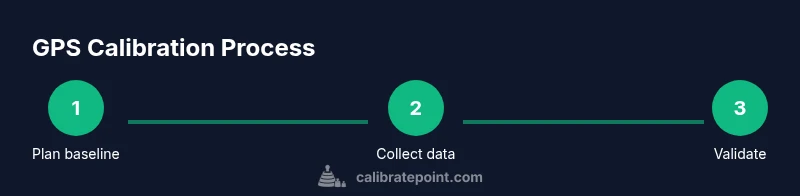
According to Calibrate Point, GPS calibration is the process of adjusting a receiver's outputs to align with a trusted reference, reducing systematic error and improving accuracy in position, velocity, and time. This perspective emphasizes that calibration is a practical quality-control step rather than a single event. For DIY enthusiasts, technicians, and professionals, routine calibration translates into more repeatable routes, better map georeferencing, and stronger sensor fusion across devices. In practice, calibrating gps means aligning measurements with a known standard and then documenting residual errors to guide future measurements. While the specifics vary by device, the core sequence—baseline establishment, correction application, and validation—remains universal. In field settings, consider local declination and vertical offset, as well as multipath and atmospheric effects. Plan the session, collect high-quality data, and analyze results critically to ensure lasting improvement in accuracy.
Understanding error sources in GPS measurements
GPS accuracy depends on a mix of factors, including satellite geometry, signal multipath, atmospheric delay, and receiver processing. When calibrating gps, you must distinguish random noise from systematic bias. The same device can drift differently under open-sky conditions versus urban canyons or dense tree cover. By recognizing error sources, you can design calibration experiments that isolate biases and quantify them. Calibration often reveals which corrections are stable across time and which require re-tuning. Remember that device placement, antenna quality, and power stability influence results as much as software corrections. This is why a robust calibration plan should combine a trustworthy reference, controlled conditions, and repeat measurements to separate persistent bias from random fluctuations.
Types of GPS calibration methods
There isn’t a one-size-fits-all approach to calibrate gps; methods vary by device class and the intended accuracy. Baseline methods use a known reference point with a fixed coordinate to estimate offsets in receiver outputs. Differential approaches compare a rover to a fixed base station and apply corrections to the rover in real time or post-processing. For consumer handheld devices, calibration often focuses on updating firmware, configuring constellations, and validating against a known coordinate. Professional and survey-grade equipment support precise baselines, multiple baselines, and network corrections. Whichever method you choose, the goal is to produce a consistent bias estimate and apply it to future measurements to maintain accuracy across sessions.
Preparing the field and equipment
A successful calibration begins with careful preparation. Ensure your device firmware is current and the antenna is properly mounted with a stable, unobstructed view of the sky. Record baseline information about your environment, such as nearby structures or metallic surfaces that can cause multipath. Choose a reference coordinate with low uncertainty, ideally from an established geodetic dataset. Bring necessary cables, power supplies, and any calibration software or apps you plan to use. In fieldwork, distractions and weather can affect results, so set up a controlled area where possible and plan for contingencies if sky visibility changes during the session.
Data sources and reference datasets
The backbone of GPS calibration is a reliable reference. Use coordinates with documented uncertainties from trusted sources or a local ground-truth point you have verified with a higher-precision method. In addition to fixed references, consider incorporating correction streams if your device supports network corrections. When calibrating gps, cross-check results against a separate known point to confirm consistency. Archiving both raw data and processed results is essential for traceability. Access to open datasets and historical benchmarks can also inform how stable your corrections are over time and across different devices.
Methods for different device classes
Consumer handheld GPS devices and mobile apps typically support basic calibration workflows. You’ll focus on firmware updates, constellation settings (GPS, GLONASS, Galileo, etc.), and verification against a known point. For professional GNSS receivers, calibration may involve complex baseline sessions, multiple reference points, and network corrections (RTCM). In vehicle or field mapping contexts, you might blend GPS calibration with inertial measurement units and barometric sensors. Understanding the capabilities and limits of your device helps you select appropriate calibration parameters and avoid chasing precision beyond what your equipment can realistically achieve.
Field testing and validation strategies
Validation is the test that proves calibration worked. Use known test points or established benchmarks to compare measured coordinates after calibration. Compute residuals, RMSE, or other simple metrics to quantify accuracy improvements. Repeat measurements under different sky conditions and time windows to assess stability. Document any deviations and analyze whether they relate to environmental factors, device limitations, or data processing choices. Regular field tests help ensure that calibration remains effective as equipment ages or firmware changes occur.
Documentation, versioning, and repeatability
Maintain a clear, auditable log of all calibration activities. Record device models, firmware versions, reference coordinates, weather conditions, and software configuration. Use a version control approach for calibration parameters so you can reproduce results or revert to a previous state if needed. Create a concise calibration report that includes methods used, data sources, corrections applied, and validation outcomes. This discipline yields repeatable results and builds trust in GPS-derived data for mapping, asset tracking, and navigation tasks.
Authority sources
For authoritative guidance on GPS calibration practices, consult official references from government and educational domains. Useful sources include GPS government portals and national standards bodies that describe how to approach calibration, data sources, and validation practices. See the following links for more detail:
- https://www.gps.gov/systems/gps/
- https://www.ngs.noaa.gov/
- https://www.nist.gov/time-and-frequency-services/gps-time-transfer
Tools & Materials
- GNSS receiver (multi-constellation capable)(Prefer devices supporting GPS, GLONASS, Galileo, and BeiDou when available)
- GNSS antenna(Co-located with receiver; ensure stable mount)
- Reference coordinate data set(Known coordinates with low uncertainty)
- Rugged field laptop or tablet(For data logging and processing in the field)
- Cables and power supply(Appropriate for the device; spare batteries)
- Calibration software or apps(Vendor-provided or open-source options)
- Tripod or fixed mounting hardware(For stable baselines and testing)
- Environmental sensors (optional)(Compass or inclinometer to document setup)
Steps
Estimated time: 40-60 minutes
- 1
Prepare baseline reference
Identify a known, stable reference point with documented coordinates. Confirm sky visibility and record the exact baseline conditions to ensure repeatability.
Tip: Choose a point with minimal multipath exposure and document its coordinates. - 2
Connect and power up the device
Power on the GNSS receiver, ensure firmware is up to date, and verify proper hardware connections. Disable power saving if it affects reception.
Tip: Verify that all antennas are firmly connected and shielded from vibration. - 3
Collect baseline data
Record multiple samples at the reference point across a short time window to capture typical signal conditions. Use multi-constellation where possible.
Tip: Capture at least 5–10 samples to average out noise. - 4
Apply calibration corrections
Load the reference data into your processing tool and apply the computed offsets or parameters to the rover outputs.
Tip: Keep a log of the exact corrections applied for traceability. - 5
Validate against a test point
Measure a separate, known coordinate and compare it to the expected value. Check residuals and repeatability to confirm calibration accuracy.
Tip: Use a second reference point if available to cross-validate. - 6
Document and archive results
Store the calibration configuration, raw data, and final results in a structured archive with version numbers and dates.
Tip: Create a brief calibration report and store it with the data.
Questions & Answers
What does GPS calibration accomplish?
GPS calibration aligns receiver outputs with a reference to reduce bias and improve position accuracy, velocity, and time estimates.
GPS calibration aligns outputs with a reference to reduce bias and improve accuracy.
Can consumer GPS apps perform proper calibration?
Some consumer apps offer basic calibration workflows, but professional-grade calibration typically requires dedicated hardware and processing. This improves reliability for mapping and navigation tasks.
Some apps offer basic calibration, but professional-grade calibration needs dedicated hardware.
How long does calibration take?
Time varies by device and environment. Plan for setup, data collection, and validation, typically from 15 to 60 minutes for consumer devices and longer for complex baselines.
Expect 15 to 60 minutes depending on the device and environment.
What data sources improve calibration?
Trusted reference coordinates, open-sky conditions, and correction streams or networks improve calibration accuracy and stability across sessions.
Trusted references and corrections improve calibration accuracy.
How do I verify calibration results?
Compare calibrated coordinates against known points, assess residuals, and test repeatability across multiple sessions to confirm stability.
Verify with known points and repeat tests to ensure stability.
Watch Video
Key Takeaways
- Plan calibrations in clear sky environments.
- Use a trusted reference and document residuals.
- Validate with known test points for accuracy.
- Maintain logs and versioned calibration data.