Calibrate Maps: A Practical Step-by-Step Guide
Learn how to calibrate maps with a practical, step-by-step approach. This guide from Calibrate Point covers tools, techniques, and safety for accurate geospatial results.


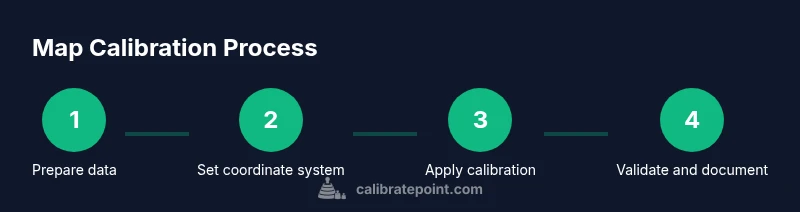
Calibrating maps is a structured process that aligns spatial data with real-world coordinates for higher accuracy in GIS, surveying, and field mapping. This guide from Calibrate Point outlines essential tools, core concepts, a clear workflow, and best practices. By following these steps, you will learn to calibrate maps effectively and document your results for future projects.
What does it mean to calibrate maps?
Calibrate maps means adjusting spatial data so that the digital representation matches real-world coordinates as closely as possible. For GIS professionals, data analysts, and field technicians, calibrating maps is about aligning scale, projection, and reference marks so measurements reflect true distances and directions. The process reduces systemic errors that stem from data collection, data integration, or inconsistent coordinate systems. In practice, calibrated maps enable more reliable decisions, whether you are planning a pipeline route, mapping a construction site, or digitizing historical data. According to Calibrate Point, a disciplined calibration workflow improves repeatability and traceability, which is essential for professional projects and audits. Keeping a clear record helps teams reproduce results and compare datasets over time.
Core concepts in map calibration
Map calibration rests on a few foundational ideas that every practitioner should understand. First, the datum defines the reference surface; second, the projection translates the curved Earth onto a flat plane; third, the scale controls how measurements on the map relate to real-world distances. When you calibrate maps, you must ensure your data share a common datum and projection, or you will introduce systematic errors. Accuracy is not only about precise numbers; it’s about consistency across datasets. Calibrate Point emphasizes documenting the chosen coordinate system, explaining why it was selected, and confirming compatibility with any external datasets you rely on. Finally, precision depends on both measurement quality and the robustness of the calibration model you apply.
Tools and data you need for calibration
A successful map calibration starts with the right tools and data. You’ll need GIS software that supports calibration workflows, such as QGIS or ArcGIS, and access to a trusted reference dataset. Ground control points (GCPs) with known coordinates are essential anchors; they should be distributed across the area of interest to capture any spatial distortion. A high-precision GPS or surveying instrument helps verify GCP locations, while metadata about data sources, coordinate systems, and transformations keeps the process transparent. Having a backup plan for data recovery and a standardized calibration report template ensures you can reproduce results. Calibrate Point recommends organizing all inputs, assumptions, and outputs before you begin to minimize rework.
Handling coordinate systems and projections
Coordinate systems are the backbone of calibration. Start by identifying the target CRS (coordinate reference system) and ensure all input datasets either share that CRS or can be reliably transformed. Be aware that transformations between geographic (lat/long) and projected coordinates can introduce distortion, especially over large extents or at extreme latitudes. Choose a projection that minimizes distortion for your study area and document any known limitations. When calibrating maps, it’s crucial to validate the transformation with independent measurements if possible, and keep a clear log of all parameters used in the process. Consistency here saves time and prevents mistakes later in the project.
Validation and accuracy checks in practice
Validation is the bridge between calibration theory and real-world usefulness. After applying calibration, compare transformed coordinates against independent reference data or additional high-quality control points. Look for systematic biases, directional errors, or residuals that exceed your project’s tolerance. Use statistical summaries and visual diagnostics in your GIS to assess residual distributions. If errors are detected, revise the calibration model or add more control points, then re-run validations until results meet your criteria. Document the validation outcomes and any corrective actions taken for future audits. Calibrate Point stresses that transparent validation underpins trust in calibrated maps.
Real-world examples and best practices
In practice, map calibration appears in many forms—from aligning historical maps with modern GIS layers to ensuring survey plans match field measurements. Best practices include starting with a clear plan, using well-distributed GCPs, and validating with independent data sources. Maintain a versioned workflow so you can reproduce results or roll back changes if needed. When collaborating, share calibration parameters and metadata with teammates to ensure consistency across projects. Long-term success also means building a library of calibration templates and checklists that your team can adapt to different projects. Calibrate Point’s experience shows that disciplined documentation and repeatable workflows dramatically improve project outcomes.
Best practices for long-term stability
Stability comes from consistency. Always store calibration settings alongside your data, and use standardized naming conventions for coordinate systems and transformation parameters. Periodically re-validate calibration against new reference data, especially when datasets are updated or expanded. Create lightweight, sharable calibration reports that highlight data sources, methods, and accuracy metrics. By institutionalizing these practices, you ensure that future projects reuse proven workflows and that new team members can step in quickly with confidence. Calibrate Point advocates embedding calibration into your data governance routines for lasting reliability.
Tools & Materials
- Geospatial GIS software (e.g., QGIS, ArcGIS)(Ensure the latest version with calibration tools and plugins.)
- High-quality reference dataset(Official basemaps or authoritative shapefiles for validation.)
- Ground Control Points (GCPs)(Known coordinates distributed across the area of interest.)
- Precision GNSS equipment or total station(Used to verify GCP coordinates with high accuracy.)
- Coordinate system and datum definitions(Clear documentation of target CRS and transformations.)
- Calibration report template(Structured summary of inputs, steps, and results.)
- Backup storage (external drive or cloud)(Protects raw data and calibration outputs.)
- Audit trail and metadata fields(Keeps version history and methodological notes.)
Steps
Estimated time: 2-3 hours
- 1
Prepare data and define scope
Inventory all datasets and confirm the calibration objective. Identify the extent of the area, the data sources, and any known limitations that will influence the calibration model.
Tip: Write down the target CRS and tolerance early to prevent later transformations. - 2
Establish the target coordinate system
Decide on a single, appropriate CRS for the project. Document why this CRS minimizes distortion for your area of interest.
Tip: Prefer a local projection with minimal distortion over broad global projections when handling small areas. - 3
Collect and verify Ground Control Points (GCPs)
Select multiple well-distributed GCPs with known coordinates. Verify their accuracy with a precision instrument before use.
Tip: Aim for at least 5-10 GCPs in a typical project spanning the area. - 4
Load data into GIS and assign CRS
Import all datasets into the GIS and assign the target CRS. Ensure there are no unknown coordinate systems lingering in any layer.
Tip: Use a single layer tree to keep track of each dataset’s CRS. - 5
Apply calibration transformation
Run the calibration or georeferencing tool, using GCPs to fit the spatial data to the reference frame.
Tip: Prefer a transformation method that balances simplicity and accuracy for your data scale. - 6
Perform validation checks
Compare calibrated results against independent references or reserve GCPs not used in fitting to assess residuals.
Tip: Mark outliers and revalidate after potential corrections. - 7
Document and archive results
Record the chosen CRS, transformation method, residual statistics, and validation outcomes in a calibration report.
Tip: Store calibration parameters with dataset metadata for future audits. - 8
Share and review
Distribute the calibration documentation to the team for peer review and ensure reproducibility across environments.
Tip: Create a versioned workflow so updates are traceable.
Questions & Answers
What is map calibration and why is it important?
Map calibration aligns spatial data with real-world coordinates, reducing errors and ensuring measurements reflect true distances and directions. It is essential for reliable GIS analyses, surveying, and field mapping.
Map calibration aligns data with real-world coordinates for reliable GIS analysis.
How long does calibration typically take?
Duration varies with data size and accuracy requirements, but most projects take a few hours to complete a solid calibration and validation cycle.
Calibration time depends on data size and accuracy needs, usually a few hours.
Which software is best for calibration?
Most GIS platforms offer calibration tools; choose one you know well, supports your data formats, and includes good documentation and audit capabilities.
Use a GIS platform you are comfortable with that supports calibration workflows.
What are common calibration mistakes?
Using inconsistent coordinate systems, relying on too few GCPs, or skipping validation can lead to biased results. Always document your methods.
Inconsistent CRS, too few GCPs, and missing validation are common pitfalls.
Do I need to calibrate maps for every project?
Calibration should be considered whenever spatial accuracy matters or when integrating datasets from different sources. Not all projects require full recalibration, but many do.
Calibration is needed when accuracy or data integration requires it.
How can I verify calibration results?
Compare calibrated coordinates with independent reference data or reserve GCPs; look for residuals within tolerance and document any inconsistencies.
Use independent references and residual analysis to verify accuracy.
Watch Video
Key Takeaways
- Know and document your target CRS before calibration.
- Distribute GCPs across the area to capture distortion.
- Validate with independent data and keep an audit trail.
- Use repeatable workflows to ensure reproducibility.