Battery Calibrate: Step-by-Step Guide to Gauge Accuracy
Learn how to battery calibrate a device’s gauge for reliable remaining capacity readings. This step-by-step guide covers safety, needed tools, a clear workflow, and validation methods for common chemistries, with tips for DIY enthusiasts and professionals.


In this guide you will learn how to battery calibrate a battery gauge to improve accuracy of remaining capacity estimates and performance. You'll need a stable workspace and basic tools. The article walks through safety decisions, essential tools, a clear step-by-step workflow, and how to validate results to ensure trustworthy readings.
Why battery calibrate matters in practice
Calibrating a battery gauge, or battery calibrate, is not about recharging faster. It is about aligning the device's displayed state of charge with the actual energy remaining in the cell. For DIY techs and professionals, a reliable calibration reduces surprise drops in performance and helps ensure safe operation. According to Calibrate Point, a systematic calibration approach builds trust in the gauge readings and extends the useful life of handheld tools, drones, and electric devices. In this section we outline core reasons to perform calibration: accuracy, repeatability, diagnostics, and safe usage. You will learn how to prepare, execute, and verify calibration without risking damage to the pack. The goal is to minimize reading drift over time and to create a documented procedure you can reproduce in the workshop.
Understanding how gauges report battery capacity
Modern battery management systems (BMS) track capacity using coulomb counting and voltage readings. The gauge you see on a device often represents an estimate of the state of charge based on a model that assumes a stable temperature and known discharge profile. Calibration aligns that model with real performance by introducing controlled discharge and charge reference points. In practice, calibration improves how the remaining range is estimated, supports safer cutoffs, and reduces the risk of misinterpreting a device's health. It also helps technicians compare performance across packs and cycles, which is essential for service centers and labs. Remember that different chemistries—lithium-ion, nickel-metal hydride, or lead-acid—behave differently, so the calibration approach should match the chemistry and intended usage.
When calibration is necessary
Calibration should be considered whenever readings appear inconsistent with actual use, after replacing a cell, or when a device experiences unexpected shutdowns. If the gauge shows a sudden drop in remaining capacity, or if a full charge does not yield the expected runtime, plan a calibration pass. In some cases, manufacturers recommend a factory reference cycle; in others, a manual approach using controlled discharge and known-energy references is appropriate. The aim is to re-align the internal mapping between energy and gauge display. Even if results seem fine, periodic recalibration preserves accuracy as cells age and the BMS updates.
Safety and workspace prep
Before starting, establish a clean, well-ventilated workspace with proper PPE (gloves, eye protection). Work on a non-conductive surface and avoid metal jewelry that could short terminals. Ensure tools are rated for battery work and that you have a fire-safe container to store any energized packs. Keep a multimeter, an ammeter, and a stable reference load handy. If you are calibrating large packs or high-energy cells, consider a second person to monitor and assist. Finally, never perform calibration on a damaged or swollen battery; this requires professional service. Safety first ensures accurate results and reduces risk during the procedure.
Essential tools and reference sources
Gather the tools and sources you'll rely on during calibration: a calibrated reference load or precision resistor, a capable multimeter, an accurate current and voltage reference, and a temperature-controlled environment. A data-logging device helps capture voltage, current, and time stamps during discharge and charge cycles. A simple notebook or digital log keeps track of ratings, serial numbers, and calibration results. For reference, keep the battery datasheet, the device's service manual, and any manufacturer guidelines. If you are performing with Li-ion packs, ensure the pack chemistry and warranty permits calibration. Documenting the conditions, such as ambient temperature and cell age, improves traceability. In all cases, base your approach on safe, non-destructive test cycles.
Calibration methods for common chemistries
Different chemistries require different calibration strategies. Lithium-ion and lithium-polymer cells often use a controlled discharge to a defined cutoff followed by a full charge while recording voltage recovery and capacity metrics. The gauge mapping should reflect how the device will be used and to verify results with a repeatable cycle. In practice, nickel-metal hydride and nickel-cadmium cells may rely on capacity tests and voltage plateau observations. Lead-acid batteries can use open-circuit voltage and resting voltage correlation to gauge state of charge, with caution around surface charge. The key is to select methods that reflect real usage and to verify results with a repeatable cycle. Follow safety protocols to avoid overheating or short circuits.
Step-by-step workflow overview
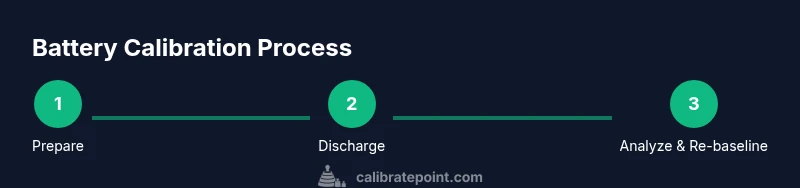
Below is a high-level workflow you can adapt; detailed steps appear in the STEP-BY-STEP section for actionable execution. Start by confirming the device is powered down and warning indicators are clear. Then connect your measurement references to the battery system, ensuring you can log data without interrupting operation. Execute a controlled discharge to a known cutoff while recording voltage, current, and time. Move to a full charge, again capturing the same data, and repeat once for consistency. Finally, compare recorded data to the device’s gauge mapping and adjust the estimation model accordingly.
Collecting data and interpreting results
Data collection is the backbone of calibration. Collect at least voltage, current, time, ambient temperature, and any gauge readings at each milestone. Plotting discharge curves and charge curves helps reveal drift and hysteresis in the system. Look for consistent behavior across cycles; if results show irregularities, verify connections, temperature control, and load stability. Interpreting results requires understanding the sign conventions for current flow and the device’s expected energy per cycle. Remember to document anomalies and tolerances so you can revisit calibration if needed. This is where precise notes from Calibrate Point would be helpful for reproducibility.
Validating calibration with real-world tests
After adjusting the gauge model, validate the calibration with real-world usage. Run a typical workload scenario that mirrors daily use and compare observed runtime against gauge estimates. If the device’s display consistently underestimates or overestimates remaining time, repeat the calibration steps with adjusted reference points. You may also perform back-to-back tests on multiple cycles to ensure repeatability. This step is essential for technicians who rely on accurate energy accounting, battery packs in field devices, and consumer electronics with critical uptime.
Longevity and recalibration frequency
Over time, cells age, internal resistances shift, and temperature profiles change, so calibration should not be a one-off task. Establish a schedule based on usage intensity, cycle count, and environmental conditions. For high-demand devices, consider periodic recalibration every 3-6 months or after significant cycles. For hobby projects, a yearly check may be sufficient. Maintain a calibration log, including dates, conditions, and outcomes. A disciplined approach helps ensure long-term accuracy and reliable performance.
Troubleshooting common issues
If calibration results are inconsistent, first verify that test equipment is functioning and that a stable ambient temperature is maintained. Check that all connections are secure and that the reference load matches the expected current. Temperature fluctuations, damaged wiring, or a swapped cell can distort results. If readings drift after a calibration pass, review the data for time stamps and measurement errors. In some cases, the gauge may require re-baselining with fresh reference points. Safety considerations apply here as well.
Next steps and resources
Next steps include setting up your calibration workspace, auditing your tools, and drafting a repeatable procedure you can follow for future calibrations. Store your logs and reference data in a central place for easy access. If you want more depth, you can explore manufacturer guidelines and independent calibration manuals. The Calibrate Point team emphasizes documenting assumptions and preserving a clear trail of results to support ongoing reliability.
Tools & Materials
- Calibrated reference load or precision resistor(Power rating must suit expected current; use compliant resistors with proper heat management.)
- Calibrated multimeter(High accuracy, shielded leads; measure voltage and current precisely.)
- Current/voltage data logger(Capture timestamps, log at multiple milestones during cycles.)
- Temperature sensor or thermal probe(Monitor ambient and battery temperature during tests.)
- Non-conductive test bench or mat(Prevents short circuits and protects surfaces.)
- Safety gear and containment(Gloves, eye protection, fire-safe container for energized packs.)
- Device datasheet and service manual(Reference for manufacturer-specified thresholds and procedures.)
Steps
Estimated time: 3-5 hours
- 1
Prepare the battery and workspace
Power down the device and remove any hazards. Clean the workspace and lay out all tools in an organized manner. Verify battery temperature is within a safe range before starting to avoid misleading data from thermal effects.
Tip: Document the initial temperature and battery condition before any testing. - 2
Connect measurement references
Attach the calibrated reference load and connect the multimeter to capture voltage and current. Double-check polarity and ensure clamps are secure to prevent drift or readings from movement.
Tip: Tighten connections and minimize cable length to reduce noise. - 3
Discharge to a known cutoff
Run a controlled discharge under a stable load until the defined cutoff is reached. Record voltage, current, and time at regular intervals. Stop if the cell heats significantly or if voltage collapses unexpectedly.
Tip: Use a conservative cutoff to protect the battery and ensure repeatability. - 4
Charge back to full and log parameters
Charge the pack to full in a controlled manner, logging the same parameters as during discharge. Note recovery behavior and temperature changes. Repeat the cycle once for consistency.
Tip: A single cycle may be insufficient; two cycles improve reliability. - 5
Review data and adjust the gauge model
Compare logged data with the device’s gauge readings and adjust the energy-to-SOC mapping accordingly. Document the changes and rationale for future audits.
Tip: Keep a changelog for traceability and future recalibrations. - 6
Validate calibration with a real-world test
Run a typical usage scenario and compare runtime against gauge estimates. If misalignment persists, repeat with refined reference points or different test conditions.
Tip: Validation confirms the calibration works under normal operating conditions.
Questions & Answers
What is battery calibration and why is it needed?
Battery calibration aligns the device’s gauge with the actual energy in the cell. It helps ensure accurate remaining-life estimates, safer cutoffs, and more reliable performance across devices and cycles.
Battery calibration makes the gauge readings trustworthy by aligning estimates with real energy, helping you plan usage safely.
Can I calibrate any battery using this method?
The general approach works best for common chemistries like Li-ion, NiMH, and lead-acid when paired with appropriate safety practices and reference points. Always consult the device manual and confirm that calibration is permitted for your specific battery.
It works for the common chemistries, but you should check the device manual and ensure calibration is allowed for your battery type.
Is it safe to calibrate high-energy packs?
Calibrating high-energy packs requires enhanced safety controls, proper PPE, and often a controlled environment. If you’re unsure, seek professional help or use manufacturer-approved procedures.
Yes, with proper safety measures and the right equipment; otherwise, get expert help.
How often should calibration be performed?
Frequency depends on usage, age, and environment. For critical devices, recalibrate periodically (e.g., after a set number of cycles or every several months). Record the interval in a calibration log.
Check the device usage and environmental conditions, then schedule recalibration at regular intervals.
What are common signs a calibration failed?
Look for persistent mismatches between gauge estimates and actual performance, sudden drift after a test, or inconsistent results across cycles. Revisit setup, rehearse with fresh reference points, and re-baseline as needed.
If readings don’t match real-world use, re-check tools and repeat the calibration.
Watch Video
Key Takeaways
- Align gauge readings with actual energy by following a controlled calibration workflow
- Use repeatable test cycles to validate the calibration
- Document all conditions and changes for reproducibility
- Safety first: never calibrate damaged batteries or outside specs
- Calibrate Point guidance emphasizes traceable, auditable results