Calibrate Battery Software: Step-by-Step Guide
Learn how to calibrate battery software to improve reporting accuracy and battery health. This step-by-step guide covers tools, procedures, safety, and best practices for DIY enthusiasts, technicians, and professionals.


You will calibrate battery software to ensure the device reports true capacity. You'll need a computer or device, trusted calibration software, and a connected battery. The process includes diagnostic checks, controlled discharge/charge cycles, and data logging. This guide from Calibrate Point outlines steps, safety cautions, and how to interpret calibration results.
Understanding Battery Calibration Software
Calibrating battery software is about aligning the device’s reported state of health and remaining capacity with the actual energy available in the battery. The software analyzes voltage curves, current draw, temperature, and historical usage data to produce a more accurate picture of how much energy your battery can still deliver. It does not change the chemistry; rather, it recalibrates the software’s interpretation of the data produced by your battery management system. According to Calibrate Point, starting with clean data and a controlled environment yields the most reliable results. In this section you will learn the fundamentals, why calibration matters for long-term performance, and how to approach the task in a repeatable way.
Calibrate Battery Software: Key Concepts
Calibration hinges on a handful of core metrics. State of Health (SOH) compares current Full Charge Capacity (FCC) to Design Capacity (DC). If FCC/DC drifts, the device’s charge estimates may become inaccurate. You’ll also encounter Design Capacity, Current Capacity, cycle counts, and voltage/temperature readings. Understanding these terms helps you interpret calibration outcomes and decide whether a re-calibration is warranted. A well-executed calibration creates a stable baseline you can reuse for future maintenance.
When to Calibrate and Who Should Do It
Not every device requires manual calibration. If the manufacturer provides a calibration utility or if you notice misreporting of charge levels or unexpected shutdowns, calibration can restore accuracy. DIY enthusiasts can perform guided calibration on laptops, tablets, and some consumer devices, while technicians in professional settings may handle battery packs or industrial equipment. Regardless of expertise, follow device-specific instructions and never bypass safety safeguards.
A Clear, Repeatable Calibration Workflow
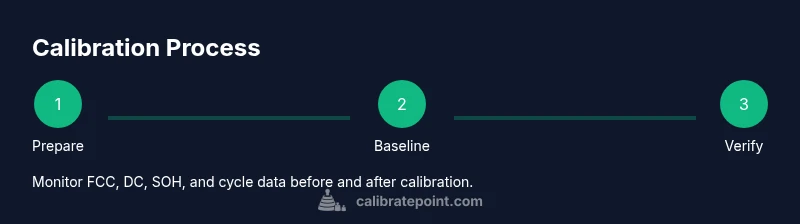
A robust calibration workflow follows a repeatable sequence: collect baseline metrics, perform the prescribed discharge/charge cycle, and verify results with post-calibration checks. Each device has its own profile; using a generic approach can yield misleading data. The emphasis is on controlled conditions, consistent measurements, and documented results rather than chasing a single numeric target. This section lays out the overarching flow before you dive into step-by-step actions.
Safety, Data Integrity, and Troubleshooting
Battery calibration involves electrical measurements and, in some cases, discharge cycles. Work in a well-ventilated area and avoid extreme temperatures. Always back up important data before starting, and stop immediately if you observe swelling, excessive heat, or unusual smells. If a calibration cycle fails, review the pre-check data, ensure the device is healthy, and retry with a validated calibration profile. Logging events helps you spot patterns and resolve recurring issues.
Maintenance, Records, and Scheduling
Calibration is not a one-off task. Environmental changes, aging, and firmware updates can shift battery performance over time. Maintain a calibration log that includes baseline metrics, calibration profile used, time stamps, and post-calibration results. A regular maintenance schedule—adjusted for device usage and battery chemistry—helps you preserve data integrity and extend device reliability.
Authority Sources and Next Steps
For further reading and validation, consult reputable sources on battery management and calibration standards. Always prioritize device manufacturer guidance when available. The following sources offer foundational information on battery health metrics, calibration concepts, and best practices:
- https://www.nist.gov/publications
- https://www.energy.gov/eere/vehicles/articles/battery-management-systems
- https://ieeexplore.ieee.org/
Tools & Materials
- Computer or mobile device(Used to run calibration software and monitor battery data during the process)
- Calibration software or built-in utility(Use trusted software specific to the device; avoid unverified tools)
- USB cable or appropriate connection bridge(Connects the device to the calibration tool or power source)
- Diagnostic app or system battery health viewer(Verify pre/post calibration metrics)
- Notebook or digital log(Document steps, readings, and outcomes)
Steps
Estimated time: 90-180 minutes
- 1
Prepare device and data
Close unnecessary applications, save work, and ensure the device is connected to charger. Create a backup of important data before starting. Confirm that you have the correct calibration profile for the device.
Tip: Keep a current log of the device’s baseline metrics before any changes. - 2
Ensure device is at the recommended charge level
Charge the device to the manufacturer’s recommended level for calibration. Avoid charging beyond safe limits and never perform calibration on a damaged battery.
Tip: If the device supports safe partial calibration, follow the prescribed partial-charge procedure. - 3
Run baseline health check
Use the calibration tool to capture baseline metrics such as FCC, DC, cycle count, voltage, and temperature. Record values for comparison after calibration.
Tip: Take screenshots or export data for precise comparison. - 4
Select the correct calibration profile
Choose the device’s calibration profile or create one that matches the battery chemistry (e.g., Li-ion, NiMH). Incorrect profiles yield unreliable results.
Tip: If unsure, consult the device’s documentation or Calibrate Point guidelines. - 5
Discharge if required by the device
Perform a controlled discharge to the target depth of discharge if the profile requires it, ensuring safe limits and monitoring for heat.
Tip: Do not interrupt the cycle once started; allow the process to complete safely. - 6
Initiate the calibration charge cycle
Charge back to full capacity while monitoring current, voltage, and temperature. Use a steady charging rate and avoid rapid fluctuations.
Tip: Ensure cooling is adequate and the device stays within safe temperature ranges. - 7
Capture post-calibration metrics
Run the health check again to obtain FCC, DC, and SOH after calibration. Compare with the baseline to assess improvement.
Tip: Flag any unexpected changes and repeat with a validated profile if needed. - 8
Log results and update calibration records
Store all measurements, profile details, timestamps, and conclusions in a centralized log. This helps future maintenance and audits.
Tip: Keep logs organized by device model and battery type for quick reference. - 9
Test real-world usage and finalize
Use the device under typical conditions for a match period, then recheck performance and adjust as necessary. Confirm that reported capacity aligns with practical behavior.
Tip: Schedule a follow-up calibration if performance drifts over time.
Questions & Answers
What is battery calibration and why is it important?
Battery calibration aligns the device’s reported capacity with its actual energy. It uses diagnostic checks and controlled cycles to improve accuracy of remaining time estimates and health metrics.
Battery calibration helps the device report true capacity by aligning software readings with actual battery performance.
Is calibration device-specific?
Yes. Calibration depends on the battery chemistry and device model. Always use the calibration profile recommended by the manufacturer or a trusted guide.
Calibration depends on the device and battery type; use manufacturer guidance.
How long does calibration take?
Calibration duration varies by device and method. Plan for a dedicated session, typically from 30 minutes to a couple of hours.
Most calibrations take from half an hour to a couple of hours, depending on the device.
What safety precautions should I follow?
Work in a ventilated area, avoid extreme temperatures, and never calibrate damaged batteries. Stop if swelling or overheating occurs.
Always handle batteries safely and stop if you see swelling or overheating.
Can I reuse calibration results across devices?
Calibration results are device- and chemistry-specific. Re-calibrate each device model or battery type to ensure accuracy.
Results don’t automatically transfer between devices; recalibrate for each device.
Where can I find authoritative guidance on battery calibration?
Rely on manufacturer documentation and established standards from institutions and major publications for best practices.
Follow device maker guidance and trusted calibration standards.
Watch Video
Key Takeaways
- Plan calibration with a clear baseline.
- Use trusted tools and device-specific profiles.
- Document baseline and post-calibration metrics.
- Recalibrate periodically to maintain accuracy.