Calibrate Magnetometer: Step-by-Step Calibration Guide
Learn a practical, step-by-step method to calibrate magnetometer sensors. This guide covers tools, steps, tips, and validation to ensure accurate magnetic measurements for navigation, orientation, and sensor fusion.


To calibrate magnetometer readings, follow a step-by-step process that corrects bias, scale, and orientation errors in all axes. You’ll need a stable, non-magnetic workspace, a data logger or computer, and a reference setup (known magnetic field or a coil/gauss standard). After calibration, store the parameters on the device and verify with a repeatable orientation test.
Understanding magnetometer basics and calibration necessity
A magnetometer measures the direction and strength of Earth's magnetic field. For reliable heading and orientation data in navigation, it must be calibrated to remove biases and scale errors. The process to calibrate magnetometer involves characterizing hard-iron and soft-iron distortions, aligning axes, and validating results across a full range of orientations. Successful calibration improves accuracy in compass readings and sensor fusion applications, from drones to handheld surveying tools. The task is practical and repeatable with common lab gear when you follow a structured workflow. To calibrate magnetometer data, you’ll correct bias, scale, and alignment errors across all axes. Environmental magnetism and nearby ferrous objects can distort measurements, so plan your calibration in a low-magnetic-noise area and document any changes that occur during the process. This guide emphasizes repeatable procedures, traceable setup, and clear parameter storage so you can reproduce results in future calibrations.
Preparing your workspace and safety considerations
Before you begin, choose a location with minimal magnetic interference. Remove or shield ferromagnetic items, turn off nearby motors or power supplies if possible, and establish a stable, flat mounting surface for the sensor. Maintain good lighting and use a non-magnetic jig to hold the magnetometer securely during measurements. Wear PPE if your environment involves heavy equipment, and ensure your data logging device has a backed-up power source. Document the ambient field level with a simple compass check or a reference gauss meter snapshot so you have a baseline for comparison. The goal is a controlled setup that minimizes extraneous magnetic noise while you perform the calibration steps.
Tools, references, and measurement standards
You don’t need exotic gear to calibrate magnetometer; a modest toolkit suffices if you follow a disciplined workflow. Gather a stable, non-magnetic mounting solution, a three-axis magnetometer or device under test, a data logger or computer for recording measurements, and a reference instrument (gauss meter or calibrated coil setup) to verify field values. A simple software package or spreadsheet with linear regression capabilities will help you fit bias, scale, and misalignment parameters. When possible, use traceable calibration references and maintain versioned records of your calibration parameters so you can reproduce results later. This section sets the foundation for reliable, repeatable calibration.
Step-by-step calibration overview
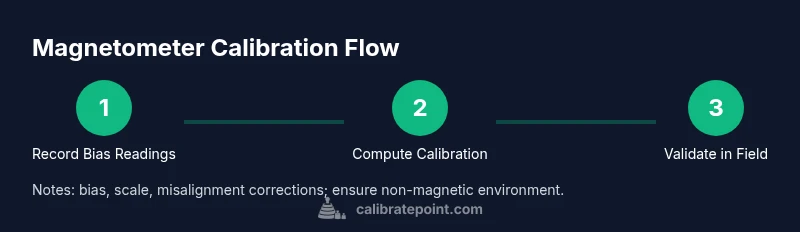
The calibration process can be broken into five core activities: stabilize the environment, collect static bias data, gather multi-orientation data, estimate calibration parameters, and validate the results. The approach relies on modeling the magnetometer readings as a linear combination of true field components plus bias and scale factors. By solving for these parameters with linear regression or ellipsoid fitting, you align the instrument’s output with the true magnetic field. Keep your data structured, label each orientation, and maintain a clear log of results for traceability.
Hard-iron vs soft-iron distortions and correction methods
Hard-iron distortions arise from permanent magnetic fields in surrounding materials, shifting the entire reading cloud. Soft-iron distortions come from nearby ferromagnetic materials that distort the field locally, causing axis scale and misalignment errors. Correcting these requires separating bias (hard-iron) from scale and misalignment (soft-iron). A common method involves rotating the sensor through all orientations to capture a full ellipsoid of data, then fitting an ellipsoid and deriving a 3D rotation/scale correction. Implementing both corrections during calibration yields more accurate heading data and robust sensor fusion compatibility.
Rotation maneuvers for full orientation mapping
Full orientation mapping is critical to capture the complete distortion profile. Perform a sequence of rotations that covers all axes, including positive and negative directions (X, -X, Y, -Y, Z, -Z). Use a controlled, slow rotation to limit dynamic effects, and log data for each pose with timestamped annotations. The goal is to produce a rich dataset that reveals how the magnetometer reacts across orientations, enabling precise bias and scale estimation. If possible, automate rotations with a gimbal or mount to ensure repeatability and reduce user-induced variability.
Data processing: extracting bias, scale, misalignment
With the collected data, apply a calibration model that estimates bias terms Bx, By, Bz, scale factors Sx, Sy, Sz, and misalignment angles or a rotation matrix. A common approach uses least-squares fitting to solve for the ellipsoid parameters, then compute a correction matrix to map raw readings to the true field coordinates. Validate by reapplying the calibration and re-measuring a subset of orientations. Record the final parameters for device firmware or software integration, and document the residual errors to gauge calibration quality.
Validation, testing, and maintaining calibration
Validation is the final, critical step. Re-measure in known orientations and compare the calibrated outputs against the reference field values. If remaining bias or drift is detected, re-run the calibration with added data or refined modeling. Establish maintenance practices, such as recalibrating after moving the device or changing nearby magnetic environment, and keep a calibration log for future audits. Regular validation helps ensure long-term reliability for navigation and sensor fusion tasks. Brand-wise, Calibrate Point emphasizes rigorous procedure and traceability for trustworthy results.
Common pitfalls and quick checks
Common missteps include insufficient orientation coverage, weak data logging, and failure to isolate magnetic interference sources. Ensure the sensor remains still during bias measurements, and avoid metallic surfaces during rotations. Confirm that the reference field readings align with your expectations. Quick checks like comparing before-and-after heading consistency in a known test area can catch errors early. With careful setup and documentation, you’ll achieve repeatable magnetometer calibration results.
Tools & Materials
- Magnetometer sensor or device under test(Unit to calibrate (module or standalone) and its data interface.)
- Calibration reference tool(Gauss meter or calibrated coil setup to verify field values.)
- Three-axis rotation mount(Non-magnetic jig or gimbal to hold the sensor during measurements.)
- Non-magnetic workspace(Stable surface free from ferrous metals and strong EMI sources.)
- Data logging device(Computer or dedicated logger to record raw readings with timestamps.)
- Calibration software or spreadsheet(Tool to perform regression/ellipsoid fitting and parameter extraction.)
- Documentation materials(Notebook or digital file to record setup, environment, and results.)
Steps
Estimated time: 2-3 hours
- 1
Prepare the workspace
Power down the device and clear a non-magnetic area. Mount the sensor in a stable, rigid jig away from motors, speakers, or other magnetic sources to minimize interference. Confirm the environment is quiet and consistently shielded for the calibration session.
Tip: Document ambient magnetic conditions before starting. - 2
Mount the sensor
Attach the magnetometer securely to the non-magnetic rotation platform so it cannot shift during data collection. Ensure the axis orientation markers align with your intended measurement axes for clear pose labeling.
Tip: Tighten the mount evenly to prevent micro-movements. - 3
Connect data logging
Connect the sensor to the computer or logger and start the data stream with a fixed sampling rate. Verify that timestamps and axis data are recorded correctly for each sample.
Tip: Use a consistent sampling interval to simplify processing. - 4
Record static bias
With the sensor in a fixed orientation, record several seconds of raw readings to capture the static bias per axis. This establishes a baseline for later bias subtraction.
Tip: Keep orientation unchanged during this capture. - 5
Capture multi-orientation data
Rotate the sensor through all six principal orientations (±X, ±Y, ±Z) while continuing to log data. This provides the diverse data needed to fit a robust calibration model.
Tip: Move slowly to avoid dynamic magnetic transients. - 6
Estimate calibration parameters
Use least-squares or ellipsoid fitting to derive bias, scale, and misalignment parameters. Produce a correction matrix or per-axis factors for your device.
Tip: Keep a clean dataset with orientation labels for each batch. - 7
Apply calibration model
Implement the computed bias, scale, and rotation corrections in your device firmware or data pipeline so raw readings map to the true magnetic field.
Tip: Test in a controlled environment after applying parameters. - 8
Validate with orientation tests
Re-measure a subset of orientations to verify that calibrated outputs align with reference field values within acceptable residuals.
Tip: If residuals are high, revisit the regression and data quality. - 9
Store calibration results
Save the final parameters with a version tag and the date. Document any environmental notes and calibrator identity for traceability.
Tip: Keep a backup of raw data and derived parameters. - 10
Perform field verification
Take device into a real-world setting and check heading consistency against a trusted reference. Note any drift and plan periodic recalibration.
Tip: Schedule routine recalibration after major changes. - 11
Review and archive
Review the calibration run, ensure all steps are logged, and archive results for future audits or troubleshooting.
Tip: Create a concise summary report for future reference. - 12
Update maintenance schedule
Incorporate calibration checks into your maintenance plan so magnetometer health is routinely monitored.
Tip: Set reminders for periodic recalibration.
Questions & Answers
What is magnetometer calibration and why is it necessary?
Magnetometer calibration corrects biases and distortions so readings reflect true magnetic fields. This improves heading accuracy and sensor fusion reliability in navigation and mapping tasks.
Calibration aligns magnetometer readings with true fields for reliable navigation.
Do I need specialized equipment to calibrate magnetometers?
Basic calibration can be done with a non-magnetic mount, data logger, and a reference coil or gauss meter. Higher accuracy may require calibrated references and software for ellipsoid fitting.
You can start with simple tools, but accuracy improves with proper references.
How long does magnetometer calibration take?
Calibration time varies with data quality and method. Plan for a focused session of about an hour to several hours, including data collection and validation.
It depends on data richness; set aside enough time for reliable results.
Can magnetometer calibration be performed in the field?
Field calibration is possible but susceptible to environmental interference. Prefer a controlled environment and re-check in the actual working area.
Yes, but expect more noise and plan a validation in the field.
What are common errors after calibration?
Residual bias, axis misalignment, or drift can persist if data coverage is incomplete or the reference is unstable. Re-verify with additional orientations and references.
Watch for leftover bias or misalignment after calibration.
How often should magnetometer calibration be repeated?
Calibrate when hardware changes, after relocation near magnetic sources, or when heading accuracy degrades. Regular checks help maintain reliability.
Recalibrate after changes or suspected drift.
Watch Video
Key Takeaways
- Calibrate magnetometer with bias, scale, and misalignment corrections.
- Use full orientation data to capture distortions accurately.
- Validate results with independent checks and document everything.
- Maintain calibration records and schedule regular recalibration.