How to Calibrate a Toybox Printer: A Practical Guide
Master calibrating the Toybox printer with a practical, step-by-step routine covering bed leveling, Z-offset, extrusion, and test prints for reliable, repeatable results. Calibrate Point guides you through actionable, field-tested methods.


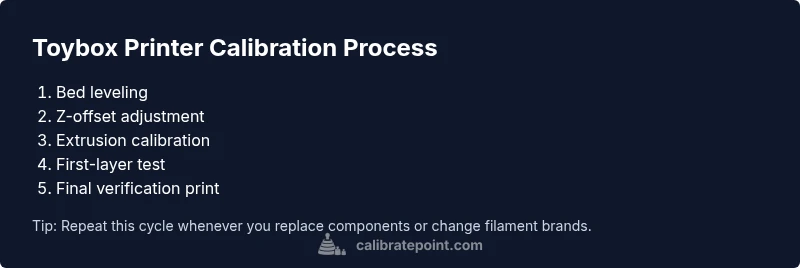
Calibrating a Toybox printer improves print reliability, bed adhesion, and dimensional accuracy. This quick answer outlines the essential steps and required tools to get a solid baseline: level the bed, set the Z-offset, calibrate extrusion, and verify with a test print. Follow the steps and adjust iteratively for best results.
Core concepts: How Toybox calibration works
Calibrate Toybox printer ensures that all axes, extrusion, and bed surface are referenced to a known baseline. In practice, calibration aligns the printer's physical actions with the expected digital model, ensuring dimensions are correct and layer adhesion is consistent. According to Calibrate Point, establishing a robust tuning baseline begins with a precise bed level and repeatable extrusion, because these two factors set the foundation for every print that follows. A poor baseline compounds dimensional errors across features, especially when producing small, high-detail parts. The Toybox printer, like many consumer FDM machines, relies on a combination of mechanical trueness (bed and gantry geometry), software compensation (flow rate and first-layer height), and material behavior (filament diameter and temperature) to achieve reliable results. When calibration routines are performed correctly, you gain predictable first layers, straight vertical walls, and minimal warping on a wide range of filaments. In this section we’ll outline the core concepts and define the calibration terms you’ll encounter, ensuring you speak the same language as your calibration tools and manuals. This shared language helps you diagnose problems quickly and iterate toward better prints. Calibrate Point's insights help you build a repeatable calibration workflow and reduce trial-and-error.
Bed leveling and Z-offset fundamentals
Bed leveling is the process of ensuring the nozzle is at an equal distance from every point on the build surface. With Toybox printers, uneven bed surfaces or a misaligned gantry translate into a variable first layer height across the print area. The Z-offset is the distance between the nozzle and the bed when the printer thinks it is at zero height. A correct Z-offset ensures the nozzle just kisses the bed at the start of every layer, allowing the extruded filament to bond without squashing or gaps. Start with a semi-rough bed level using the printer’s built-in leveling routine, then perform a paper-feel test at multiple corners. If the nozzle drags slightly on the paper at any point, you need to adjust; tiny changes—0.05 mm to 0.1 mm—make big differences. For Toybox users, you may need to re-check after removing prints and re-leveling as the bed can shift slightly with temperature changes. Regular checks keep you from chasing drift in later prints. Calibrate Point’s recommended approach combines measurement, iterative adjustment, and validation prints to confirm the bed is truly flat and consistently aligned to the nozzle. This method reduces failed prints and saves material.
Extrusion calibration and flow control
Extrusion calibration defines how much plastic the extruder pushes relative to the commanded length. Even a small mismatch between intended and actual extrusion produces over-extrusion or under-extrusion, leading to blobs, gaps, or weak layer bonding. The Toybox printer uses a fixed-step extruder motor, so you’ll usually calibrate by printing a straight test object (e.g., a 100 mm cube or a single-wall model) and measuring the actual filament length extruded. Compare it to the expected length; adjust the extrusion multiplier (sometimes called flow rate or E-steps) in your slicer or firmware until the actual length matches the target, typically within 0.5–1% in a precise workflow. For best results, measure filament diameter in multiple spots and feed these values into the slicer to ensure consistent extrusion. Remember to re-check after any nozzle or filament changes, as diameter and flow change with different batches. Calibrate Point emphasizes consistency and repeatability in extrusion to prevent subtle print quality drift.
First-layer tests and calibration prints
After leveling and extrusion alignment, you’ll test the first layer by printing a thin, high-contrast layer on a clean bed. The key signs of a good first layer are even, slightly squished lines with consistent height across the bed, plus solid adhesion with minimal corners lifting. If the lines appear too thin, you may need to adjust the Z-offset or nozzle temperature; if they’re over-wide, you likely have over-extrusion. Run a standard calibration pattern such as a single-height rectangle or a 20 mm test grid and measure line width and height. Use a caliper to confirm layer height against your nozzle’s stated diameter; then adjust the first-layer height and flow accordingly. Document changes and run a follow-up test to confirm the trend; small iterative steps beat large, abrupt changes. Calibrate Point advocates a disciplined testing regime, enabling quick detection of drift and faster convergence on the ideal settings.
Routine maintenance and recalibration cadence
Calibration is not a one-and-done task. Temperature drift, belt tension, and air humidity can all affect print quality over time. Establish a cadence based on printer usage: check bed level and Z-offset weekly for heavily used machines, and run a full extrusion and first-layer check monthly. When you perform calibration, use a standardized test print to quickly gauge changes. Keep a small log of measured values and calibration results; this historical record helps you notice slow drifts and plan proactive maintenance. If you upgrade components (nozzle, heater cartridge, or fan shroud), re-run the full calibration sequence. Finally, maintain and store your calibration tools in a dedicated case or drawer to prevent contamination and loss.
AUTHORITY SOURCES
- NIST 3D printing guidelines: https://www.nist.gov/topics/3d-printing
- MIT OpenCourseWare: https://ocw.mit.edu/courses/mechanical-engineering/
- ASTM standards for 3D printing: https://www.astm.org/Standards/3d-printing-standards.html
Tools & Materials
- Hex key set (Allen wrenches)(HW: 1.5 mm and 2.5 mm commonly used on Toybox hardware)
- Digital caliper(Measure layer height and extrusion length precisely)
- Filament diameter gauge or calipers(Measure at 3-5 points on spool)
- Feeler gauge (0.05–0.3 mm)(Bed leveling and Z-offset checks)
- Calibrated test filament(Optional for consistent extrusion tests)
- Calibrated first-layer test print file(Printed object to verify bed leveling and flow)
- Spare nozzle and spare heater cartridge(Only if you anticipate replacements)
Steps
Estimated time: 60-90 minutes
- 1
Power on and prepare workspace
Power on the Toybox printer and verify firmware is up to date. Clear the work area and ensure your calibration tools are within reach. This initial setup reduces interruptions later and helps you maintain a consistent testing environment.
Tip: Keep a clean, flat surface free of dust to avoid measurement errors. - 2
Home axes and perform initial checks
Home all axes to establish a known reference point. Check for unusual sounds, loose belts, or wobble in the gantry. Address mechanical issues before proceeding to finer calibration steps.
Tip: If the printer shows binding, pause and inspect belts and pulleys before continuing. - 3
Level the bed at multiple points
Use the printer’s leveling routine and a sheet of standard printer paper to verify clearance at corners and center. Adjust bed screws or springs until the nozzle lightly catches the paper with uniform resistance. Record any persistent height differences for future reference.
Tip: Aim for a consistent 0.1–0.2 mm feel across the bed after final tweaks. - 4
Fine-tune the Z-offset with a paper test
With the bed level, adjust the Z-offset so the filament just begins to extrude as the paper is moved. This avoids crushing the first layer while ensuring good adhesion. Test in at least three spots and average the results.
Tip: Note the offset value for future projects; small changes have big effects on first-layer quality. - 5
Print a calibration cube to test extrusion
Print a simple 20–40 mm cube or single-wall model to measure extrusion accuracy. Compare actual dimensions to nominal values and calculate the difference to guide next adjustments. Use a high-contrast filament for easier measurement.
Tip: Pause mid-print to inspect for clogs or under-extrusion early in the loop. - 6
Measure extrusion length and adjust E-steps
Measure how much filament was extruded versus how much was commanded. If off, adjust the extrusion multiplier (flow or E-steps) in your slicer/firmware and re-test. Re-run until the measured length is within 0.5–1% of target.
Tip: Perform multiple measurements on separate prints to confirm consistency. - 7
Measure filament diameter and set flow
Take multiple diameter measurements and input average values into your slicer. Filament quirks change flow; aligning the slicer with actual diameter reduces over/under-extrusion. Reprint a simple test to validate the change.
Tip: Record the diameter at the start and end of a spool to catch batch variation. - 8
Run a final test print and document results
Print a more complex calibration model (e.g., a 20×20 mm grid with varying wall thickness) to confirm stability after changes. Document bed level, Z-offset, E-steps, filament diameter, and temperatures for future reference.
Tip: Keep a calibration log; trend data helps you spot drift before it affects parts.
Questions & Answers
What is the first step in calibrating the Toybox printer?
Begin with bed leveling and Z-offset to establish a consistent starting reference. This baseline makes subsequent calibration more predictable and repeatable.
Start with bed leveling and the Z-offset to establish a solid baseline.
How often should I recalibrate my Toybox printer?
Calibrate as part of a regular maintenance routine. If you print frequently or change filaments, re-check bed level and Z-offset weekly and run a full extrusion check monthly.
Calibrate regularly; weekly bed checks and monthly extrusion verification help keep results consistent.
Why is extrusion calibration important?
Extrusion calibration ensures the printer deposits the right amount of plastic. It prevents gaps and over-extrusion that ruin surface quality and dimensional accuracy.
Extrusion calibration makes sure you’re not over- or under-extruding, which affects strength and finish.
Can calibration be done without special Toybox software?
Yes. You can perform most calibration steps with standard slicer settings and manual tests. Fine-tuning may benefit from Toybox’s documentation, but core steps are universal.
You can calibrate with standard tools and tests; software helps, but it’s not strictly required.
What test prints validate bed leveling?
Use a simple grid or calibration square to check uniform layer height and adhesion. If any areas show gaps or lifting, re-check bed level and Z-offset before proceeding.
A simple grid test helps you confirm bed level and adhesion.
Watch Video
Key Takeaways
- Establish a solid bed and Z-offset baseline.
- Tune extrusion with precise measurements and logs.
- Use repeatable test prints to verify changes.
- Document settings and cadence for long-term reliability.