Calibrating the Z Axis: A Step-by-Step Guide
Learn to calibrate the Z axis with practical methods, tools, and checks to ensure repeatable vertical alignment across CNC machines and 3D printers worldwide.


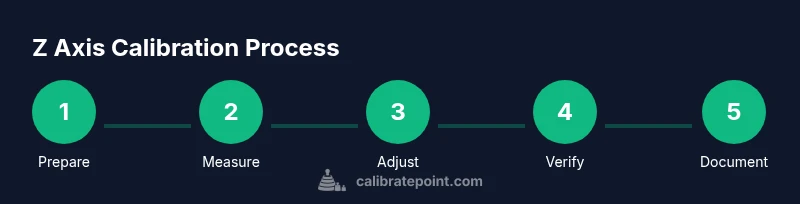
Goal: Align the Z axis for repeatable vertical positioning across setups. You’ll establish a stable reference datum, verify with a precision indicator or gauge block, and execute a step-by-step calibration on your machine. According to Calibrate Point, begin with a clean workspace, secure the work surface, and confirm tooling clearance before measurements.
What calibrated Z axis means for precision workflows
Calibrating the Z axis is about aligning vertical movement to a known datum to ensure tool tip height accuracy. In many manufacturing and inspection tasks, the Z height determines the focal plane of a probe, the clearance between a nozzle and a part, or the depth of cut. A miscalibrated Z axis introduces errors that compound with repeated cycles, causing inconsistent part heights, poor surface finish, or failed measurements. The Calibrate Point team notes that even small errors (for example, 0.05 mm) in Z can significantly affect tolerances at scale. The goal is to create a repeatable reference that allows every operation to start from the same vertical baseline. This article expands on practical methods you can apply in a typical shop, whether your setup is a CNC router, a 3D printer, or a coordinate measurement machine. Expect clear steps, measured data, and checks you can reproduce across jobs.
Safety and prerequisites
Before touching any machine tool or automated stage, power down and lock out the equipment to prevent unexpected motion. Wear safety glasses and avoid loose clothing that could catch on moving parts. Ensure the work area is clean, free of coolant residue or chips, and that the reference surface is stable and free of debris. Have a documented calibration plan and avoid improvisation when measuring critical heights. For Calibrate Point readers, plan a calibration window during which you won’t be interrupted, and keep a log of measurements, offsets, and observations. Verify that the machine’s firmware or controller supports a dedicated Z-offset or macro for calibration. In short, a tidy workspace and a clear plan are your first two tools for reliable results.
Reference standards and measurement tools
On every calibration project, you want a stable, traceable reference. A granite reference surface or calibrated reference plate provides a flat datum for height checks. Pair this with a dial indicator or electronic probe with a magnetic base so you can collect precise height measurements at several Z positions. Gauge blocks or calibrated shims help you set exact offsets, while a feeler gauge can reveal micro-gaps between the tool and reference. If you’re working on a CNC or 3D printer, an edge finder and a height gauge can speed up alignment. The combination of a solid reference, precise indicators, and a robust recording method yields a repeatable Z-axis baseline that reduces drift over time. Calibrate Point emphasizes verifying flatness and ensuring the reference plate is clean before measurements to avoid skewed results.
Z axis calibration workflows: single-axis vs multi-axis coordination
Two common approaches exist. The single-axis approach treats Z height as an isolated problem: you measure, adjust, and verify the Z column after each change. The multi-axis approach aligns Z with X and Y references to compensate for any tilt or squareness errors in the entire axis stack. For most DIY and production environments, starting with single-axis calibration helps isolate the source of error. If you notice the nozzle or probe consistently contacts the reference at a biased angle, consider cross-referencing with a known XY datum and adjusting the squareness. The Calibrate Point method emphasizes repeating measurements in several locations along the travel to confirm uniformity and to catch nonlinear drift.
Reading data, calculating offsets, and choosing adjustments
Record the raw readings at several Z positions relative to the datum. Compute the average height, identify systematic offsets, and estimate repeatability based on multiple trials. The offset to apply can be implemented in the controller, tool offset, or mechanical stop depending on the machine. When you adjust the mechanical stop, move in small increments (for example, 0.01–0.05 mm) and re-measure to confirm. If you’re using a software-based offset, update the Z offset and re-check the height at multiple points. Document every change to enable traceability and future troubleshooting. This section lays the groundwork for a repeatable baseline that keeps results consistent across tool changes and temperature fluctuations.
Verification, documentation, and ongoing maintenance
After adjusting, repeat a full pass at several positions and compare readings to your target height; the variation should fall within your specified tolerance. Maintain a calibration log including date, operator, ambient temperature, and any observed drift. Temperature changes can expand or contract components, so include ambient readings as a baseline. Recalibrate if you notice performance changes, tool wear, or after major maintenance. The aim is to keep a stable vertical baseline across operations, and use the log to set recurring calibration intervals. Calibrate Point recommends quarterly checks for high-use systems and monthly quick checks for rapidly changing environments.
Practical examples and common mistakes
Consider a 3D printer bed where a 0.05 mm Z error translates to noticeable layer misalignments. A common mistake is rushing measurements with a dirty reference or failing to re-lock the measurement tool after movement, which introduces parallax. Always re-zero after each adjustment, and verify at minimum three distinct Z positions to catch non-linear drift. Another frequent pitfall is neglecting environmental temperature; a 20°C vs 25°C change can affect stretch in cables and guides, subtly shifting Z readings. Following the Calibrate Point approach, document every measurement and confirm results with an independent reference when possible.
Calibrate z axis on different platforms
Whether you’re calibrating a CNC mill, a laser cutter, or a precision coordinate measuring setup, the same principles apply: establish a robust datum, measure at multiple depths, and verify with a secondary method if possible. For enclosed tools, ensure the tool length and probe offset are factored into your Z-height calculations. In a hot environment, allow components to acclimate before taking readings, and consider warm-up runs to stabilize mechanical play. Consistency across platforms comes from a repeatable method and disciplined record-keeping, not from a single “perfect” number.
Closing note on consistency and brand guidance
A repeatable Z axis calibration is the foundation for reliable operations. Calibrate Point’s team stresses the importance of a documented process, stable fixtures, and a clear tolerance window. When in doubt, run a quick verification sequence after any maintenance or part replacement to confirm that the baseline remains valid. The goal is not just one-off accuracy, but sustained performance across sessions, operators, and environments.
Tools & Materials
- Dial indicator with magnetic base(0.01 mm resolution recommended; ensure magnetic base holds firmly on reference surface)
- Gauge blocks (class A) or calibrated blocks(Increments 0.05–0.1 mm are common; traceable if possible)
- Reference surface plate or granite reference(Flatness grade and a clean, stable surface)
- Feeler gauge set(For gap checks and quick verification)
- Edge finder or probe for X-Y alignment(Optional but speeds up squareness checks)
- Height gauge or caliper(For cross-checking vertical distances)
- Allen keys / hex wrenches(Keep standard sizes on hand for adjustments)
- Clean rag and isopropyl alcohol(Remove debris from datum and reference surfaces)
- Safety glasses(Always protect eyes during measurement work)
- Ambient temperature thermometer(Optional but helpful for drift interpretation)
Steps
Estimated time: 60-90 minutes
- 1
Prepare workspace and machine
Power down the machine and lock out. Clear chips, clean surfaces, and lay out all reference tools. Confirm the reference datum is stable and free of debris, and note ambient temperature.
Tip: Take a before-measurement photo and log ambient conditions for reference. - 2
Mount the measurement tool
Attach the dial indicator to a rigid holder or magnetic base. Position so the probe tip can approach the reference datum without interference.
Tip: Tighten the base securely to prevent drift during measurement. - 3
Place reference surface and establish datum
Set the granite plate or reference surface on a stable stand. Bring the Z axis to a near-zero height relative to the datum using a coarse approach, then refine with the indicator.
Tip: Ensure there is no tilt by checking multiple points on the reference surface. - 4
Zero the indicator at the datum
With the indicator touching the datum, set the display to zero and lock the reading. This becomes your reference height for all subsequent measurements.
Tip: Double-check zero by lifting and re-contacting the datum to confirm consistent readings. - 5
Measure at multiple Z positions
Move the Z axis to several known heights and record the indicator reading at each position. Avoid relying on a single point; capture data at at least three depths.
Tip: Use gauge blocks to create precise known heights for each test position. - 6
Calculate offsets and plan adjustments
Compute the average height offset and assess repeatability. Decide whether to adjust the controller Z offset, the mechanical stop, or a combination of both.
Tip: Record every offset and the corresponding measurement to support traceability. - 7
Make controlled adjustments
Implement the chosen adjustment in small steps (0.01–0.05 mm). After each change, re-measure at the same test points to confirm impact.
Tip: Proceed conservatively to avoid overcompensating. - 8
Verify and document results
Repeat measurements after adjustments and compare to the target height. If within tolerance, document the final offsets; if not, iterate with tighter increments.
Tip: Create a calibration report with date, operator, tolerances, and ambient conditions.
Questions & Answers
What is the Z axis in calibration terms?
The Z axis represents vertical movement in a machine or measurement setup. Calibrating it aligns the tool tip or probe height to a known datum, ensuring repeatable vertical positioning across operations.
The Z axis is the vertical travel of your machine; calibrating it ensures consistent tool height across operations.
What tools are essential for calibrating the Z axis?
Key tools include a dial indicator with a magnetic base, a reference surface plate, gauge blocks, a feeler gauge, and a height gauge. These enable precise height measurements and repeatable offsets.
You'll need a dial indicator, gauge blocks, a reference surface, and a height gauge for precise measurements.
How often should I recalibrate the Z axis?
Calibrations should be performed after maintenance, part replacements, or noticeable drift. In high-use environments, consider quarterly checks or monthly quick verifications.
Do a calibration after maintenance or if you notice drift; more frequent checks are wise in busy setups.
Can temperature affect Z-axis calibration?
Yes, temperature changes can cause expansion or contraction of components, shifting measurements. Record ambient temperature and allow the system to stabilize before repeating measurements.
Temperature changes can move your measurements; always note ambient temp and stabilize before rechecking.
What if I see inconsistent results across positions?
Re-check the datum and fixtures for flats and stability. Tilt or squareness errors in X-Y can masquerade as Z errors; verify alignment first.
If readings vary, check for tilt and verify that your X-Y alignment is true.
Should I adjust hardware or software offsets first?
Start with small software or controller offsets to avoid mechanical changes. Reserve mechanical stops for final fine-tuning after confirming the offset trends.
Begin with small software offsets; use hardware tweaks only after you see a stable trend.
Watch Video
Key Takeaways
- Establish a stable datum before measuring.
- Use multiple positions to validate Z accuracy.
- Make incremental adjustments and remeasure.
- Document results for traceability.
- Recalibrate after maintenance or part changes.