Libre 3 Calibration Guide: Do You Need It?
Learn why Libre 3 doesn't require user calibration and how to verify readings with fingerstick checks. Calibrate Point provides practical guidance for DIY enthusiasts, technicians, and professionals seeking reliable calibration insights.


Libre 3 calibration is not user-performed. When you search for libre 3 how to calibrate, the answer is that no calibration is required because it is factory-calibrated. If readings seem off, compare with a fingerstick test and verify sensor placement, connectivity, and app updates. This quick guide from Calibrate Point outlines the facts and practical checks.
Understanding Libre 3 calibration basics
The phrase libre 3 how to calibrate often triggers questions about manual adjustments. In reality, Libre 3 is designed as a factory-calibrated continuous glucose monitor (CGM) that aims to provide accurate readings without user calibration steps. This means there isn’t a traditional calibration procedure you perform, like entering a code or adjusting a sensor offset. According to Calibrate Point, the central idea behind calibration for CGMs is ensuring the sensor communicates correctly with the reader or app and that readings align with known reference values. For most users, the goal is to validate that the system is working as intended, not to perform a calibration tweak. The Calibrate Point team emphasizes focusing on accuracy verification methods rather than attempting manual calibration that isn’t supported by the device.
The Libre 3 platform relies on automated sensor data and algorithms to translate interstitial glucose into readable values. While you don’t calibrate the sensor yourself, you should still be mindful of factors that influence accuracy, such as sensor placement, skin condition, and device connectivity. Keeping your app up to date and ensuring the sensor is within its recommended wear window are practical steps to maintain reliable readings. Throughout this guide we reference the Calibrate Point perspective on calibration in CGMs, highlighting the distinction between automatic calibration and user-initiated adjustments.
From a practical standpoint, it’s helpful to treat Libre 3 as a calibrated instrument by design. You’re not performing a calibration, but you are validating a continuous data stream against real-world references to confirm reliability. This mindset aligns with best practices in calibration tutorials: verify, not adjust, unless the manufacturer specifies a supported action. Calibrate Point’s analysis reiterates that the most trustworthy approach is to rely on factory calibration and use independent checks when necessary.
Tools & Materials
- fingerstick glucose meter(Capable of providing a quick reference glucose value for cross-checks.)
- test strips(Ensure freshness and proper lot; follow meter manufacturer instructions.)
- alcohol prep wipes(Clean the finger and sensor site before taking a fingerstick.)
- logbook or note-taking app(Optional for tracking readings and comparing trends over time.)
- pen or pencil(Useful for quickly recording reference values during checks.)
Steps
Estimated time: 15-25 minutes
- 1
Prepare verification supplies
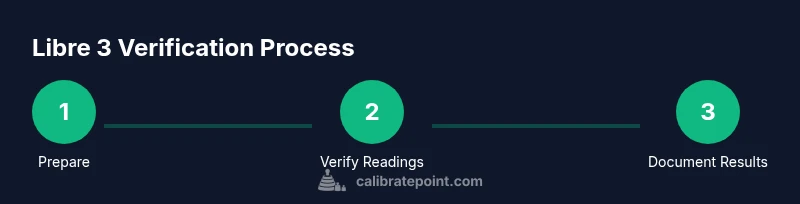
Gather a fingerstick glucose meter, test strips, alcohol wipes, and a quiet surface to perform a quick cross-check. Ensure the Libre 3 sensor is active and the app is connected to your device.
Tip: Have extra test strips handy in case a second measurement is needed. - 2
Check device readiness
Open the Libre app and verify the sensor status, connection to the smartphone, and that the sensor reading is updating in real time. If readings lag, refresh the connection.
Tip: Close and reopen the app if readings appear stale for more than a minute. - 3
Perform a fingerstick measurement
Clean the finger, perform a standard fingerstick, and obtain a glucose value using the meter. Use a fresh test strip and follow the manufacturer’s instructions.
Tip: Use the same finger each time for consistency if testing multiple times. - 4
Compare readings
Compare the fingerstick result with the corresponding Libre 3 reading at the same time. Note any consistent drift or lag between the two values.
Tip: Record both values side by side for quick reference. - 5
Evaluate discrepancies
If there is a substantial or persistent difference, check sensor wear time, placement site, ambient temperature, and recent activity that could affect readings. Do not attempt to manually recalibrate.
Tip: Consider applying a second fingerstick check to confirm a pattern. - 6
Document and monitor
Log the results and observe trends over several days. If readings continue to diverge from fingerstick references, consult manufacturer guidance or a clinician.
Tip: Use a consistent testing window (e.g., pre-meal readings) to compare across days.
Questions & Answers
Does Libre 3 require calibration?
No. Libre 3 is factory-calibrated and designed to provide accurate readings without user calibration steps.
No, Libre 3 does not require user calibration. You can verify readings if needed by cross-checking with a fingerstick.
How can I verify accuracy without calibrating?
Use a fingerstick glucose reading to cross-check the Libre 3 value at the same time. Look for consistency over several measurements and times of day.
You can verify accuracy by comparing Libre 3 readings with a fingerstick value taken at the same moment.
What factors can cause readings to drift?
Sensor wear time, placement site, skin conditions, temperature, and connectivity issues between the sensor and the reader can affect readings.
Drift can be caused by sensor wear, placement, temperature, or connectivity issues.
Can I recalibrate Libre 3 if readings are off?
Calibrating Libre 3 manually is not supported. If you have concerns about accuracy, follow official guidelines or contact support.
Manual recalibration isn’t supported; contact support if readings seem off.
How long does the Libre 3 sensor last?
Sensor wear time is defined by manufacturer guidelines and may vary by model and usage. Always follow the official wear period.
The sensor wear time follows the manufacturer guidelines; don’t exceed that period without replacement.
Where can I find official calibration guidelines?
Refer to the manufacturer’s user guide and support site for the most current calibration and verification recommendations.
Check the official Libre 3 documentation for guidance on verification steps.
Watch Video
Key Takeaways
- Libre 3 does not require user calibration; rely on factory calibration.
- Cross-check readings with fingerstick to verify accuracy when needed.
- Maintain device connectivity and sensor wear within guidelines.
- Document trends and seek professional guidance if persistent discrepancies occur.