How to Calibrate a Crane Scale
Learn a practical, safety-focused method from Calibrate Point to calibrate crane scales, verify zero, test with certified weights, and document results for traceability.


Our goal is to guide you through calibrating a crane scale accurately to ensure safe, legal lifting and repeatable readings. You’ll verify the scale’s zero, check with certified calibration weights, and adjust the display and sensors according to the manufacturer’s procedure. Necessary prerequisites include a level work area, proper PPE, a licensed supervisor, certified weights, and lockout/tagout procedures before starting.
Why crane scale calibration matters
Crane scale calibration matters because load readings shape decision-making on every lift. An under- or over-read can cause damaged slings, unsafe attachments, or overload events that threaten personnel and property. Regulators and insurance providers expect evidence of a reliable measurement system, especially in industries like construction, manufacturing, and logistics. Regular calibration also improves repeatability: the same weight should display consistently across repeated tests, even if the crane moves between loads or operator changes. A well-calibrated scale reduces downtime, helps schedule preventive maintenance, and supports accurate inventory accounting for weight-based processes. Practical calibration combines zero verification, span adjustment, and verification against certified weights. Documenting the results builds traceability so future audits or service visits can verify that the instrument remained within tolerance since the last calibration. In short, calibration is not a one-off task; it’s a recurring control that protects people, equipment, and processes.
Safety and compliance considerations
Calibrating a crane scale involves working with heavy equipment and lifting devices. Before you begin, ensure the crane is fully powered down and cannot move. Implement lockout/tagout procedures and establish a safe exclusion zone to protect nearby workers. Wear appropriate PPE such as hard hats, eye protection, and gloves. Only trained personnel should perform calibration, and a supervisor should validate the work. Check local regulations and your facility's policies to align calibration activities with required intervals and documentation practices. Document safety checks as part of the calibration record to support audits and future maintenance.
Planning your calibration: tools, environment, and documentation
Start with a simple plan that lists required tools, the calibration weights you will use, and the method you will follow. Confirm the ambient conditions are suitable; avoid calibration in drafts, extreme temperatures, or vibrations. Prepare a clear calibration log and a template for recording readings, tolerances, and any adjustments. Ensure the area has a clean, level surface and that the crane is accessible from the hook point. Gather the manufacturer service manual and any site specific procedures, and assign a responsible technician who will sign off on the results.
Understanding crane scale components
A typical crane scale consists of the load cell or sensor, the display unit, the hook or shackle assembly, and the load path that transfers weight to the sensor. The zero limit, span adjustment pot, and communication interface (if any) control how the scale reads and reports weight. Damaged cables, worn hooks, or bent components can introduce drift even after a proper calibration. Understanding each part helps you diagnose drift sources and decide whether an adjustment or a component replacement is necessary. Always inspect physical components for wear before calibration and replace any suspect parts following the manufacturer’s guidance.
Step-by-step calibration workflow
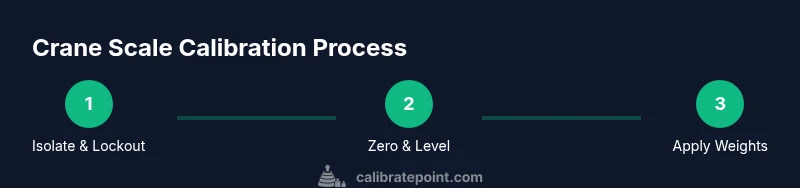
This section outlines a practical workflow that aligns with standard calibration practices while staying adaptable across crane types. Plan the procedure, perform zero verification, apply known weights, compare measurements to actual weights, adjust zero and span, and confirm linearity across the scale range. Maintain a calm pace, document every reading, and verify that the results meet your defined tolerance. If the readings remain out of tolerance after adjustments, consult the manufacturer’s troubleshooting guidance or engage a qualified service technician. Documentation should include date, technician ID, weight values, tolerance bands, and any corrective actions taken.
Performing zero and span verification
Zero verification ensures the display reads zero when no load is present. With the hook empty and the weight path unobstructed, set zero and record the value. Span verification involves applying a series of certified weights at progressive load levels, recording the displayed weight for each, and comparing to the known weights. If a weight reading consistently deviates beyond tolerance, recheck the installation path, sensor alignment, and any shims used to level the scale. Repeat until readings align within spec across the tested range.
Using certified calibration weights correctly
Certified calibration weights should be traceable to a recognized standard and used within the scale's rated range. Place each weight securely at the load point, allow settling, and capture the displayed value. Do not shock-load the scale; apply weights gradually and avoid swinging or bouncing the load. Maintain a safe distance from lifting points and ensure weights are stable before recording results. Keep the weight certificates handy for audit trails and future verifications.
Recording results and maintaining records
Calibrate Point recommends a formal calibration log that includes instrument ID, date, operator, scope of calibration, tolerated limits, and results for every tested weight. Attach copies of weight certificates and any maintenance notes. Store the log in a centralized asset management system or a dedicated calibration folder. Periodically review past records to track drift trends and schedule preventive maintenance before issues arise.
Validation: tolerance tests and acceptable ranges
Validation requires confirming readings stay within defined tolerance bands across the scale range. Establish tolerance bands based on the scale's specification sheet and applicable standards. If readings drift outside these bands, investigate potential causes such as sensor wear, load path deformation, or environmental interference. Document the validation outcome and implement corrective actions or recalibration as necessary.
Troubleshooting common issues
If readings drift or are inconsistent, first check for mechanical binding in the hook or shackle, verify level alignment, and confirm there is no interference from nearby machinery. Inspect cables and connectors for damage, and confirm the load path has not bent or loosened. Recalibrate starting with a clean slate: verify zero, reapply weights, and compare results after each adjustment. When in doubt, consult the equipment manual or contact a qualified technician.
Maintenance, recalibration intervals, and best practices
Establish a maintenance calendar that includes zero/span checks, cleanup, and a review of calibration certificates. Follow the manufacturer recommended intervals for recalibration and adjust as site conditions demand, such as high vibration or extreme temperatures. Keep all documentation up to date, including asset IDs and service history. Train staff on safe handling and the importance of calibration for safety and efficiency.
Tools & Materials
- Certified calibration weights (traceable to national standards)(Select weights that match the scale's capacity and tolerance.)
- Lockout/tagout devices(Ensure crane is de-energized and cannot move during work.)
- PPE (hard hat, safety glasses, gloves)(As per site safety protocol.)
- Level surface and spirit level(To ensure accurate zero and measurement.)
- Calibration checklist or logbook(To record results and sign-off.)
- Calibrated lifting gear (slings, hooks)(Use appropriate attachments for safe loading.)
- Calibration report or certificate of weight accuracy( Helpful for records and audits.)
Steps
Estimated time: 2-3 hours
- 1
Isolate and lock out the crane
Power down the crane and apply lockout-tagout. Confirm that all motion is disabled and verify isolation with a test weight or device. Ensure the area is clear and a supervisor has acknowledged the lockout.
Tip: Coordinate with a supervisor and verify isolation with a test. - 2
Position the scale on a level surface
Place the scale on a stable, level surface and ensure unobstructed access to the load path. Use a spirit level to confirm flatness and adjust as needed before attaching anything.
Tip: Use shims or leveling aids to correct minor inclines. - 3
Zero the scale
With no load attached, set the display to zero and record the zero value. If the zero is out of tolerance, inspect the load path for binding or debris and re-zero after addressing.
Tip: Allow a short settling time for the sensor after leveling. - 4
Apply the lowest calibration weight
Hang a known weight at the hook path, ensure it is stable, and observe the displayed value. Wait for any settling before recording readings.
Tip: Limit swinging by using gentle, controlled application of weight. - 5
Record reading and compare to weight
Note the displayed weight and compare it with the actual known weight. Calculate the percent error and determine if it is within tolerance.
Tip: Use a consistent data entry method to avoid transcription errors. - 6
Adjust zero and span controls
If readings are outside tolerance, adjust the zero and span controls per the manufacturer instructions, then re-test with the same weight.
Tip: Make only small adjustments and verify after each change. - 7
Repeat with additional weights across the range
Proceed to higher weights in increments up to the scale's capacity, verifying linearity at each step. Stop at a safe load within the rated range.
Tip: Do not exceed the scale’s rated capacity; check for linearity trends. - 8
Document results and obtain sign-off
Record date, technician ID, weights used, readings, tolerances, and any adjustments. Obtain supervisor approval and file the calibration record.
Tip: Attach weight certificates to support traceability. - 9
Re-energize and perform a final test under light load
Remove lockout, restore power, and perform a final load test to confirm normal operation. Ensure all safety zones are clear before resuming work.
Tip: Conduct a quick field check under light use before returning to full operation.
Questions & Answers
What is the purpose of calibrating a crane scale?
Calibration ensures accurate load readings, improves safety, and supports compliance with standards. It helps maintain consistent performance over time.
Calibration ensures accurate readings, improves safety, and supports compliance.
How often should a crane scale be calibrated?
Follow the manufacturer schedule or regulatory requirements. Frequency varies with usage, environment, and criticality.
Follow the manufacturer schedule or regulatory requirements; frequency varies with usage and conditions.
What weights should I use for calibration?
Use certified weights that cover the scale's range and ensure traceability to standards.
Use certified weights that cover the scale's range and are traceable.
Can I calibrate a crane scale myself or do I need a pro?
Small facilities may perform routine checks; complex or critical operations should involve a qualified technician.
Routine checks can be done by trained staff; for critical tasks hire a technician.
What if readings drift after calibration?
Recheck installation, sensor alignment, and load path. If drift persists, recalibrate or call service.
If drift continues, recheck components and recalibrate or seek service.
What safety steps are essential during calibration?
Lockout/tagout, verify immobilization, PPE, and clear exclusion zones are essential before calibration.
Lockout and PPE, plus a clear area, are essential for safety.
Watch Video
Key Takeaways
- Document zero and span adjustments for traceability
- Use certified weights and verify with the same setup
- Follow manufacturer procedures and lockout/tagout protocols
- Record results in a calibration log with asset ID
- Schedule recalibration at prescribed intervals